Need help?
Do you have a question about the Ambient Weather WS-228TBH and is the answer not in the manual?
Guide for preparation, care, and operation of the traditional weather station.
Instructions for removing protective pad and preparing the barometer for use.
Guidance on cleaning the barometer using soft cloths and mild detergent.
Explains how the mechanical coil spring sensor measures indoor relative humidity.
Discusses difficulties in humidity measurement and factors affecting accuracy.
Describes the use of a flexible metal box (aneroid cell) and levers to display pressure.
Advises tapping the glass before reading and explains how pressure changes forecast weather.
Explains the difference between measured pressure and sea-level corrected pressure.
Details how to calibrate the barometer using a screw on the back for altitude.
Explains the bimetallic strip principle and its accuracy compared to other thermometer types.
Instructions for hanging the weather station indoors on a wall.
Table outlining the range, accuracy, and resolution for temperature, humidity, and pressure.
Details the 1-year limited warranty, coverage, and exceptions.
Explains the warning requirements and chemicals known to cause cancer or reproductive harm.
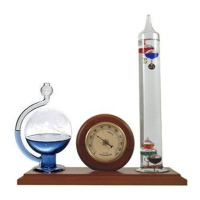
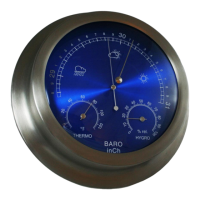
The Ambient Weather WS-228TBH is a traditional weather station designed for indoor use, featuring a 9" brushed aluminum casing with a radiant blue finish. This instrument combines a barometer, a hygrometer, and a dial thermometer to provide comprehensive environmental readings within your home.
The device serves as a multi-functional weather station, offering insights into indoor temperature, humidity, and barometric pressure. Each component operates independently to provide specific environmental data.
The aneroid barometer is a key feature, designed to measure atmospheric pressure. It utilizes a small, flexible metal box, known as an aneroid cell, made from an alloy of beryllium and copper. This evacuated capsule expands or contracts in response to external air pressure changes. These tiny movements are mechanically amplified and displayed on the barometer's face by an indicator needle. A manually set needle is included, allowing users to mark the current measurement and easily observe changes in pressure over time. The barometer's primary function is to aid in weather forecasting, as changes in barometric pressure are indicative of impending weather shifts. For instance, a rising pressure generally suggests improving weather (sunny to partly cloudy), while a decreasing pressure often points to degrading weather (cloudy to rain). The rate and magnitude of these pressure changes are crucial for accurate forecasting.
The hygrometer measures the indoor relative humidity. Its sensor consists of a sensitive mechanical coil spring bonded with a moisture-absorbent material. This mechanism registers the percentage of water vapor present in the air relative to the maximum amount it can hold at a given temperature. While humidity levels can change abruptly, the hygrometer's coils respond slowly, often taking an hour or more to provide an accurate reading. It's important to remember that this device measures indoor humidity, which can differ significantly from outdoor humidity reported by weather services. The hygrometer helps users monitor indoor air quality, as optimal humidity levels (45% to 50%) are important for comfort and health, preventing issues like dry air during heating seasons or mold/mildew growth during high humidity periods.
The dial thermometer provides indoor temperature readings. It operates using a bimetallic strip wrapped into a coil. One end of this coil is fixed to the device's housing, while the other end drives an indicating needle. The principle behind this design is that different metals expand at different rates when warmed. As the bimetallic strip heats or cools, it bends, causing the needle to move and display the current temperature. This type of thermometer offers a convenient way to monitor indoor temperatures.
To ensure accurate readings from the barometer, it is highly recommended to lightly tap the glass near the center brass knob with your fingers before taking a measurement. This action helps overcome any friction in the mechanism, which can affect the accuracy of the hand readings, especially during periods of slow atmospheric changes. The barometer comes with a manually set needle, which is a useful tool for tracking pressure trends. Users can align this needle with the current pressure reading to easily observe whether the pressure is rising or falling over a specific period. This allows for a visual comparison of current pressure against a previous reading, aiding in personal weather trend analysis. Barometric readings should ideally be taken daily, and multiple readings may be beneficial during periods of unstable weather.
For initial setup, the barometer requires calibration to sea-level conditions. This is achieved by adjusting a small screw located on the back of the device using a flat blade screwdriver. Users should turn this screw slightly in either direction while observing the indicator needle. Tapping the barometer after each adjustment helps the needle settle accurately. This process should be repeated until the barometer displays the correct pressure reading for your location, which can be obtained from official reporting stations (e.g., Weather.com or Wunderground.com). Once calibrated, no further adjustment is typically needed unless the device is moved to a new geographic location.
The hygrometer, while providing relative humidity, responds slowly to changes. Users should allow sufficient time (an hour or more) for the meter to stabilize and provide an accurate reading, especially after significant changes in indoor conditions.
Installation of the weather station is straightforward. It is designed to be hung on a wall using the built-in hole in its casing. The device is intended for indoor use only and should be installed in a clean environment to ensure optimal performance and longevity.
The weather station is designed for minimal maintenance. For cleaning, it is important to avoid harsh household cleaners and coarse paper towels, as these can damage the lacquer coating or scratch the bezel or lens. Fingerprints and dirt on the lenses and bezels can be removed with a soft cloth lightly dampened with a mixture of water and mild dishwashing liquid. After cleaning, ensure the lens and bezel are thoroughly dried with a soft cloth.
The barometer's calibration is typically a one-time process upon initial setup or relocation. Once calibrated to your specific geographic location, it generally does not require further adjustment unless the device is moved to a different altitude or region.
The dial thermometer does not require calibration, simplifying its maintenance.
The device is intended for indoor use only, which helps protect it from environmental elements that could cause wear and tear, reducing the need for frequent maintenance.
 General
| Type | Wireless Weather Station |
|---|---|
| Display | LCD |
| Temperature Resolution | 0.1°F |
| Humidity Accuracy | ±5% |
| Humidity Resolution | 1% |
| Wind Direction Resolution | 1° |
| Transmission Frequency | 915 MHz |
| Temperature Accuracy | ± 2 °F |
| Humidity Range | 10% to 99% |
| Wind Speed Resolution | 0.1 mph |
| Wind Direction Range | 0° to 360° |
| Rain Gauge Resolution | 0.01 inches |
| Transmission Range | 300 feet (91 meters) |
| Update Rate | 16 seconds |
| Power Source | 2 x AA batteries (sensor) |
| Power | DC 4.5V (display), DC 3V (sensor) |
| Outdoor Temperature Range | -40°F to 140°F (-40°C to 60°C) |

 To Next Page