EasyManua.ls Logo

Ambient Weather WS-HE01 - User Manual

Ambient Weather WS-HE01
9 pages
Print Icon
To Next Page IconTo Next Page
Loading...
Version 1.0 ©Copyright 2012, Ambient LLC. All Rights Reserved. Page 1
Ambient Weather WS-HE01 Heat Index Monitor with
Temperature, Humidity, Dew Point User Manual
Table of Contents
1 Introduction ..................................................................................................................................... 2
2.4 Display Console Set Up ................................................................................................................ 2
2.4.1 Display Console Layout ..................................................................................................... 4
2 Display Settings .............................................................................................................................. 4
2.1 Set Mode ................................................................................................................................ 5
2.2 Heat Index Alarm Set Mode ................................................................................................... 5
2.3 Heat Index Alarm ................................................................................................................... 5
2.4 Temperature, Heat Index and Dew Point Display .................................................................. 5
2.5 Calibration Adjustment Mode ................................................................................................ 5
3 Heat Index Safety Discussion ......................................................................................................... 6
4 Glossary of Terms ........................................................................................................................... 7
5 Specifications .................................................................................................................................. 8
5.1 Measurement Specifications ......................................................................................................... 8
5.2 Power Consumption ...................................................................................................................... 8
6 Troubleshooting Guide .................................................................................................................... 8
7 Accessories ..................................................................................................................................... 8
8 Liability Disclaimer ........................................................................................................................ 8
9 Warranty Information ...................................................................................................................... 9

Questions and Answers

Summary

Introduction

Display Settings

Display Console Layout

Illustrates the full segments of the LCD for description purposes only.

Set Mode

Instructions for setting time and units of measure.

Heat Index Alarm Set Mode

Procedure to set the Heat Index alarm set point.

Heat Index Alarm Operation

How to turn the Heat Index alarm on and off.

Temperature, Heat Index and Dew Point Display

How to switch the display between temperature, heat index, and dew point.

Calibration Adjustment Mode

Procedure to fine-tune or correct sensor errors for temperature and humidity.

Heat Index Safety Discussion

Glossary of Terms

Specifications

Measurement Specifications

Provides specifications for measured parameters like range, accuracy, and resolution.

Power Consumption

Details the battery requirements and expected battery life.

Troubleshooting Guide

Accessories

Liability Disclaimer

Warranty Information

Summary

Introduction

Display Settings

Display Console Layout

Illustrates the full segments of the LCD for description purposes only.

Set Mode

Instructions for setting time and units of measure.

Heat Index Alarm Set Mode

Procedure to set the Heat Index alarm set point.

Heat Index Alarm Operation

How to turn the Heat Index alarm on and off.

Temperature, Heat Index and Dew Point Display

How to switch the display between temperature, heat index, and dew point.

Calibration Adjustment Mode

Procedure to fine-tune or correct sensor errors for temperature and humidity.

Heat Index Safety Discussion

Glossary of Terms

Specifications

Measurement Specifications

Provides specifications for measured parameters like range, accuracy, and resolution.

Power Consumption

Details the battery requirements and expected battery life.

Troubleshooting Guide

Accessories

Liability Disclaimer

Warranty Information

Overview

The Ambient Weather WS-HE01 is a Heat Index Monitor designed to provide real-time measurements of temperature, humidity, and dew point, along with a calculated heat index. This device is intended for home use to indicate weather conditions and is not for medical or public information purposes.

Function Description:

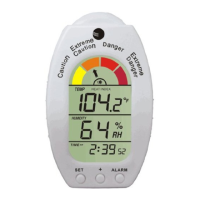
The primary function of the WS-HE01 is to monitor and display environmental conditions relevant to human comfort and safety, specifically focusing on the heat index. The heat index, often referred to as the apparent temperature, measures how hot it truly feels when relative humidity is factored with the actual air temperature. The device also displays the current temperature, relative humidity, and dew point. An important safety feature is the Heat Index Alarm, which can be set to alert users when the heat index reaches a predefined threshold, indicating conditions that may cause heat-related disorders. The display console features a clear LCD layout with indicators for different heat index ranges (Caution, Extreme Caution, Danger, Extreme Danger) to visually communicate the severity of conditions.

Important Technical Specifications:

  • Measurement Range:
    • Temperature: 14 to 140 °F
    • Humidity: 20 to 99%
  • Accuracy:
    • Temperature: ± 2 °F
    • Humidity: ± 5%
  • Resolution:
    • Temperature: 0.1 °F
    • Humidity: 1%
  • Power Consumption:
    • Batteries: 2 x AAA 1.5V Alkaline or Lithium batteries (not included)
    • Battery Life: Approximately one year
  • Display: LCD with segments for temperature, heat index, dew point, relative humidity, time of day, and heat index range indicators.
  • Units of Measure: Temperature can be displayed in °F or °C.
  • Out-of-Range Indication: "LL" for out of range low, "HH" for out of range high.

Usage Features:

  • Easy Setup: The device requires the insertion of two AAA batteries into the back of the sensor.
  • Display Modes: Users can switch the main display between temperature, heat index, and dew point readings by pressing the SET button.
  • Time Setting: The device allows setting the time in either 12-hour or 24-hour format, including the hour and minute of the day.
  • Temperature Units: Users can select between Fahrenheit (°F) and Celsius (°C) for temperature display.
  • Heat Index Alarm:
    • Setting: The heat index alarm set point can be configured by pressing and holding the ALARM button. The + and ALARM buttons are used to adjust the value.
    • Activation: The alarm can be turned on or off by a single press of the ALARM button, indicated by an alarm icon on the display.
  • Calibration Adjustment Mode: This advanced feature allows users to fine-tune temperature and humidity readings to correct for sensor errors.
    • Temperature Calibration: Press and hold the SET button for 9 seconds to enter calibration mode. The + and ALARM buttons are used to adjust the temperature.
    • Humidity Calibration: After confirming temperature calibration, the humidity will begin flashing, allowing adjustment using the + and ALARM buttons.
    • Calibration Discussion: The manual emphasizes the importance of using a known calibrated source (e.g., fluid thermometer, sling psychrometer, or humidpak calibration kits) for accurate calibration, rather than comparing to internet or local weather station readings, which can vary significantly. It also notes that temperature errors can occur if the sensor is too close to heat sources, and humidity can drift over time due to contamination.

Maintenance Features:

  • Battery Replacement: The device is powered by two AAA batteries, which need to be replaced approximately once a year. The manual provides clear instructions for accessing the battery compartment.
  • Troubleshooting Guide: A dedicated section in the manual addresses common issues such as weak display contrast, inaccurate temperature/humidity readings, and high heat index readings, offering solutions like battery replacement and calibration.
  • Calibration: While a usage feature, calibration also serves as a maintenance aspect, allowing users to maintain the accuracy of their device over time, especially for humidity sensors which can drift.
  • Environmental Responsibility: The manual encourages users to return used batteries to an authorized depot and dispose of electronic waste responsibly to protect the environment.

The Ambient Weather WS-HE01 is a practical device for monitoring environmental conditions, providing essential information for personal comfort and safety, particularly in hot and humid climates. Its user-friendly interface, combined with calibration capabilities, ensures reliable performance for home use.

Ambient Weather WS-HE01 Specifications

General IconGeneral
BrandAmbient Weather
ModelWS-HE01
CategoryMeasuring Instruments
LanguageEnglish

Related product manuals