Version 1.1 ©Copyright 2016, Ambient LLC. All Rights Reserved. Page 27
For more information on Alarm Settings, please reference Section 4.3.
5.3.4 Calibration
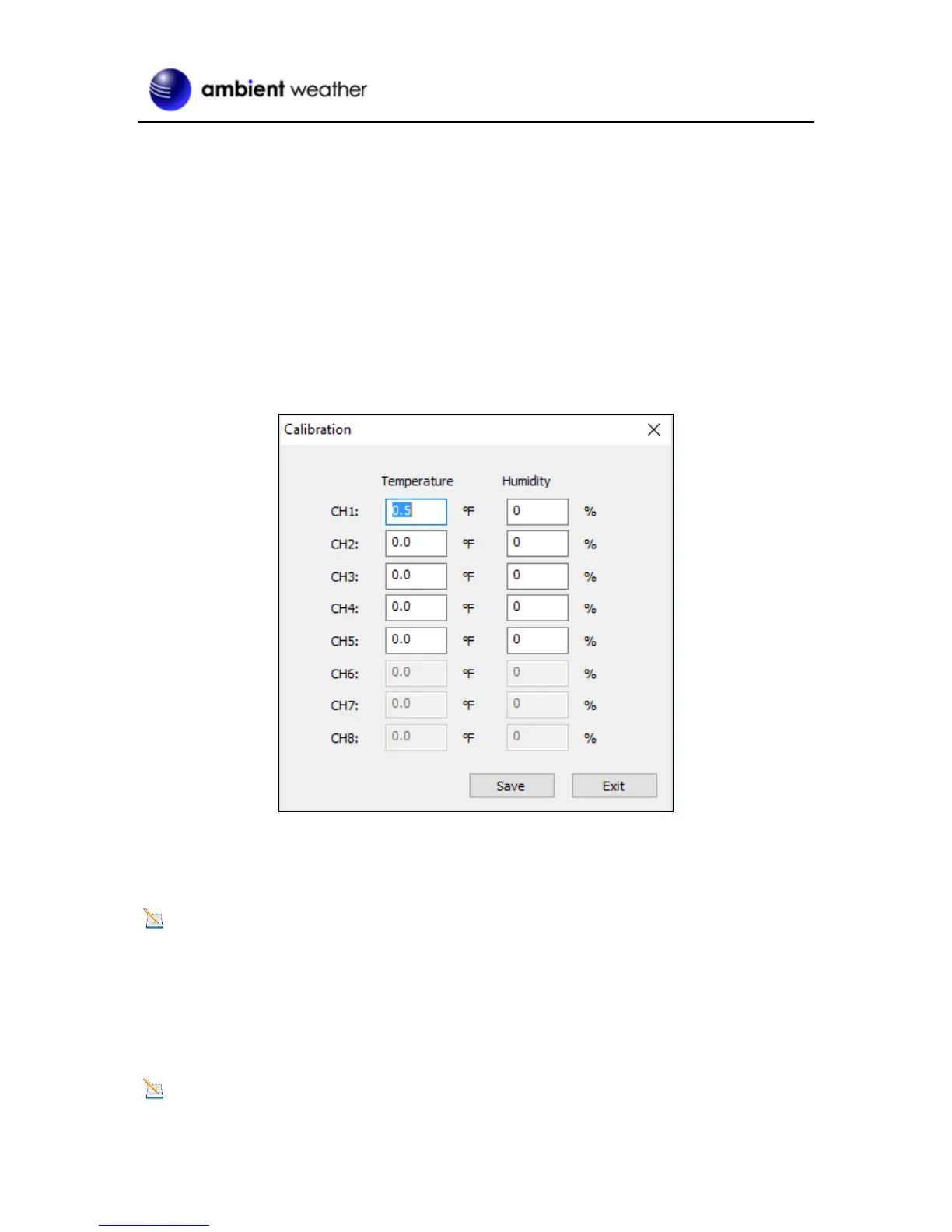
Select Menu | Calibration to calibrate each of the 8 supported channels.
The temperature and humidity values are offsets.
Example: If the actual temperature measured by a calibrated source is 70 °F, and the channel 1
temperature sensor reads 69.5 °F:
CH1 Temperature Offset = 70 – 69.5 = 0.5 °F.
Enter 0.5 in the CH1 Temperature field, as shown in Figure 28.
Figure 28
It may take a minute or two for the console to update the calibrated temperature, since the temperature
updates once per minute.
Note: There may be some °F to °C rounding error, since the native calculations are performed
in °C. For example, if you enter 0.6 °F in the field, 0.5 °F may be displayed the next time you open
this panel.
For more information on Calibration, please reference Section 4.2.
5.3.5 SDCard File
Note: The Micro SD Card is optional, not included and sold separately.


 To Next Page