User’s Guide
25
4.
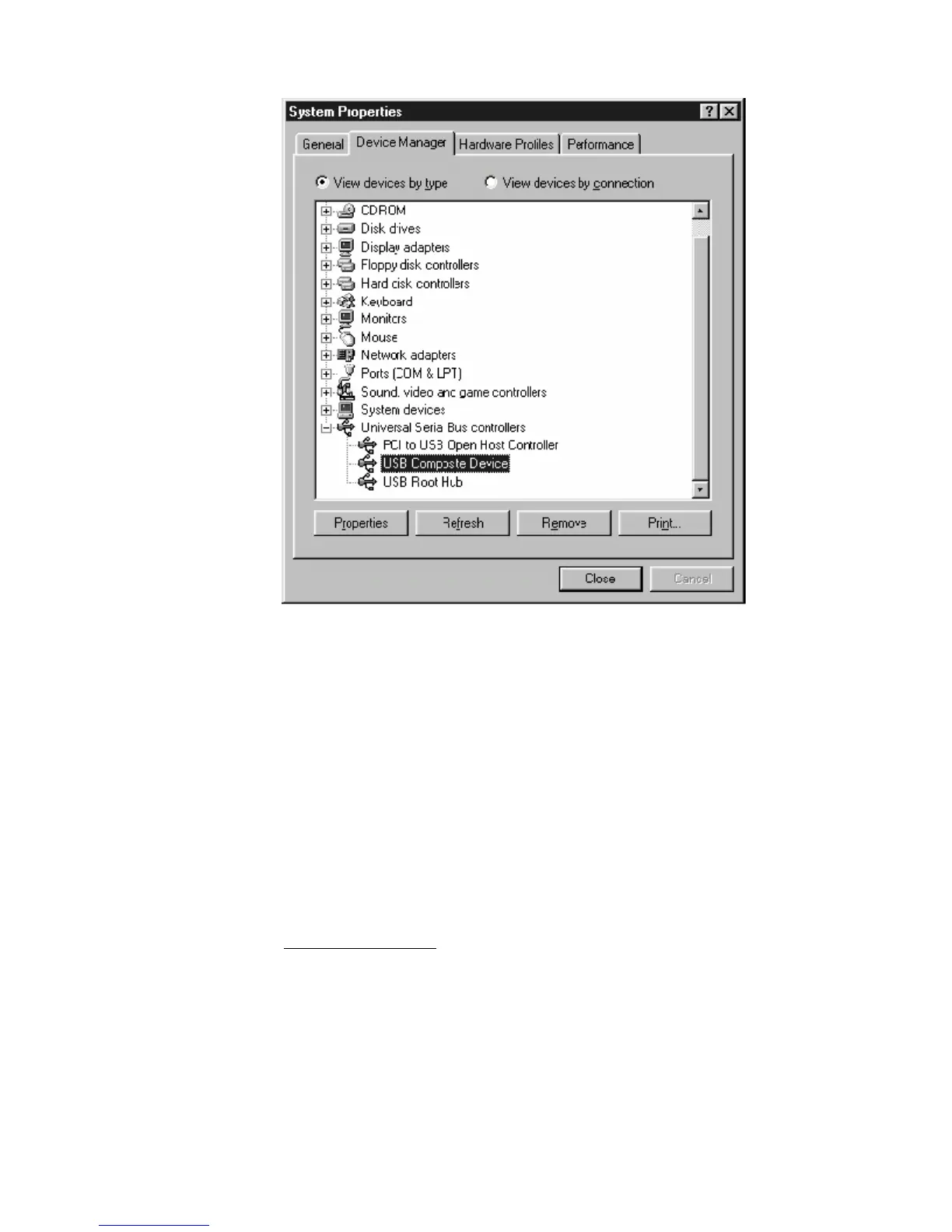
Select USB Composite Device and click Remove
5.
Click Refresh
The Add New Hardware Wizard window appears, displaying the device name
USB Composite
Device. Refer to the proper operating system instructions in this chapter for information on
reinstalling the driver properly.
All of the LEDs on the front of my modem look correct, but I cannot access the Internet.
• If the power, usb, sync, and ready LEDs are solidly lit, the cable modem is working
properly. Use the following procedures to verify connectivity between the PC and the
cable modem:
o Launch Your PC’s Internet Browser (e.g., Netscape, IE)
o Enter http://192.168.100.1 into your browser. This URL connects you directly to the
web server within your cable modem. A successful connection indicates that the PC
is able to communicate with the cable modem. The next step is to enter a public
URL to ensure connectivity between the cable modem and your cable service
provider. If this fails, please contact your cable service provider for further
assistance.


 To Next Page