User’s Guide
32
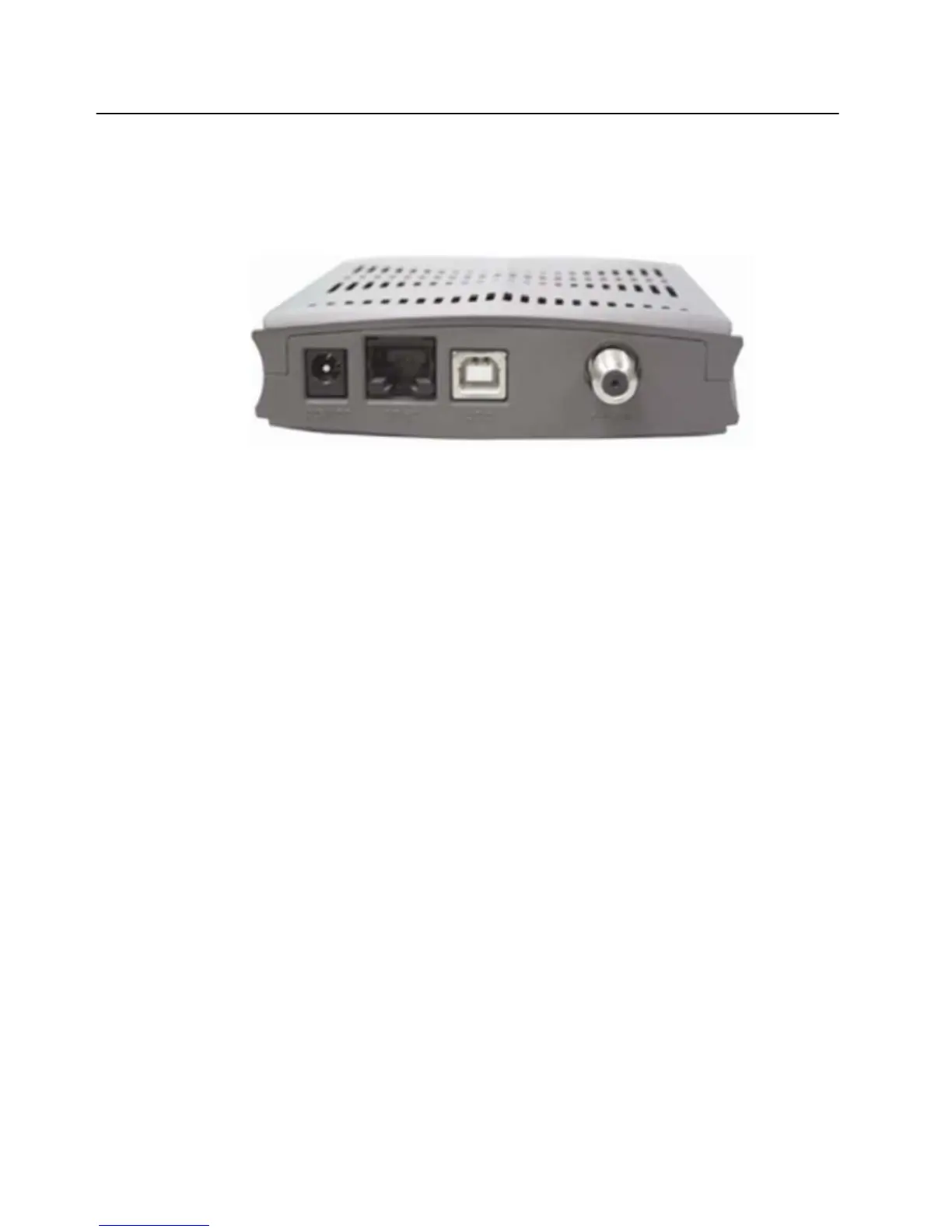
Connectors on the Back of the Modem
This list of connectors describes where to connect the cables and power adapter when installing the
cable modem.
1.
power: This is where you plug the included power adapter. Remember to use only the
power adapter that came with the cable modem.
2. enet: This is where you plug the included ethernet cable. The other end connects to the
ethernet port on the PC or NIC. It is not requires when using the USB.
3. usb: This is where you plug the included USB cable. The other end connects to the USB
port on your PC. It is not required when using the ethernet port.
4. cable: This is where you connect the coaxial cable (not included) that leads to the cable
splitter (not included) or the cable wall outlet.
5. Web User Interface
Accessing the Web User Interface
1. The PC connected to the cable modem must support TCP/IP connection and dynamic DHCP IP
address acquisition, and must have a web browser installed.
2. Open the web browser and set the URL location as: http://192.168.100.1


 To Next Page