54
Below is an explanation of the fields on the General settings tab:
• Device Name: This field allows the user to change the device’s name.
• Language: This dropdown box allows the user to change the language used in the camera.
• Video Standard: This dropdown box allows the user to select either the NTSC or PAL video standard.
To reset to default settings, click the Reset Defaults button. To refresh the page, click the Refresh button.
To save the settings, click the Save button.
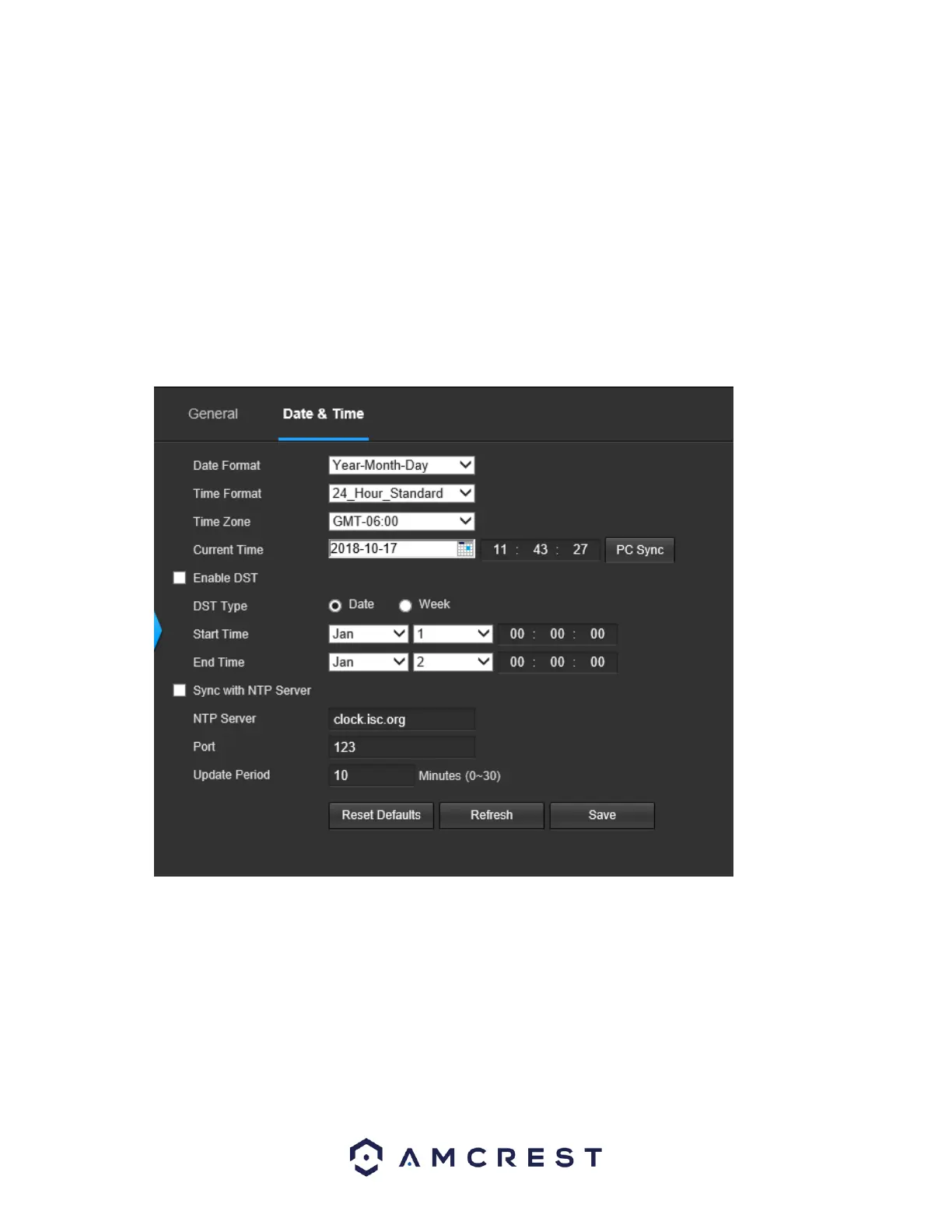
5.4.5.1.1 Date & Time
This tab is where the user can configure the date and time settings for the camera. Below is a screenshot
of the Date & Time tab:
Below is an explanation of the fields on the Date & Time settings tab:
• Date Format: This dropdown box allows the user to change the date format used in the camera.
• Time Format: This dropdown box allows the user to change the time format used in the camera.
• Time Zone: This dropdown box allows the user to change the time zone used in the camera.
• Current Time: This field allows the user to enter in the date and time manually. Clicking the PC Sync
button allows the camera to sync with a Network Time Protocol (NTP) server.
• Enable DST: This checkbox allows the user to enable daylight savings time for the camera.
• DST Type: This radio button allows the user to select whether DST is based on the week, or a specific
day.















 To Next Page