6
For more information on how to connect your camera, refer to section 4, Camera Access Setup.
3.2 Installation Guide
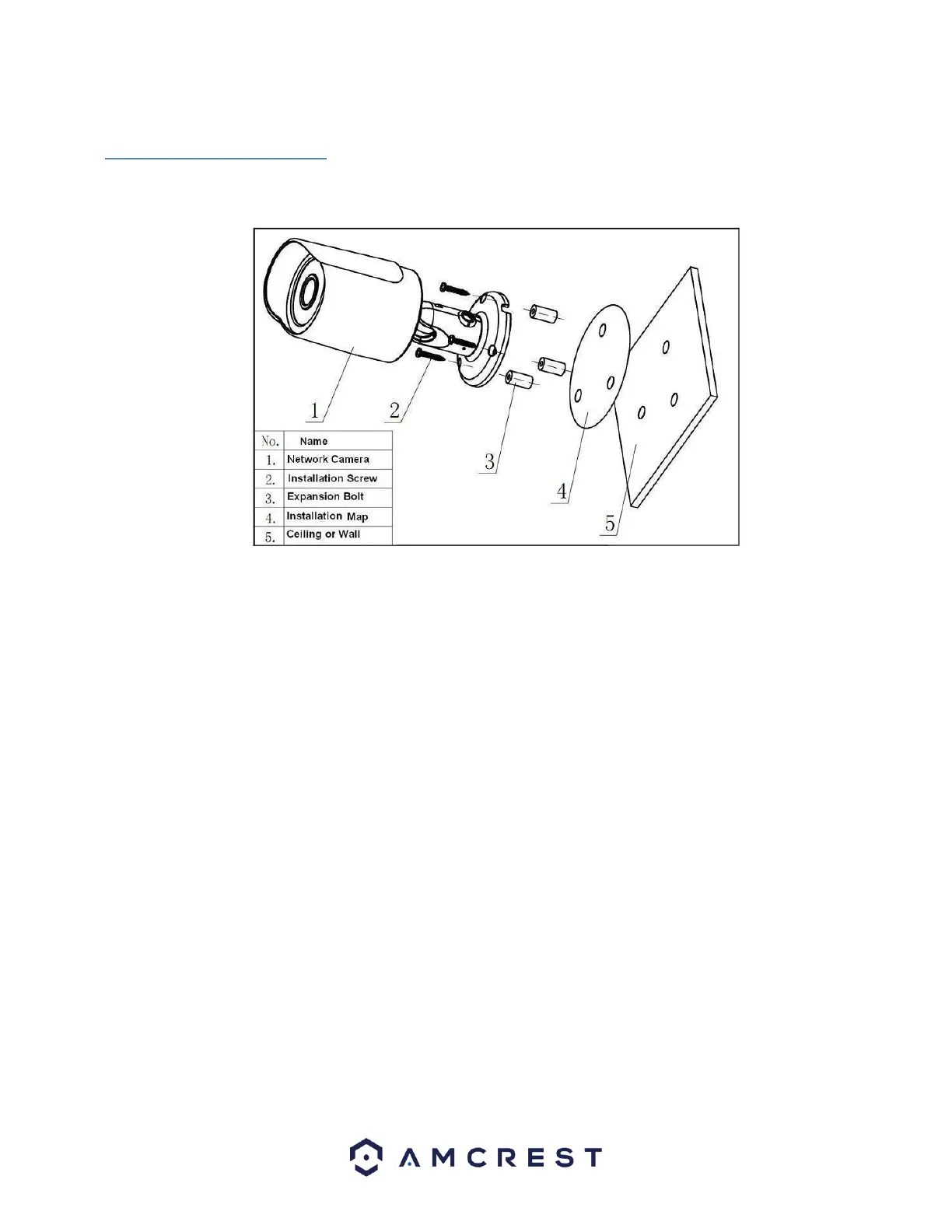
Follow the steps and use the diagram in this section to install you WiFi camera.
Note: Prior to installation ensure that the installation environment can support at least 3 times the weight of
the camera.
1. Attach the provided WiFi antenna to the back of the device.
2. Stick the installation sticker on the designated surface where the device will be installed (wall or ceiling).
3. Drill 3 holes through the holes on the installation sticker.
4. Open the accessories bag and take out the expansion bolt and insert it into the holes.
5. Open accessories bag and take out the screws. Tighten the 3 screws to fix the device on the installation
surface
(wall or ceiling).
6. Loosen the sunshade screw to move it around to the desired position, then tighten the screw to lock it into
place.
7. Plug in the camera to power it, using either an Ethernet or power cable.
8. Using a Philip’s head screwdriver, (not included) loosen the adjusting screw near the base of the camera.
This allows the camera to be rotated, as well as pivoted within the ball joint.
9. Adjust the device to the desired position.
10. Using a Philip’s head screwdriver, (not included) tighten the adjusting screw near the base of the camera to
lock the camera in position.
4 Camera Access Setup
This section of the guide will provide the user with information on how to setup access to the camera
through any of the following methods.















 To Next Page