Note:
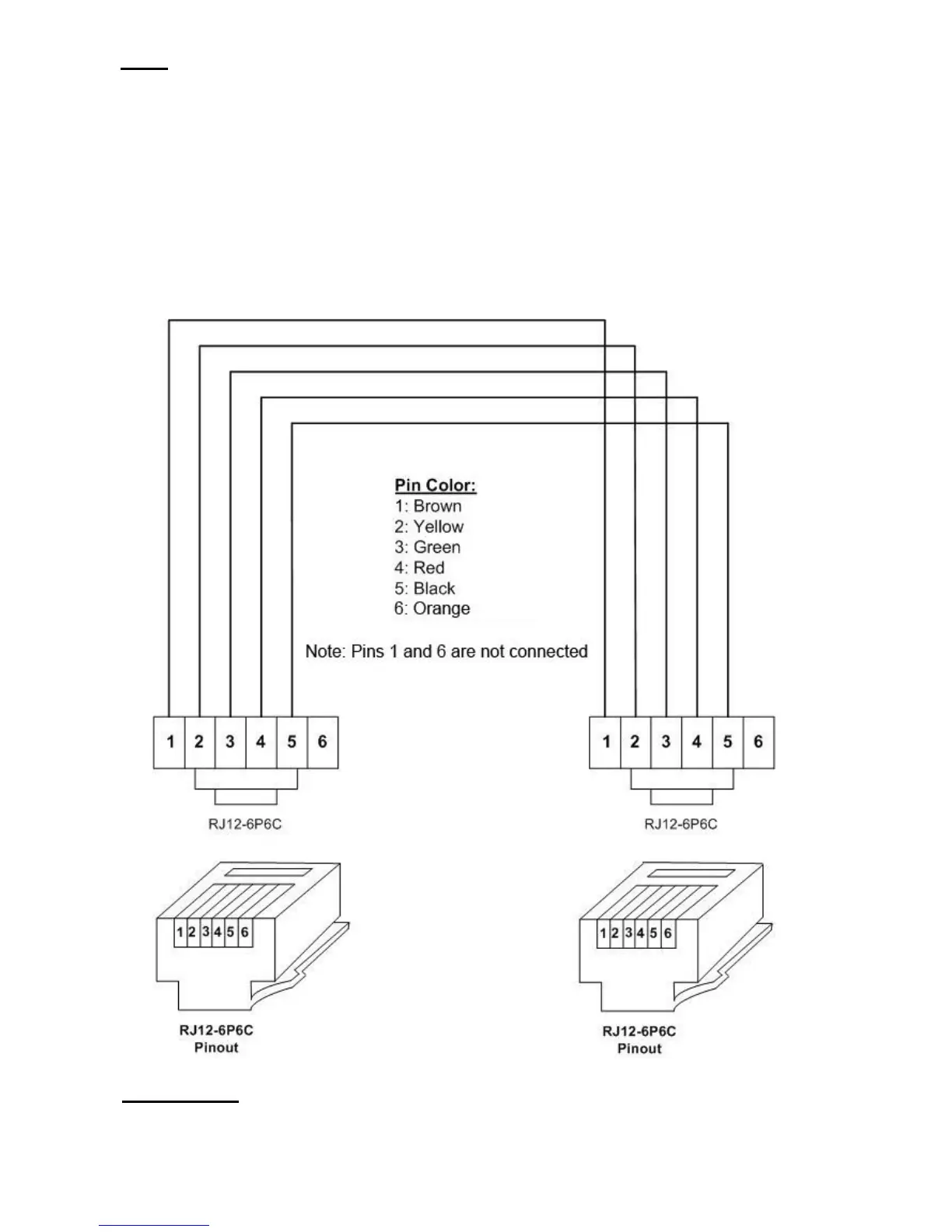
The interconnecting wiring is a straight wiring configuration, i.e. Pin 1 to 1, Pin 2 to
2, Pin 3 to 3, and Pin 4 to 4, Pin 5 to 5. To verify straight wire configuration, look at
both Modular plugs RJ-12, side by side (both clips of the plugs must be on the same
side). You must see wiring color codes. Yellow/Green/Red/Black/Orange
alternatively, on both plugs
The wiring configuration is not a telephone application. Telephone application is a
cross wire configuration, i.e. Pin 1 to 6, Pin 2 to 5, and Pin 3 to 4. To convert from
cross wire to straight wire configuration, just simply reverse either plug upside
down.
Figure 12.1: Interconnecting Wiring Cable between ELT Remote Unit
and Main Unit, Part No. 4510041-5



 To Next Page