EasyManua.ls Logo

Amiro U1 - Mode Description and Switching; Intense Mode Description

Default Icon
41 pages
Print Icon
To Next Page IconTo Next Page
To Previous Page IconTo Previous Page
Loading...
24
Mode Description and Switching
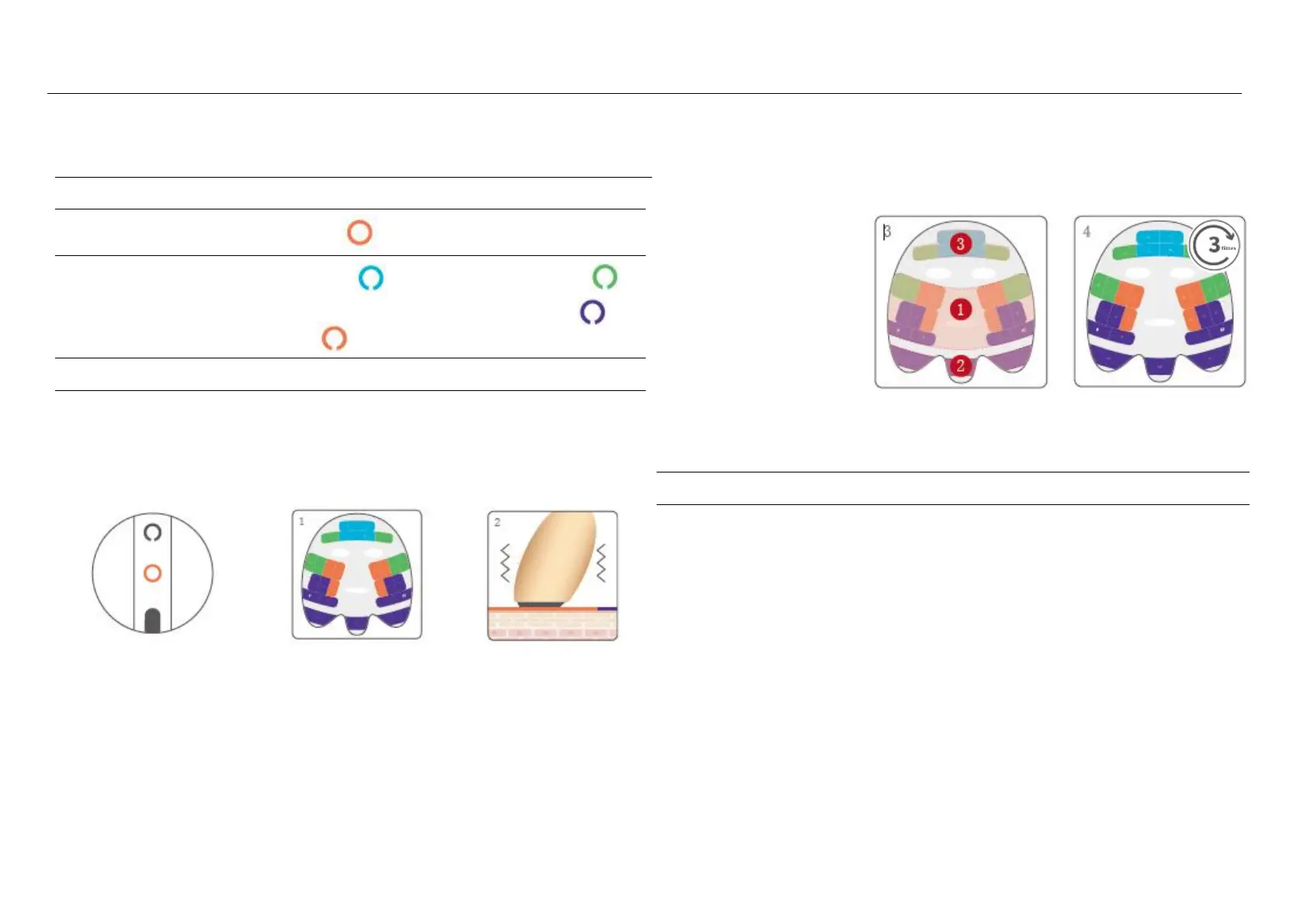
[Intense Mode]
Matching skincare product
Timeless Face Lifting Mask
Mode Indicator Light:
Orange
Smart Recognition Light
Forehead
Middle area of the
face
Eye Contour
Lower Jaw
Treatment Areas:
Whole Face
Matching Methods
Stamp sequentially according to the numbers.
Stamp each section three times.
Intense Mode: orange
light
Timeless Face Lifting
Mask
After 5 seconds, the
device will vibrate to
signal advancement to
the next grid.
Skincare routine for the
face, jawline, and forehead
in order
Stamp the whole face
for 3 times
Usage Frequency
1-2 times per week
Warnings
1. The essence features a dense texture to
ensure optimal energy transmission with
minimal loss
2. Due to the characteristics of ultrasound
technology, the Intense Mode requires the
official mask that matches the device.
3. By double-clicking, you can switch to
Gentle Mode, which is recommended for
unstable skin conditions.
4. Do not stamp continuously on the same
area.

Related product manuals