3.5 Maintenance inside the case 3 MS3PRO HARDWARE
3.5.1 Diagnostic lights
The MS3Pro Ultimate has several diagnostic lights on the outside of the box to help you determine if a problem is
caused by a fuse failure or external wiring. From top to botton, the LEDs indicate the following:
• 12V power. If this light is out, the MS3Pro is either not receiving power or the main F5 fuse is blown.
• 5V VCC. This light indicates that the MS3Pro internal power supply is operating. It should be on at any time
that the 12V power light is on. If this light goes out while the 12V power light is on, contact AMP EFI technical
support.
• 5V REF 1. This indicates that the main 5 volt sensor supply circuit is working correctly. If this light goes out,
check the F4 fuse.
• 5V REF 2. This indicates that the secondary 5 volt sensor supply circuit is working correctly. If this light goes
out, check the F6 fuse.
• Diagnostic (DO1). Controlled by Digital Out 1, this can be used as a built in Check Engine light.
3.5.2 Changing the fuses
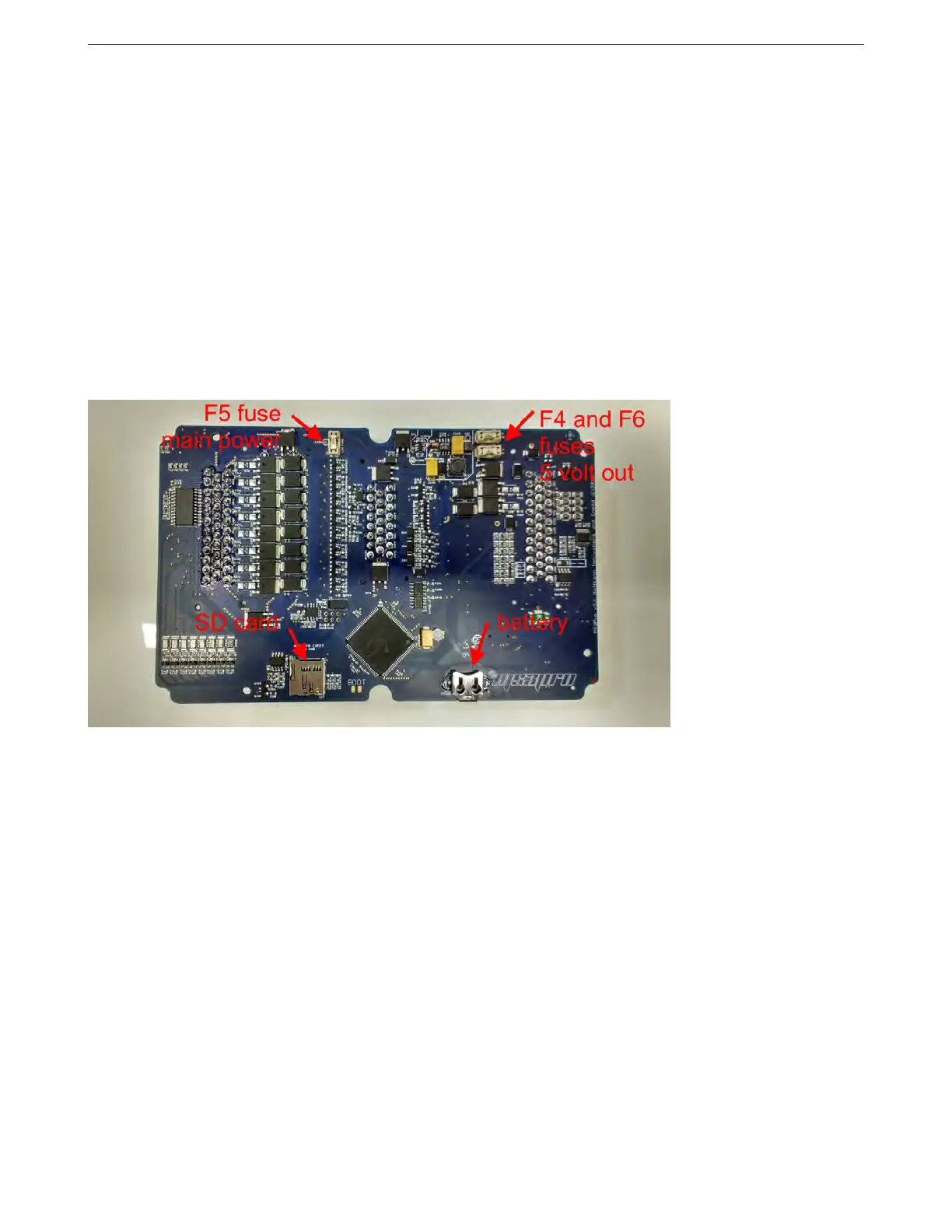
The MS3Pro Ultimate uses three replaceable fuses, accessible on the underside of the board. The F5 fuse protects
the main input; if it blows, the entire MS3Pro will shut down. The F4 fuse protects just the TPS reference voltage
output, while the F6 fuse protects the VREF2 reference voltage. If it fails, you lose the reference voltage in the
wiring harness, but all internal operation in the MS3Pro will continue as normal. If you have a fuse blow, please
check to be sure there are no short circuits that may have caused the problem. You do not need to remove the
MS3Pro main board from its case to change the fuses; all three are accessible once you open the case. To remove
the fuses, use a needle nose pliers to pull the fuse out of its holder and press a new fuse (available from AMP EFI
and its resellers) into its place. Note that F5 is a higher current rating than F4 and F6.
3.5.3 Replacing the SD card
The SD card stores the MS3Pro’s data logs. This can be swapped out for a larger card if needed. The card simply
slides in until the retaining pin in the side of the SD holder moves out.The card must be pushed in to eject it.
3.5.4 Changing the real time clock battery
The MS3Pro real time clock uses a lithium battery for maintaining its time and other data when the ECU is powered
down. The battery slips in with the positive (flat) side up. The MS3Pro can use any of the following batteries. Part
numbers starting with BR can be used for -30 to +80 °C (-22 to 176 °F) and we recommend these for their extended
AMP EFI MS3ProUltimate manual version 1.203, firmware 1.5.0, 5/23/2017 Page 30



 To Next Page