EasyManua.ls Logo

Amped Wireless R20000G - User Manual

Amped Wireless R20000G
92 pages
Print Icon
To Next Page IconTo Next Page
Loading...
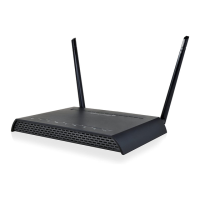
R20000G
High Power Wireless-N 600mW Gigabit
Dual Band Router
User’s Guide

Other manuals for Amped Wireless R20000G

Question and Answer IconNeed help?

Do you have a question about the Amped Wireless R20000G and is the answer not in the manual?

Summary

SETUP GUIDE

Connect Router to Modem

Instructions for connecting the router to the broadband modem using an Ethernet cable.

Power On Modem and Router

Guides on powering up the modem and then the High Power Router.

Access Setup Wizard

Guides on accessing the router's web-based setup wizard.

Configure Internet Connection

Steps to set up the internet connection, automatically or manually.

5.0 GHz WI-FI SETTINGS

Basic Settings (5.0 GHz)

Configures SSID, band, and data rate for the 5.0GHz network.

Security Settings (5.0 GHz)

Sets the encryption type and password for the 5.0GHz network.

2.4 GHz WI-FI SETTINGS

Basic Settings (2.4 GHz)

Configures SSID, band, and data rate for the 2.4GHz network.

Security Settings (2.4 GHz)

Sets the encryption type and password for the 2.4GHz network.

NETWORK SETTINGS

Local Network (LAN) Configuration

Configures IP address, subnet mask, and DHCP for the local network.

Internet Network (WAN) Configuration

Configures the internet connection type, IP, and DNS settings.

SMART FEATURES

USB STORAGE

FIREWALL SETTINGS

MANAGEMENT FEATURES

TROUBLESHOOTING

Web Menu Access Issues

Solutions for problems accessing the router's web interface.

Internet Connection Problems

Steps to resolve issues with internet connectivity.

Wireless Connectivity Issues

Resolves problems related to wireless signal strength and connectivity.

Summary

SETUP GUIDE

Connect Router to Modem

Instructions for connecting the router to the broadband modem using an Ethernet cable.

Power On Modem and Router

Guides on powering up the modem and then the High Power Router.

Access Setup Wizard

Guides on accessing the router's web-based setup wizard.

Configure Internet Connection

Steps to set up the internet connection, automatically or manually.

5.0 GHz WI-FI SETTINGS

Basic Settings (5.0 GHz)

Configures SSID, band, and data rate for the 5.0GHz network.

Security Settings (5.0 GHz)

Sets the encryption type and password for the 5.0GHz network.

2.4 GHz WI-FI SETTINGS

Basic Settings (2.4 GHz)

Configures SSID, band, and data rate for the 2.4GHz network.

Security Settings (2.4 GHz)

Sets the encryption type and password for the 2.4GHz network.

NETWORK SETTINGS

Local Network (LAN) Configuration

Configures IP address, subnet mask, and DHCP for the local network.

Internet Network (WAN) Configuration

Configures the internet connection type, IP, and DNS settings.

SMART FEATURES

USB STORAGE

FIREWALL SETTINGS

MANAGEMENT FEATURES

TROUBLESHOOTING

Web Menu Access Issues

Solutions for problems accessing the router's web interface.

Internet Connection Problems

Steps to resolve issues with internet connectivity.

Wireless Connectivity Issues

Resolves problems related to wireless signal strength and connectivity.

Amped Wireless R20000G Specifications

General IconGeneral
BrandAmped Wireless
ModelR20000G
CategoryWireless Router
LanguageEnglish

Related product manuals