6
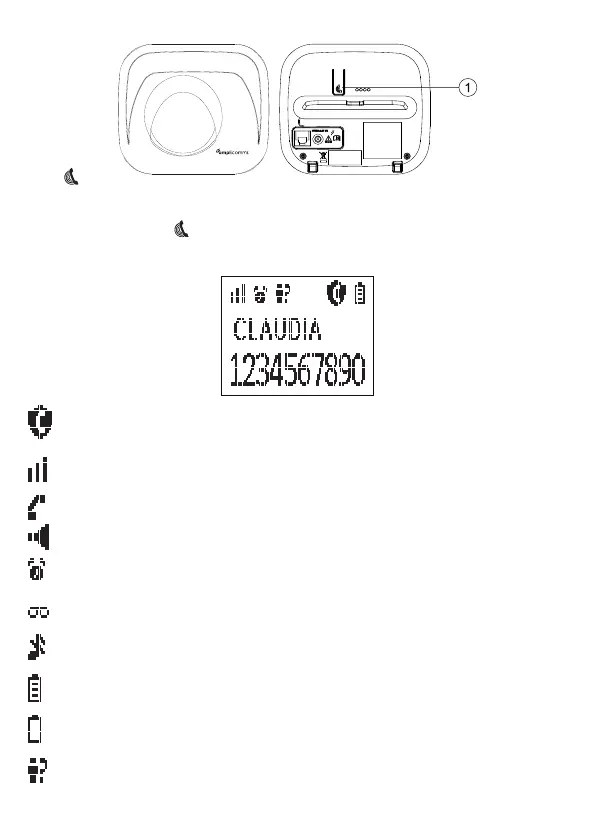
1.2. Base Station Overview
1.
Press the Page on the base station to page your handset. It will ring for
approximately 60 seconds.
Press and hold onthebasestationforaboutveseconds,thebase
station will enter into registration mode and is ready for handset registration.
1.3. Display Icons and Symbols
On indicates either Call Block Setting is set to ON or Block Anonymous
Setting is set to ON..
Steadily on when the handset is in range of the base.
Flashes when out of range of the base or not registered to the base.
Steadily on indicates a call is in progress.
Flashes when there is an incoming call.
Indicates that handsfree is being used.
Steadily on when an alarm is set.
Flashes when the alarm time set before reaches.
Indicates when there are received new Voice Message Waiting (VMWI)
not yet read.
Indicatesthattheringerisswitchedo.
Indicates when the battery is fully charged.
Wholeiconasheswhenthebatteryperformsinitialcharging.
Internalblockiconasheswhenthebatteryisinnalchargingstage.
Flashes when low battery power level is detected.
On indicates it’s a new call which has not been read in call log and * will
be shown in the end of call number or name. After read, * will disappear.
Flashes when the call list is being accessed.














 To Next Page