9
Note:ForDuoorTrioversions,allyouhavetodoiscongureasinglehandset,theother
handset (s) will be automatically set identically.
Change language (Handset)
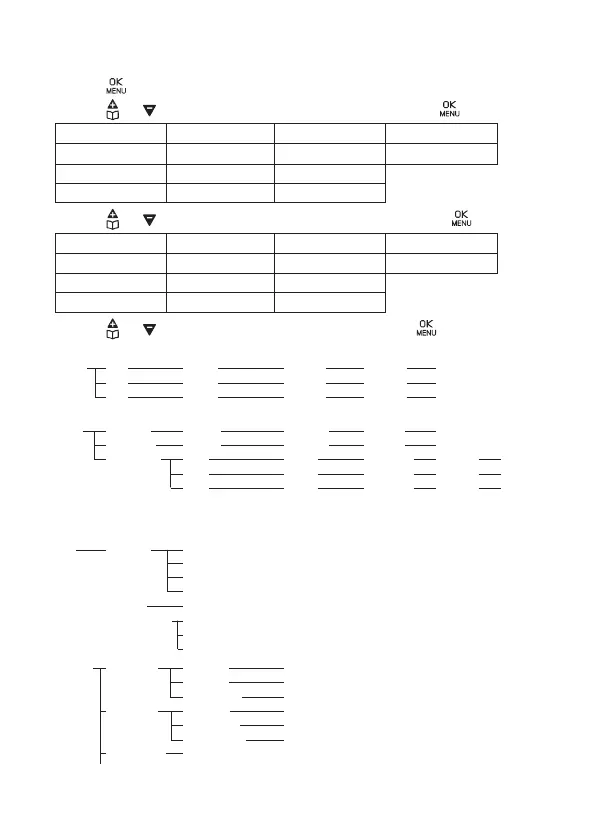
1. Press on the handset in idle mode.
2. Press or to select “HS Settings”(1), then press .
(1)
EN
HS Settngs
NL
Handset Inst
FR
Régl. Comb.
ES
Conf Telef.
DE
Mt-Einstel.
PT
Config. Term
IT
Imposta Port
3. Press or to the menu “Language”(2), then press .
(2)
EN
Language
NL
Taal
FR
Langue
ES
Idioma
DE
Sprache
PT
Idioma
IT
Lingua
4. Press or to the desired language, then press .
3.4. Menu Tree
Intercom
Phonebook Add New Name Number Melody VIP X or VIP √
Call List Add To PB Name Number Melody VIP X or VIP √
Add To DM M1 Name Number Melody VIP X or VIP √
M2 Name Number Melody VIP X or VIP √
M3 Name Number Melody VIP X or VIP √
Direct Mem. M1 Name Number Melody VIP X or VIP √
M2 Name Number Melody VIP X or VIP √
M3 Name Number Melody VIP X or VIP √
Add To Block
Delete
Delete All
Call Block Block Set. O
On
VIP OK
Contacts OK
Blocklist Add New
Block Anonym O
Private
All
HS Settings Ring Setup Ext. Ring Melody 1 to 10
Int. Ring Melody 1 to 10
Ring Volume Volume 1 to 5, O
Tone Setup Key Tone On or O
Battery Tone On or O
Out of Range On or O
LCD Contrast Level 1 to 5
Equalizer Natural
Bass
Treble
Language English, Italian, Français, Deustch, Netherlands, Español, Português
Date & Time Date Format DD-MM-YY
MM-DD-YY
Time Format 12 HR
24 HR
Set Time
Rename HS
Auto Answer On or O
Registration PIN?
D
efault PIN?
BS Settings
Delete Hs PIN?
Dial Mode Tone
Pulse
Flash Time Short
Medium
Long
Change Pin Old Pin? New Pin?
ECO Mode On or O
Alarm O
On Time Once Snooze On or O
Daily Snooze On or O














 To Next Page