12
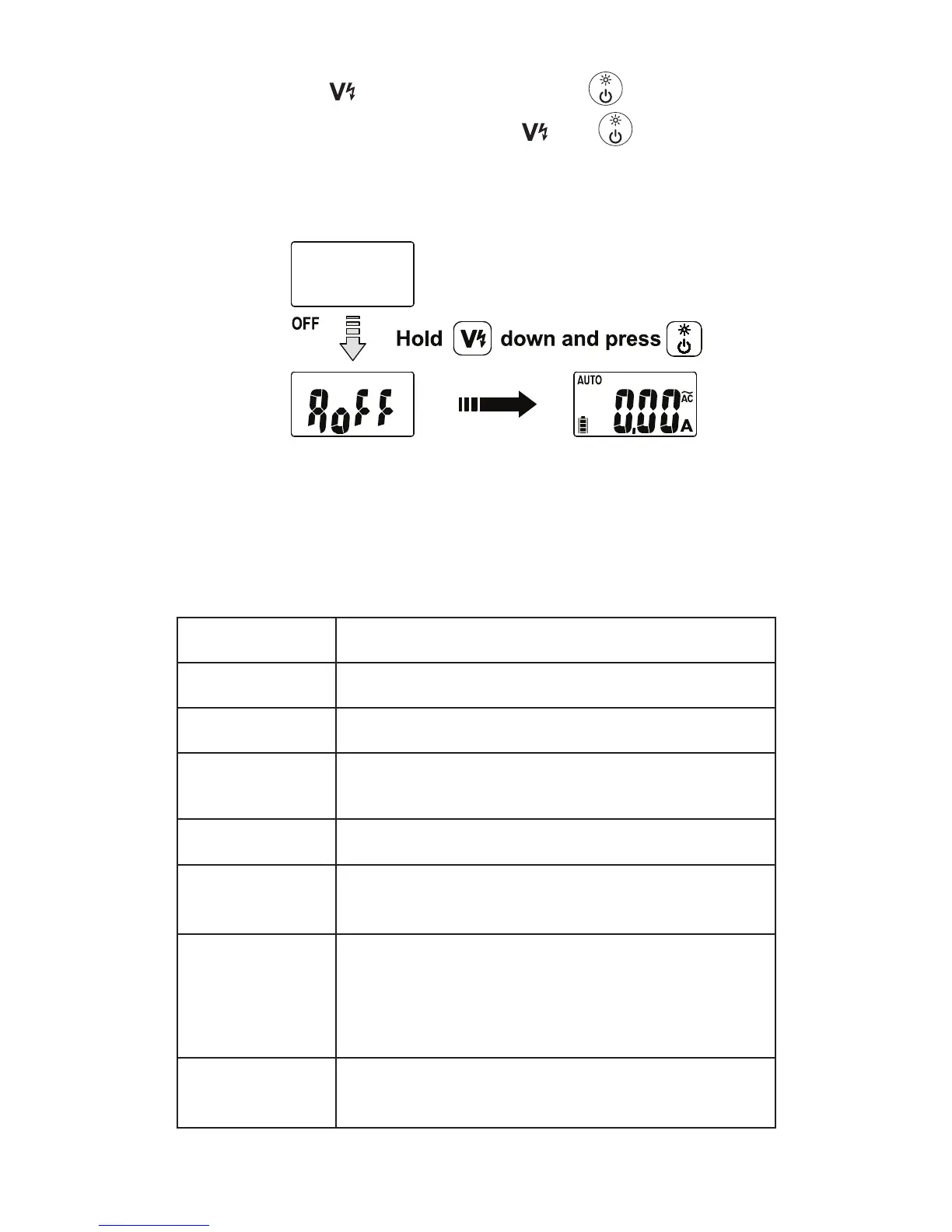
Disable auto power off:
Press and hold
button while pressing button.
“AoFF” is displayed, then release
and button. The
meter is turned ON and goes into default measurement
function (auto AC/DC A).
The auto power off mode resumes back when the Meter is
OFF and is turned ON again.
SPECIFICATIONS
Display
6000 counts
Sensing
True-RMS
Polarity
Automatic
Over-Range
Display
“OL” or “-OL”
Update Rate
2 times per second nominal
Operating
Temperature
32 °F to 122 °F (0 °C to 50 °C)
Relative
Humidity
Non-condensing,
32 °F to 86 °F (0 °C to 30 °C) ≤ 80%,
>86 °F to 104 °F (>30 °C to 40 °C) ≤ 75%,
>104 °F to 122 °F (>40 °C to 50 °C) ≤ 45%
Storage
Temperature
-4 °F to 140 °F (-20 °C to 60 °C), 0% to
80% R.H. (with battery removed)



 To Next Page