9
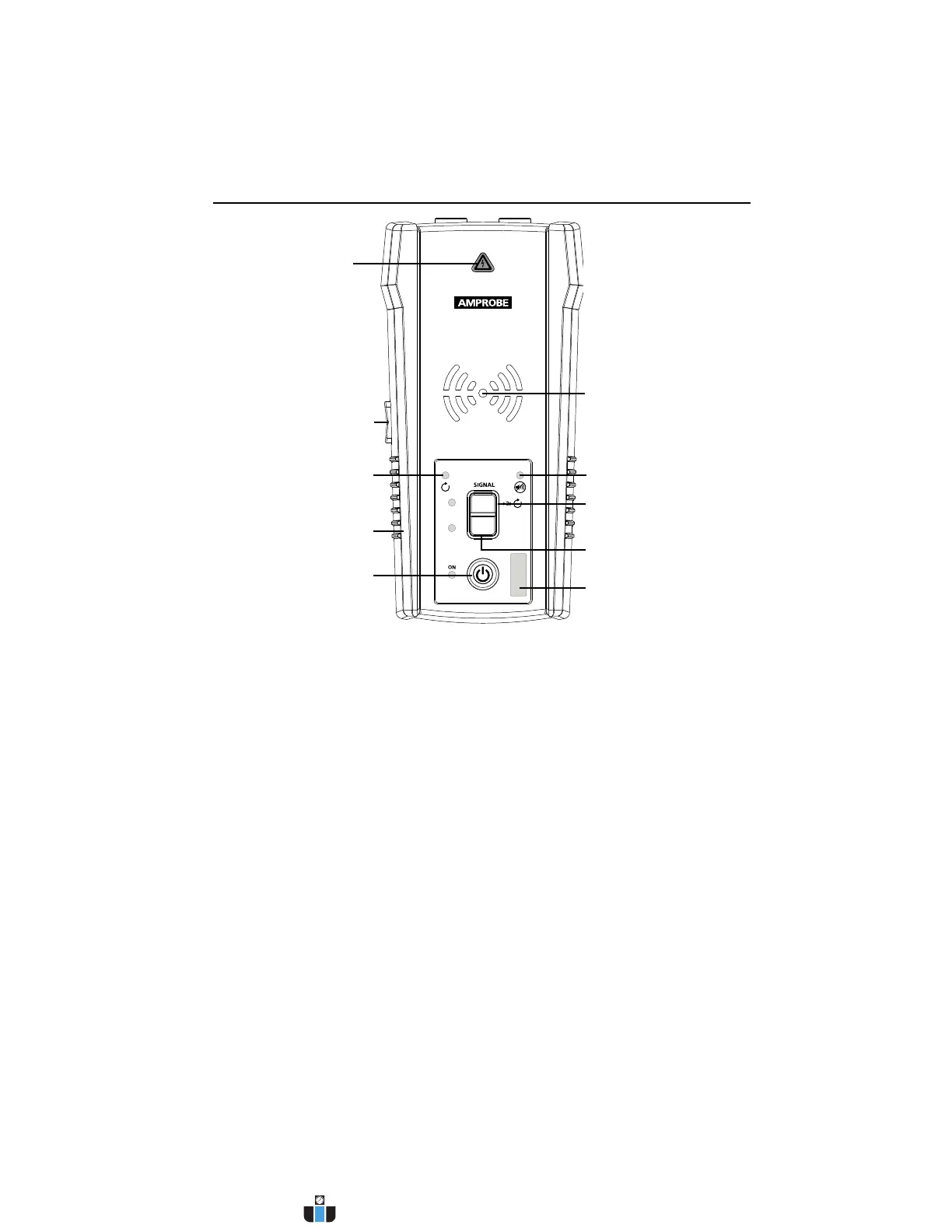
AT-6000-T
TRANSMITTER
HI
LO
VOLTAGE WARNING
INDICATOR
1. Red: Energized
2. Off: De-energized
3. Blinking: Overvoltage
LOW (PRECISION) MODE
ON / OFF BUTTON
TRANSMISSION MODE
INDICATOR
HIGH SIGNAL MODE
Press >2s for Loop mode
MUTE INDICATOR
BATTERY STATUS
LOOP MODE INDICATOR
RUBBER OVERMOLDED
ENCLOSURE
VOLUME
ADJUSTMENT
BUTTON (+/-)
ON/OFF: Short press to turn the Transmitter on. Long press >2s to turn the Transmitter off.
Volume adjustment: The volume can be changed by short presses on VOLUME UP/DOWN
buttons. In addition to mute, four volume levels are available. The chosen volume level will
be shown on LED display for a short time. If sound is muted, the MUTE LED light will be on.
The sound pattern is different depending on chosen operating mode.
Voltage Warning light: The warning light will be ON for Energized circuits (30 to 600 V
AC/DC), OFF for De-energized circuits (0 > 30 V AC/DC), and BLINKING if an overvoltage is
detected (> 650 V AC/DC).
LED display:
The LED diodes will blink with different rhythm depending on the chosen operating mode.
Transmitting in HIGH mode – Fast blinking,
Transmitting in LOW mode – Slow blinking,
Transmitting in LOOP mode – Alternating blinking.
High mode: Short press on HI pushbutton to turn on HIGH transmitting mode. Second short
press on HI button to turn off transmitting.
Low mode: Short press on LO pushbutton to turn on LOW transmitting mode. Second short
press on LO button to turn off transmitting.
Loop mode: Long press (>2s) on HI pushbutton to turn on Loop mode. Short or long press on
HI button to turn off Loop mode.
2. KIT COMPONENTS
Figure 2.3: Overview of AT-6000-T Transmitter
www.calcert.com sales@calcert.com1.800.544.2843
0
5
10
15
20
25
30


 To Next Page