6
CALIBRATION
Make sure the THWD-5 is turned off. Plug the meter’s probe into a known trusted 32.8% 1.
salt bottle. Press ”On/Off + F/C” pushbuttons simultaneously for more than one second to
enter the calibration mode.
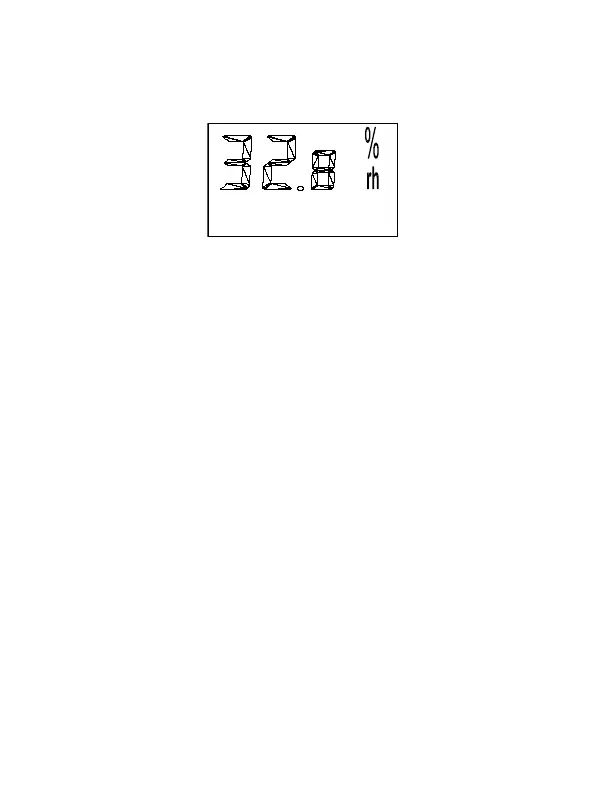
3x.x% will be flashing on LCD (see fig.1). After 30 minutes the ”3x.x%” will stop flashing. 2.
The calibration for the ”3x.x%” is now completed. Proceed with the 7x.x% calibration.
Fig. 1
Remove the meter from the 32.8% salt bottle and place it into a 75.3% salt bottle.3.
Press Min Max Reset pushbutton for more than one second to enter the7x.x% calibration
mode. ”7x.x%” will be flashing on LCD. After 30 minutes the ”7x.x%” will stop flashing.
The calibration process is now complete.
Note:
Auto power off is automatically disabled during calibration procedure.•
In order to get high accuracy, you must do the calibration at a 23 • ± 2°C (73 ± 2°F) and steady
airflow in the room.
If the value differs from 7x.x% or 3x.x% for more than 0.3%, the calibration fails .(see •
trouble-shooting)
TROUBLESHOOTING
Power on but no display
Make sure the time of pressing the On/Off pushbutton is more than 100 ms.•
Check the batteries are in place, good contact and correct polarity.•
Replace the batteries and try again.•
Flickering display and then disappears
Check whether the low battery indicator displayed before display disappeared. If yes, •
replace the batteries.
Turn on the meter by pressing ”• On/Off + Hold” key to disable auto power off.



 To Next Page