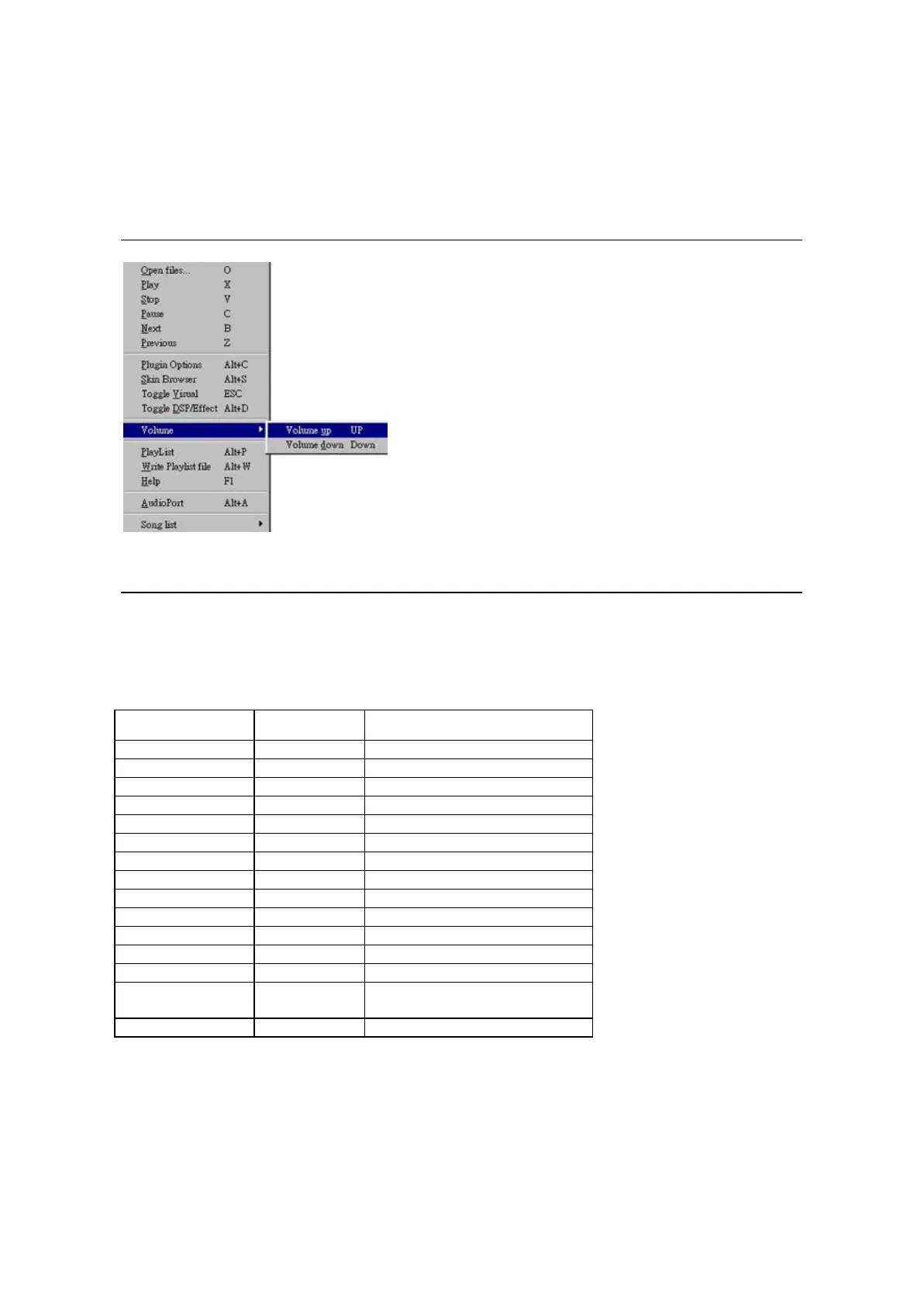
Figure 1: Right-bottom activated menu of LifeAmp.
3.3 Main Menu
The buttons on Main Console are the basic functions. Advanced function can be referred
from the Main Menu. Main Menu of LifeAmp is activated by right button of the mouse. The
function items in the menu can be used to control the playback and the configuration of
LifeAmp. Table 1 illustrates the hot key used in the menu.
Table 1. Shortcut for LifeAmp Main Console
Functions Hot Key Description
Open Files… O Open the new files.
Play X Play the current song.
Stop V Stop the playback.
Pause C Pause the playback.
Next B Playback next song.
Previous Z Playback last song.
Plugin Options Alt + C Open Main Menu.
Skin Browser Alt + S Activate the Skin browser.
Toggle Visual ESC Turn on/off the Visual Plugin.
Toggle DSP Effects Alt + D Turn on/off DSP Plugin.
Volume Up Up Arrow Increase Volume.
Volume Down Down Arrow Decrease Volume.
PlayList Alt + P Activate Playlist Console.
Write Playlist file Alt + W Save the music sequences in
Playlist into a file.
Help F1 LifeAmp on-line user’ guide.



 To Next Page