EasyManua.ls Logo

AMPULLA SENTRY - Sentry with Rear Camera (JL chip)

Default Icon
17 pages
Print Icon
To Next Page IconTo Next Page
To Previous Page IconTo Previous Page
Loading...
- 15 -
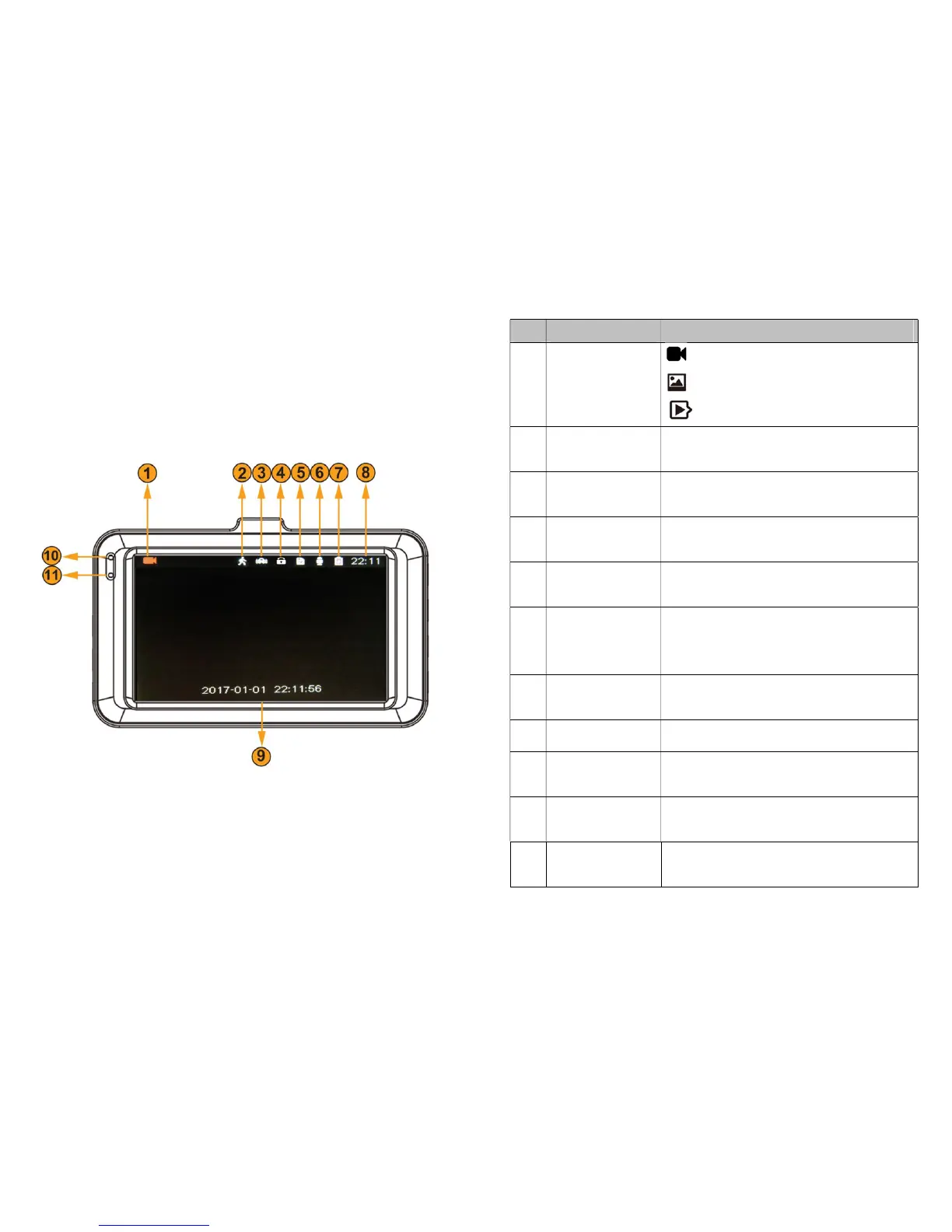
7.2 Sentry with Rear Camera (JL chip)
- 16 -
No.
Name
Description
1
Mode
Indicator
Video Mode,
Photo Mode,
Playback Mode
2
Motion
Detection
This icon indicates the Motion
Detection has been turned on.
3
Parking
Monitoring
This icon indicates the Motion
Detection has been turned on.
4
Emergency
Lock
This icon indicates if the
current video is locked or not.
5
SD card
inserted
This icon indicates the Micro SD
card has been inserted.
6
Microphone
This icon indicates the
Microphone has been turned
on.
7
Battery
Indicator
It shows the
status
of the
battery.
8
Current Time
Time in HH/MM format.
9
Date & Time
The date watermark will be on
the video.
10
Charging
Indicator
Red light
while
charging
. No
light while the battery is full.
11
Record
Indicator
Light on while working. Flash
while recording.

Related product manuals