EN-3
Button Tips
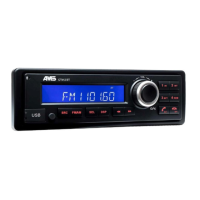
Power On/Off Button
Press the [ Power ] button to turn the unit on
when the vehicle ignition is switched on. Press
and hold the button to turn the unit off.
Adjust Volume level
Turn the volume knob to adjust the sound
level. Turn clockwise to increase and
counterclockwise to decrease the volume.
Audio Mute
Press the [ Power ] button to mute the sound.
"MUTE" will appear on the the display and
sound will be muted.
Press the [Power ] button again or rotate the
[Volume ] knob to return the sound level to the
setting in use before the Mute function was
activated.
Button (SRC)
Press the [SRC ] button to change between
DAB/BT AUDIO/FM/LW/MW.
Button (
/
)
FM-AM Press the [
or ] button to return
or go to the previous or next frequency.
Manual mode: press simultaneously on [
and ] "MANUAL " appears you can then
search manually by the frequency step by
step.
DAB: Press the [
or ] button to return or
specic emitter.
Press simultaneously on (
LIST) and (
SCAN
): “ENS LIST” will appear brievly,
then the name of the first DAB emitter will
be displayed. Turn the volume knob to
select an emitter, press to validate. Turn the
volume knob again to select a station from
that emitter, and press again to validate your
selection (You can also wait 3 seconds for
automatic selection).
Sound setting
Press the [ MENU ] button and press [
/
] button to select sound mode, press the knob
to conrm. First press shows current EQ.
Press [
] or [ ] button to select options,
rotate the knob to adjust.
EQ OFF -> BALANCE -> FADER-> LOUD
BALANCE:LEFT 1-7->CENTER->RIGHT 1-7
FADER:FRONT 1-7->CENTER->REAR 1-7
LOUD: ON/OFF
Menu “DISPLAY”
Press the [MENU] button, then press on [
/ ] to select “DISPLAY SET”. Turn the knob
to scroll through the following:
Singer/song name > station program type
(PTY) > emitter name > emitter block ID >
frequency > time > sation name.
NB: the displayed informations may vary
depending on the currently selected mode
(DAB or FM)
go to the previous or next radio station (choice
by name).
Button ( SCAN )
FM-AM: Press the button for 1 seconds
( SCAN
) to automatically save the 6
strongest radio stations in memory.
DAB: Press the button for 1 seconds ( SCAN
) to start scanning the entire DAB band and
update the list of DAB radios.
Button ( LIST)
FM-AM: to show the memories of the FM or
AM band (stay on FM1 or FM2-3 or 4).
Press the button for 1 second (
LIST)
then turn the volume knob to scroll through
the memories, then validate your choice by
pressing the volume knob.
DAB: To scroll through previously scanned
radios.
Press the button for 1 second (
LIST) then
turn the volume knob to scroll through the
names of the DAB radios, then validate your
choice by pressing the volume knob.
N.B : if you do not validate on the volume
button, after 3 seconds the current displayed
radio station is automatically selected.
Double function “SENDER LIST”*
Allows to scroll through the list of DAB
emitters and select a radio station from a



 To Next Page