6
2.1.4 Service reset
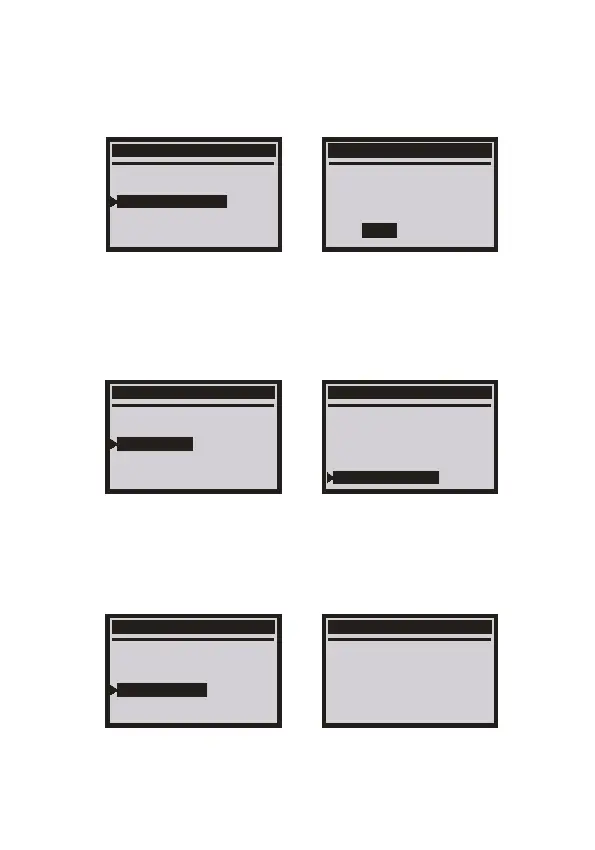
Choose [Service reset] and then press [ENTER] button. The screen will
display as follows:
2.1.5 Throttle Adaptation
Choose [Throttle Adaptation] then press [ENTER] button. The screen will
display as the follows:
V/A Diagnosis
Common system
V/A A11 Systems
Service Reset
Throttle Adaptation
EPB Replace Brake Pads
Service Reset
Oil Service
Inspeotion Service
Reset ESI
ESI: Distance inspect
FIX: Distance inspect
ESI: Time inspect
V/A Diagnosis
Common system
V/A A11 Systems
Service Reset
Throttle Adaptation
EPB Replace Brake Pads
Precondition
1.The ignition switch on.
Trouble-free
2.The engine is not running
3.The water temperature
above 85 degrees
2.1.3 Clear Fault codes
Choose [05-Clear Fault Codes]. The screen will display as follows:
01--Engine
01--Control Unit Info
02--Read Fault Codes
05--Clear Fault Codes
Erase Codes
Erase trouble codes!
Are you sure?
YES NO
EN



 To Next Page