4.Tool Description
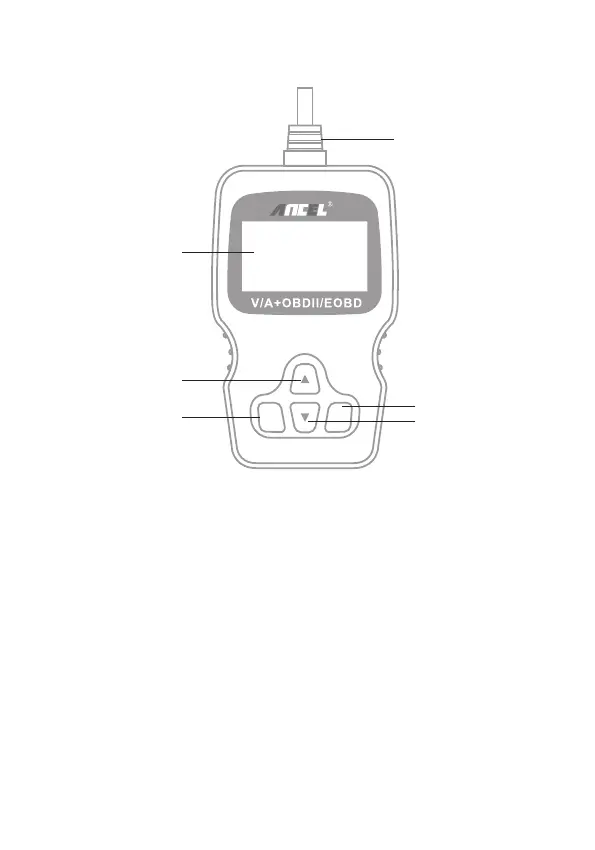
1. LCD DISPLAY – Indicate test results. Backlit, 128 x 64 pixels display
with contrast adjustment.
2. ENTER BUTTON – Confirm a selection (or action) from a menu.
3. EXIT BUTTON – Cancel a selection (or action) from a menu or returns
to the menu. It is also used for exit DTC Lookup screen.
4. UP SCROLL BUTTON – Move up through menu and submenu items in
menu mode. When more than one screen of data is retrieved, move up
through the current screen to the previous screens for additional data.
5. DOWN SCROLL BUTTON – Move down through menu and submenu
items in menu mode. When more than one screen of data is retrieved,
move down through the current screen to next screens for additional data.
6. OBD II CONNECTOR – Connect the scan tool to the vehicle’s Data
Link Connector (DLC).
3 EN
ENTER EXIT
1
6
3
5
4
2
VD500



 To Next Page