English 15
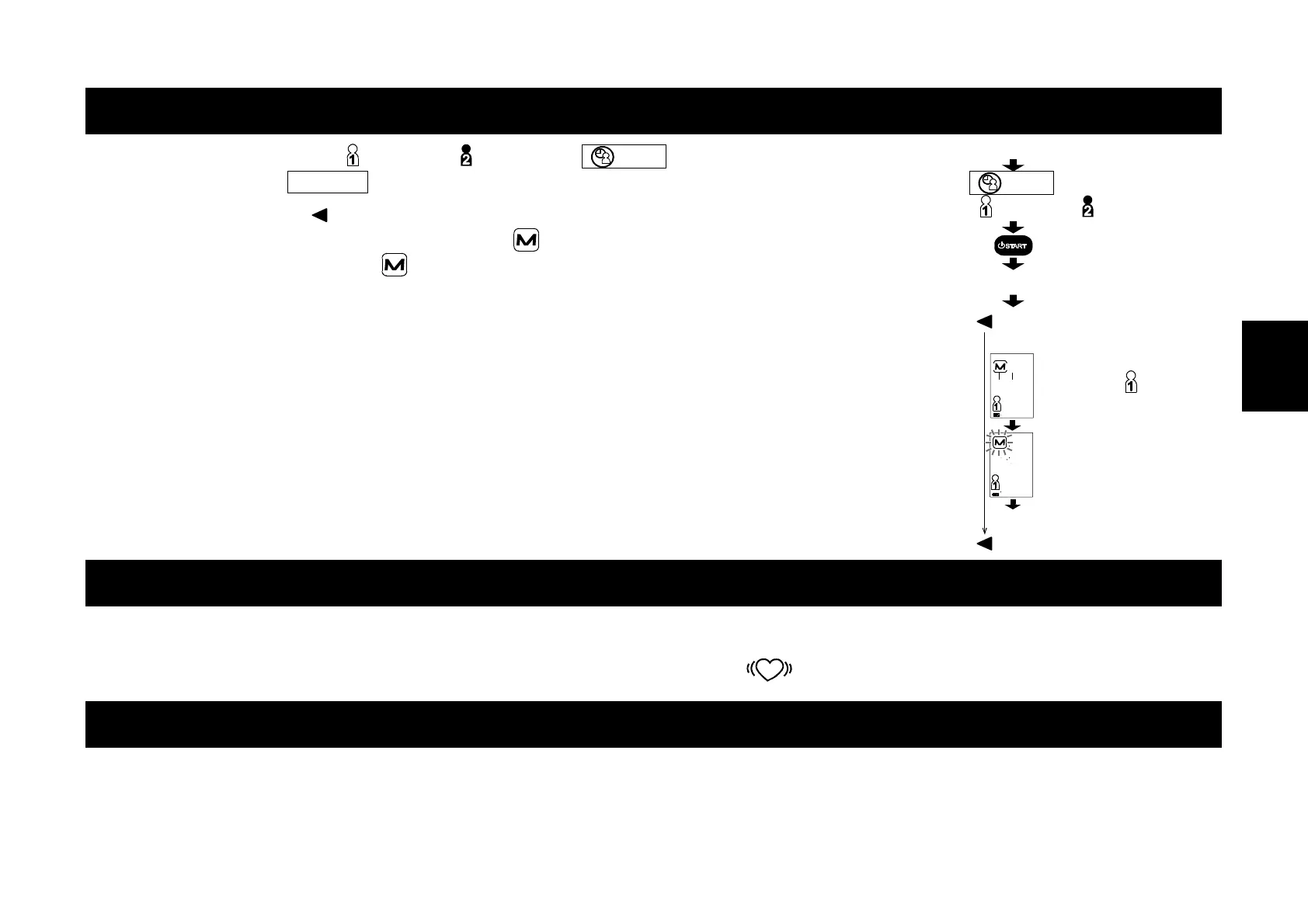
Deleting Data Stored in Memory
1. Select a user from user and user using the
SET
button. Turn off the
device using the START button.
2. Press and hold the button until turning off the device automatically.
The device displays a user icon and the
mark, deletes data stored in
memory while blinking the
mark and turns off automatically.
Note: This operation will delete specified user data stored in memory.
You cannot select which data to delete.
What Is The IHB/AFib Indicator?
When the monitor detects an irregular rhythm during the measurements, the IHB/AFib indicator will appear on the
display with the measurement values.
Note: We recommend contacting your physician if you see this
IHB/AFib indicator frequently.
What Is The AFib?
The heart contracts due to electrical signals occurring in heart and sends blood through the body. Atrial fibrillation (AFib)
occurs when the electrical signal in the atrium becomes confused and leads to disturbances in the pulse interval. AFib
can cause blood to stagnate in the heart, which can easily create clots of blood, a cause of stroke and heart attack.
Turn off
SET
button
User or User
Display is turned off
Press and hold button
Ex.: User
Deleting data
Display is turned off
Release button


 To Next Page