Welcome to Anet Facebook and Twitter Page
The latest news, products etc information from Anet would be published in Facebook, Twitter.
And we have after-sales service team in Facebook to help you solve using
issues. Let’s have a look how to join us:
1. You can visit following links to find Anet and join us:
Facebook: facebook.com/anet3dtech
Twitter: twitter.com/anet3dprinter
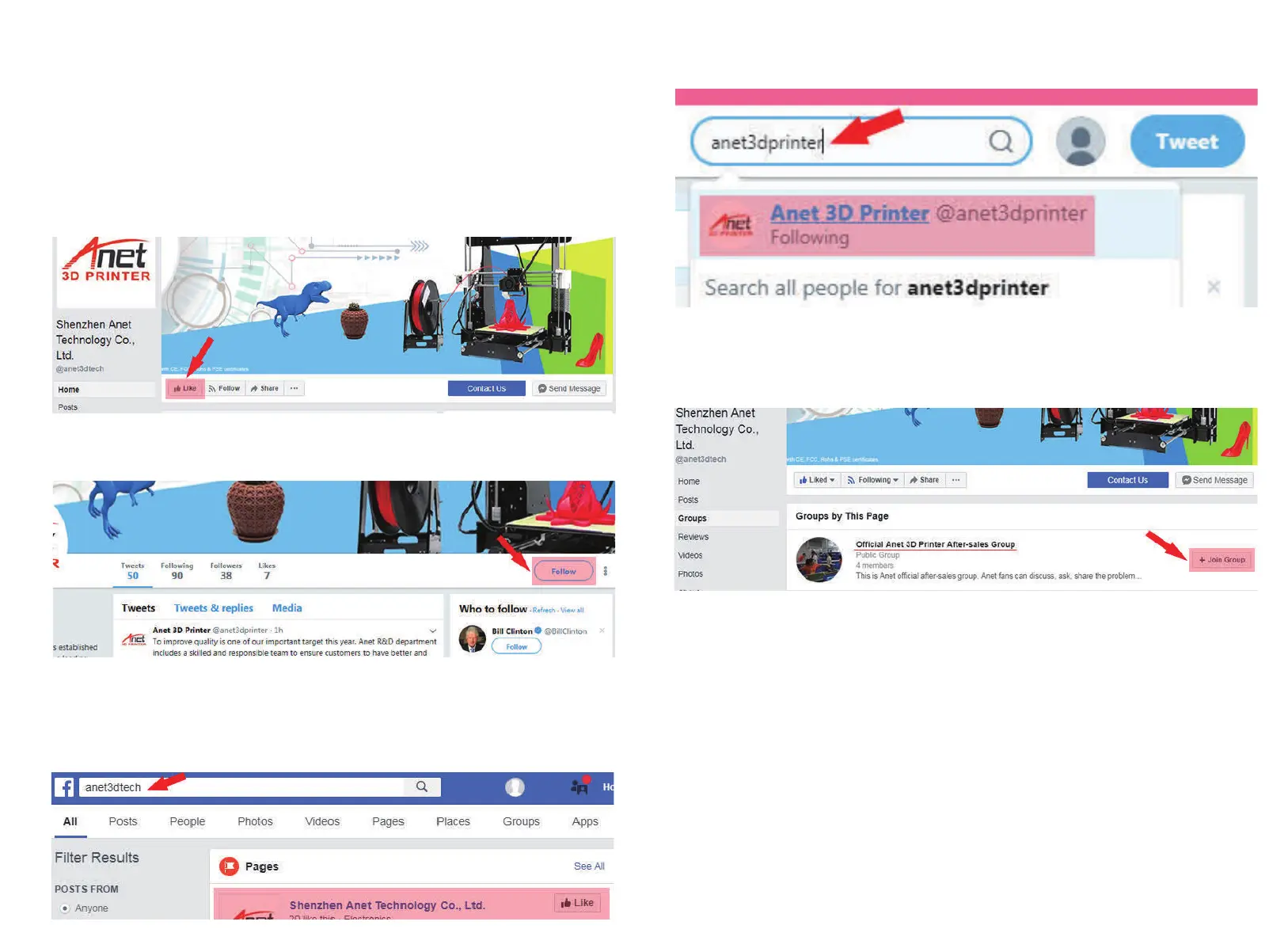
In Anet Facebook page(@anet3dtech), click “ Like ”;
In Anet Twitter page(@anet3dprinter), click “ Follow ”;
2. In Facebook and Twitter, You can search keywords to find Anet:
In Facebook search box, please search “ anet3dtech ” ; Find Anet page and “Like” us;
In Twitter search box, please search “anet3dprinter”; Find Anet page and “Follow” us;
3. In Anet Facebook page, you can also join our after-sales group: Follow above two methods,
you can find Anet Facebook page, then on the left side click “ Groups ”, you would see “ Official
Anet 3D Printer After-sales Group ”, click “ Join Group ” to join us;
4. Scan QR code to find Anet Facebook and Twitter page:
Twitter: com/anet3dprinter Facebook: com/anet3dtech



 To Next Page