2. A8 Quick User Guide
2.1 User instruction
2.2 Specification
2.3 Specification
2.4 Quick Operation Guide(More details please check TF card)
Dear customer:
Thanks for choosing and using Anet 3D printer. For your convenience, please read the
instructions carefully before using them and follow the instructions strictly.
Special Version:
1. All the contents in this manual have been checked carefully. If there is any misprint or
misunderstanding of them, Anet reserves the right to interpret it.
2. This user manual is for reference only and does not constitute any form of commitment.
3. It is recommended to use Anet original filament.
In order to prevent damage to you and others in the process of
using, Please be aware of the following:
● Please do not attempt to use the machine in any way undescribed in the instructions to avoid
accidental personal injury and property damage.
● Please do not place this machine near inflammable and explosive materials or high heat
sources. Please place this machine in a ventilated, cool and dust free environment.
● Please do not place the printer on a larger vibrating or other unstable platform. The shaking of
the machine will affect the printing quality.
● Please do not replace the power line of other products during installation. Please use the
original power line supplied with the machine. The working power supply uses 110V/220V AC. The
power plug must be plugged into the three holes socket with ground wire to avoid damage to
components or accidents such as fire and electric shock.
● Please do not touch the nozzle and heating bed during the printer working to prevent high
temperature burns and personal injury.
● Please do not wear gloves or wrappers when operating the machine in case the movable parts
cause entanglement and cutting damage on the human body parts.
● After printing, please use the remaining temperature of the nozzle to clean up the filament on
the it with the help of tools. Do not touch the nozzle directly with your hands during cleaning to
prevent scalding.
● Please often do product maintenance. In the circumstance of power off, please regularly clean
the printer body with dry cloth to wipe away dust and bonded printing materials, foreign objects
on guide rails, and lubricating oil is recommended for sliding parts, screw rods and bearing parts.
● Children under 14 years old or people above 60 years old, please use this machine under the
adult people to avoid personal injury.
●Some filaments will produce slight odor but it won't make people feel uncomfortable , so it is
recommended that you use A8 Plus in a well-ventilated environment.
●Self-disassembly or modification may cause damage or abnormal performance, and your
machine will no longer enjoy warranty service.
●It is recommended to use A8 in a well-ventilated environment. Please cut off the power supply
after using.
Model: A8
Layer thickness: 0.1-0.3mm
Printing speed: 10-120mm/s
X Y axis position accuracy: 0.012m
Z axis position accuracy: 0.004m
Printing material: ABS,PLA
Material tendency: PLA
Software Ianguage: English
Function of support: automatically
Software: Cura
Filament diameter: 1.75mm
Nozzle diameter: 0.4mm
Machine size: 500*400*450mm
Machine weight: 7.5KG
Packing size: 510*310*208mm
Gross weight: 8.7KG
Build size: 220*220*240mm
LCD screen: Yes
File format: STL、G-Code、OBJ
OS: windows(linux、mac)
Working condition: 10-30°C, Humidity 20-50%
Offline printing: TF CARD
Machine Installation:
More instructions can be obtained as below:
●Manual guide in TF card
●Video guide in www.anet3d.com
●Email support support@anet3d.com
Software Installation:
Software and configuration files in TF card, more detail about software using
guide please visit website.
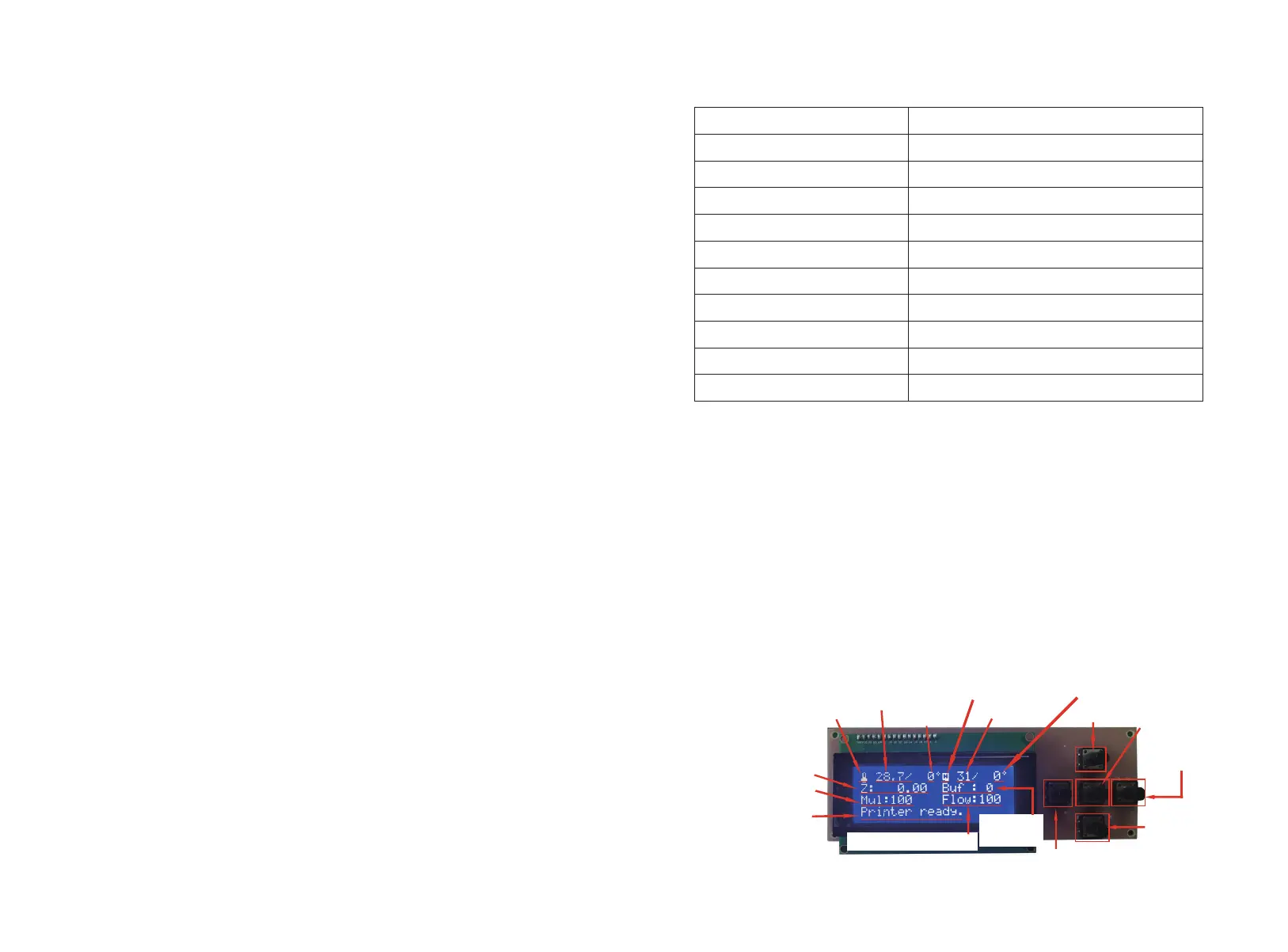
2.4.1 Operating Interface Introduction
Extruder Temp
Estimated hotbed temp
Hotbed temp
Hot bed icon
Extruder icon
Height of Z axis
Printing speed
Status
Cache
Instruction
Back
Down
Enter
Menu
up
Current extrusion rate
Estimated
extruder temp
Attention:this is the interface befor printing
page 28 page 29



 To Next Page
 Loading...





