EasyManua.ls Logo

Anet A8 - Page 17

Anet A8
19 pages
Print Icon
To Next Page IconTo Next Page
To Previous Page IconTo Previous Page
Loading...
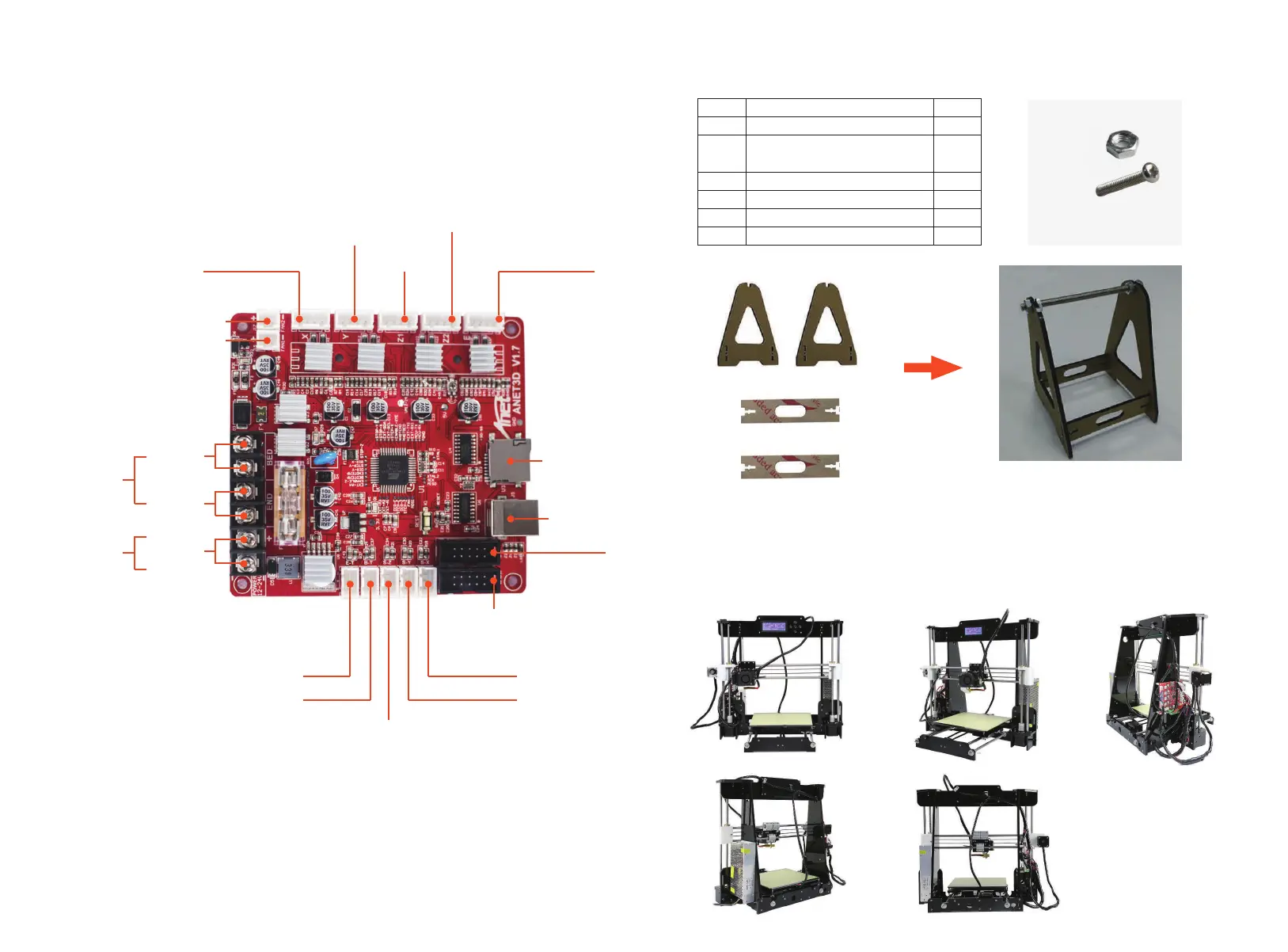
X axis motor
Y axis motor
Z1 axis motor
Z2 axis motor
Extruder
Step 29
Attention: Please connect the electronics wire to each
components correspondingly.
Note: Please make sure the wire of the power supply connect the
connector in Max.
Step 30
Installation picture
Item
1
2
3
4
5
6
2
2
1
4
4
4
QTY.Name of parts
Filament support plate
connecting plate
Threaded rod 150mm
M8 Screw
M3*18 screw
M3 Nut
M3
M3*18
40*10 Fan
There is no
need to separate
positive and
negative electrodes
(+red line,
-black line)
Hotbed
line
Extruder
line
Power
input line
+
-
50-15 Air
blower
SD card port
USB port
LCD display screen
X axis limit switch
Y axis limit switch
Z axis limit switch
Heating thermistor
Nozzle thermistor
J3 display screen
(J3: NO connection
required)
page 26 page 27

Other manuals for Anet A8

Related product manuals