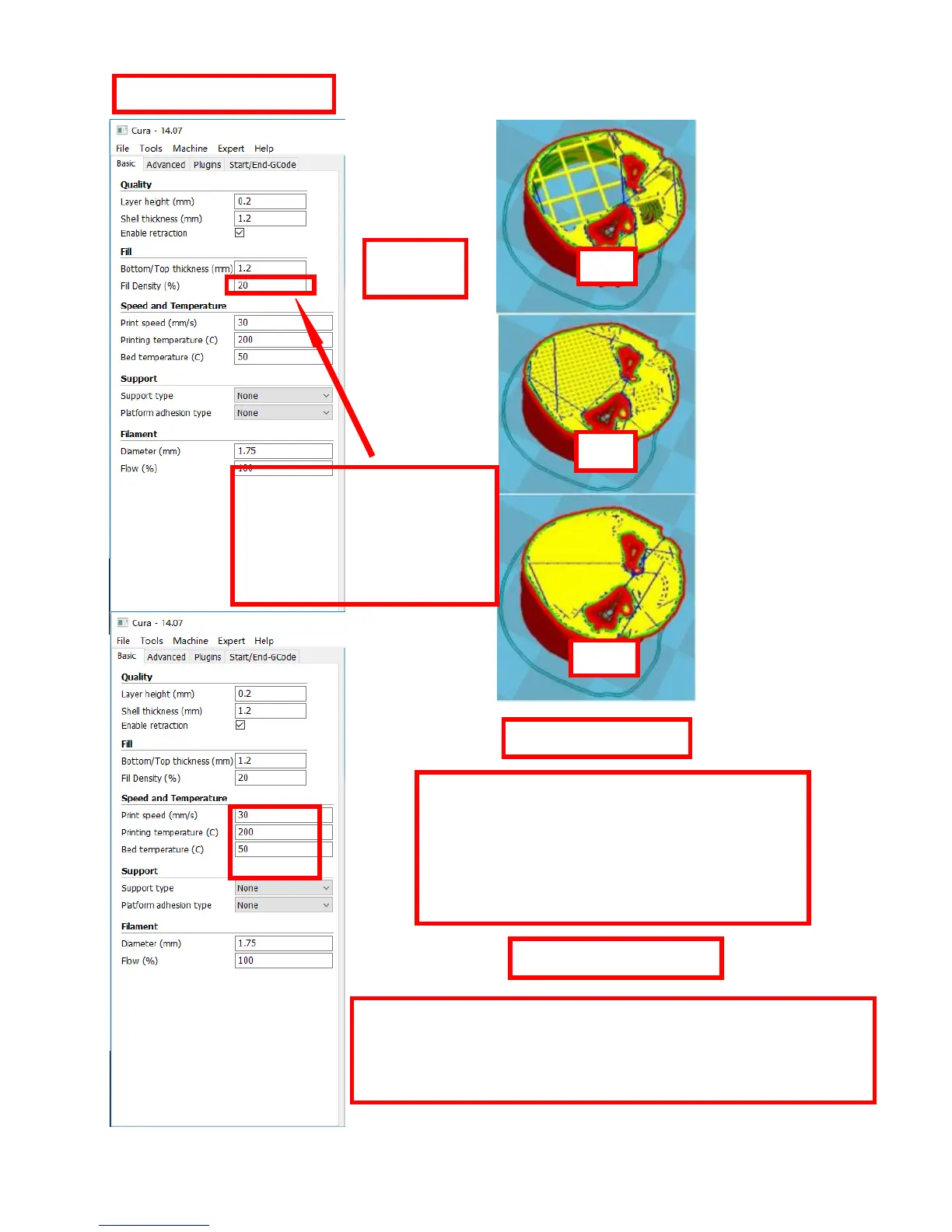
Bottom/Top thickness setting
Fill Density: If strength requirement
is not so high , set 10% is ok.
Please improve fill density when
strength requirement gets higher.
Printing time will go up as well.
Pringting Temperature
setting
This is default speed. If other settings aren’t changed,
it prints more accurately while the printing process
takes more time.
High printing speed takes less time while it cannot
print accurately , making the model have bad quality.
Normally 40-60 print speed is suitable for printing.
PLA filament temperature setting: nozzle: 190-210 ℃ hotbed: 40-60℃
ABS filament temperature setting: nozzle: 230-250℃ hotbed: 60-90℃
Please set higher temperature of nozzle when it prints fast and the
thickness is big
Please set lower temerature of nozzle when it prints slow and the
thickness is small


 To Next Page