E
N
7
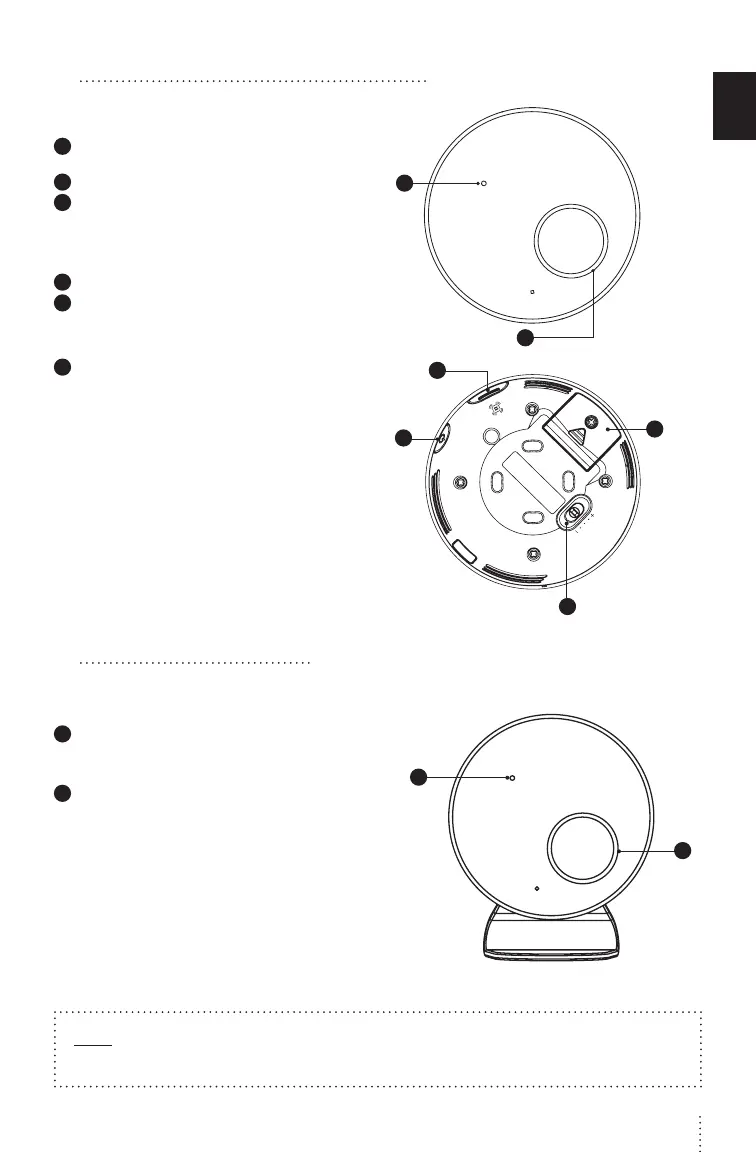
4 GETTING TO KNOW YOUR MONITOR
NURSERY UNIT
1
Power indicator
/ Low battery light indicator
2
Movement Sensor Pad indicator
3
Pause movement Sensor Pad
Allows you to pause the Sensor Pad if you remove baby
from the cot, e.g. for feeding or comforting. Ensure to
un-pause the Sensor Pad before putting baby in the cot
/ Pairing button
(press & hold)
4
Power ON/OFF (press & hold)
5
Movement Sensor Pad Sensitivity Switch
To ensure adequate monitoring of your child’s
movements, you can adjust the sensitivity of the
Sensor Pad (STEP 3, TEST THE SENSOR PAD)
6
Battery door (2 x AAA)
1
2
6
3
4
5
5 NURSERY UNIT ALERTS
NURSERY UNIT
1
Power ON/OFF & Low Battery Light Indicator
Flashing green: Monitor is activated
Flashing yellow: Nursery Unit battery is low
2
Movement Sensor Pad
Flashing red: No movement is detected
• e Nursery Unit speakers will emit loud
consecutive beeps - this is the Movement Alarm
Flashing white: Monitor is paused.
• e Nursery Unit emits a single beep every 20 seconds
Flashing light blue: Loss of connectivity between
the Nursery Unit and the Sensor Pad
• e Nursery Unit emits a single beep every 20 seconds
Flashing yellow: Sensor Pad battery is low
• Nursery unit emits a single beep every 20 seconds
1
2
Note:
Press Pause on the Nursery Unit to stop the alarm
CFO4B_ANGE_Manuel_AC027_ROW.indd 7 19-02-05 09:32


 To Next Page