OptiBean (XL)
54
2013/08 Rev. 0.5
OptiBean (XL)
GB
55
2013/08 Rev. 0.5
When loading new software the following changed
settings (data) are lost:
- Changed recipes
- Changed personal settings
- A non-standard language le will be overwritten by
the standard language le NL/GB/DU/FR
Counts, Log and operating hours will be preserved!
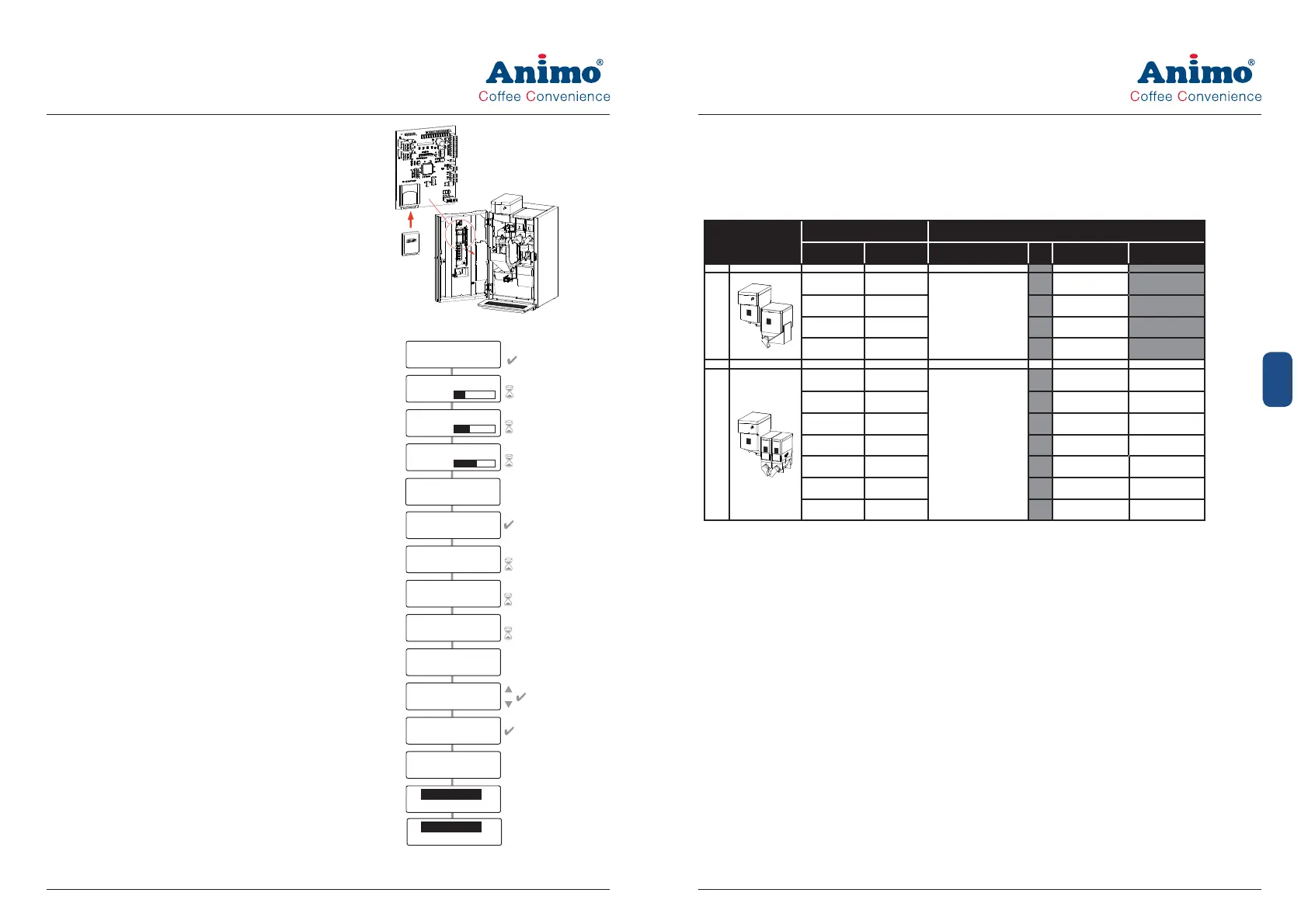
1. Download the OptiFresh software from the Animo
extranet site.
2. Unpack the ZIP le and copy all les to an SD card.
3. Remove the cover plate on the inside of the door.
4. Insert the SD card in the card holder.
Tip: Save any changed settings rst on an SD
card. This can be the same SD card as the one
containing the new software. Go to service menu
item 2.10 SD menu / Save data and save the
required settings.
5. Switch the machine off (0).
6. Switch the machine on again (I).
7. Press the Enter key (key 10). The new software will
now be installed automatically. The following
procedure takes about 5 minutes.
8 Choose the appropriate model and con rm your
selection with Enter.
9. The display now shows ‘Make your choice’.
10. The new software has now been installed.
11. Now reload the Personal recipes and settings
saved in step 4 into the machine. Go to service
menu item 2.10 SD menu / Load data and reload
the saved settings back into the machine.
12. Remove the SD card from the card holder.
After installation, check the display contrast in the
Operator menu / 1.9 Contrast
Attention: during the software installation the display
can show some contrast uctuations. This is a normal
symptom because the contrast parameter is rst active
after the whole software is installed.
SELECT FILE/FOLDER
< le name > . MHX
< le name > . MHX
ERASING
Reading
< le name > .TLF
Reading
< le name > .MDD
Reading
< le name > .RCD
Finished
No Errors
Model
2Bxxxx
Model 2Bxxxx
Are you sure?
Model 2Bxxxx
moment please
< le name > . MHX
FLASHING
< le name > . MHX
VERIFYING
START APPLICATION
LOAD FILES?
OptiBean
V 5 . xx. xxxx
OptiBean
ANILCD V1. xx. xxxx
Memory Card
4. MODELS AND RECIPES
There are 11 different models in the standard and XL machine software. The bold printed OptiBean
models are the standard models.
OptiBean (XL)
Model code Canister con gurations
Std. XL 1 3 4
2
3
1
2B 1A 2B 1L
Coffee beans
Topping
2B 3A 2B 3L Cocoa
2B 4A 2B 4L Tea
3
3
4
1
2B 2A 2B 2L
Coffee beans
Topping Cocoa
2B5A 2B5L Topping Sugar
2B6A 2B6L Topping Tea
2B7A 2B7L Tea Cocoa
2B8A 2B8L Tea Sugar
2B9A 2B9L Topping Coffee inst.
2BAA 2BAL Topping Decaf inst.



 To Next Page