
 Need help?
Do you have a question about the Animo OptiFresh and is the answer not in the manual?
This document provides directions for use and serves as a service document for trained, authorized service staff.
Explains the meaning of various pictograms and symbols used in the manual, including CAUTION, WARNING, and DANGER.
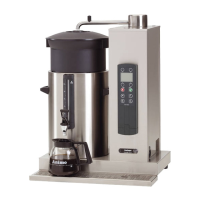
Illustrates and lists the main components of the OptiFresh machine, such as the brewer, water reservoir, and motors.
Explains the boiler system, including filling, heating, temperature regulation, and safety features.
Describes the hot water and optional cold water dispensing processes and their respective components.
Details how ingredients are dispensed from canisters and mixed with hot water.
Explains how evaporation released during mixing is absorbed and filtered by the extractor ring and filter cassette.
Details the step-by-step brewing process, including piston movements and coffee extraction.
Provides instructions on adjusting the brewer unit's tensile force to resolve leaks and ensure proper wiper function.
Offers visual guidance and indicators for correct, too low, and too high tensile force settings on the brewer unit.
Lists problems like residue issues, wet coffee, and leaks, with their probable causes and corrective actions.
Introduces the operator and service menus, highlighting PIN code protection and available functions.
Details settings like clock, timer, recipe counters, quick recipe, permanent filter, software, and PIN code.
Explains how to configure quick recipes and button assignments within the service menu.
Describes detailed recipe settings for water, ingredients, and mixer timing for various units.
Details strength adjustments for ingredients like coffee, chocolate, and sugar, and other recipe options.
Covers language selection, boiler temperature settings, display options, and bleeper activation.
Explains coin system configurations and how to reset various counters like brewer, mixer, and total.
Details service parameters for descaling reminders and filter replacement indicators.
Guides on testing device inputs like sensors and switches, and outputs like motors and valves.
Explains how to read and clear error logs, and load default settings for the device.
Details using SD cards for saving/loading settings and changing the device's PIN code.
Covers settings for waste bin management, drip tray sensor, and provides a water hardness table.
Explains how to set cup volume and ingredient strength for quick recipes accessible by the operator.
Describes the model code system used to identify different canister configurations of the OptiFresh machine.
Details the standard recipes assigned to the 12 buttons for different OptiFresh models based on canister setup.
Explains how optional recipes are programmed to buttons for various canister configurations across different models.
Provides rules for setting detailed recipes, including water amounts, motor times, and rinse parameters.
Illustrates the timing and sequence of water, ingredient, and mixer operations for different recipe types.
Guides on calibrating dispensing valves (DV) to ensure accurate water delivery for brewing and mixing.
Details how to install new software and language packs using the Animo Extranet or email.
Explains setting service parameters, including the descaling/filter replacement indicator based on drink count.
Emphasizes the benefits of preventative maintenance and adherence to safety instructions.
Discusses the advantages of service contracts for reducing malfunctions and extending device life.
Provides guidelines for annual servicing frequency based on estimated yearly cup production.
Details the initial steps for descaling, including product requirements, tools, and warming up the reservoir.
Continues descaling steps: applying solution, soaking, activating cleaning programs, and rinsing.
Illustrates and labels major accessible components like the display, brewer, water reservoir, and circuit board.
Details electronic components and the main control unit, including its accessibility and key parts.
Explains the connections of the interface, display, and service keyboard to the main control unit.
Describes the 24V DC power supply, its location, and overload reset procedure.
Lists and describes input connectors (J12, J7, J16) and their associated sensors and components.
Details output connectors (J2, J4, J15, J6) for motors, valves, fan, and relays.
Lists communication ports like USB, MDB, CSI, and RS232 on the main circuit board.
Explains how to access and clear the device's error log via the service menu.
Lists common display messages ('Out of order') and their probable causes like boiler filling or drip tray full.
Details troubleshooting steps for specific error codes related to brewer, mixer, ingredient motors, and outputs.
Describes the standard DIL switch configuration and how to reject specific euro coins.
Guides on activating existing tokens and programming new tokens into the coin mechanism.
Details setting prices and enabling recipe buttons for payment with euros or tokens.
Explains how to block euro coins and configure the device to accept only tokens.
Provides instructions for cleaning the coin mechanism using a damp cloth.
 General
| Brand | Animo |
|---|---|
| Model | OptiFresh |
| Category | Coffee Maker |
| Language | English |











 To Next Page