EN 6867 EN
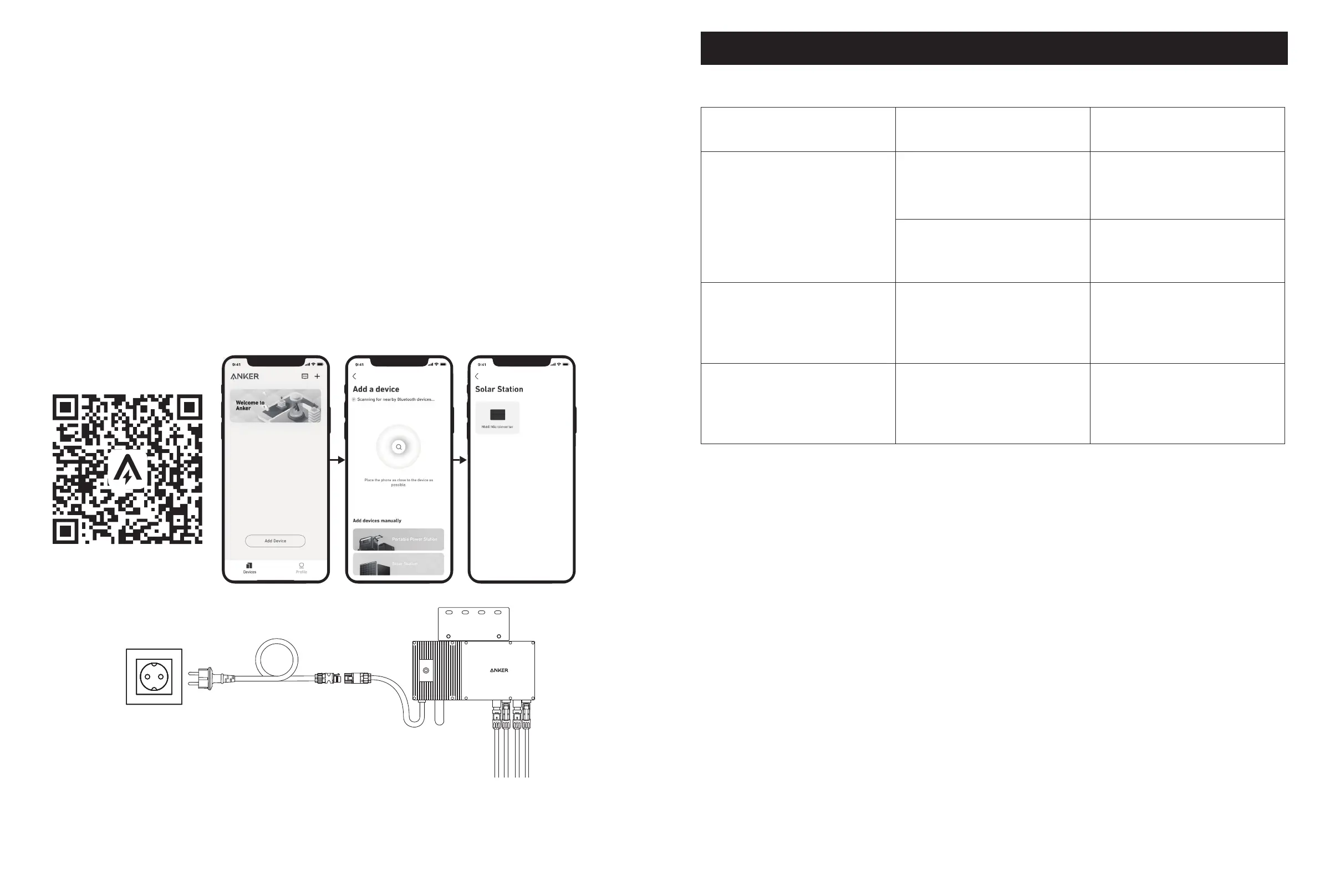
11. Download the app, and follow the in-app instructions to finish the microinverter configuration and Schuko cable connection.
① Scan the QR code on the microinverter or search "Anker" on the App Store, Google Play, or other ocial application
stores to download the app.
②
Tap Add Devices/"+" > Add a Device > Solar Station > MI60 Microinverter.
③ Sign up/log in to your Anker account.
④ Select your home's Wi-Fi SSID, enter the password, then click the "Next" button. You will be directed to the device's
Wi-Fi Guidelines page.
⑤ Read the guidelines, then click the "Connect to Device's Wi-Fi" button. You will be redirected to the Wi-Fi pairing list of
your devices.
⑥ Pair the microinverter's SSID (named MI-XXXXXXXX) on the Wi-Fi pairing list with your device. The default password is
12345678.
⑦ Return to the Anker app. A scanning page will be displayed; wait for a while.
⑧
If you are redirected to the No Devices Found page, press the "Retry" button, then follow the instructions to unplug all solar
panel extension cables from the microinverter. Then repeat steps 10 and 11 (excluding the download and login operations).
⑨ If you are redirected to the Distribution Network Inspection page, you can connect the microinverter to your home
grid via the Schuko cable.
Status Check:
I. If the LED light on the microinverter flashes green slowly (on for 1 second, then o for 1 second), it means the Wi-Fi connection is
successful. Move on to step 12.
II. If the LED light on the microinverter flashes orange slowly (on for 1 second, then o for 1 second), it means that communication
and connection have failed. Unplug the Schuko cable from your home grid, then unplug all solar panel extension cables from the
microinverter to disconnect. Repeat steps 10 and 11 (excluding the download and login operations).
5m
12. You will receive data from the balcony solar power system on your Anker app after 20 minutes.
Note: According to the government's regulations and to ensure safety, the microinverter can only start working after connecting to a
powered grid for 5 minutes. To improve the accuracy of the data, the system will verify and validate it for 15 minutes before showing
it on the app.
LED Light Guide
When sucient DC voltage from the module is applied, the microinverter will be powered, and the LED will start flashing.
LED Light Indicator Description How To
Red light on for 2 seconds, then o for
2 seconds
The microinverter is on and is ready to
be configured.
Follow the instructions to start the
configuration.
The microinverter's network is set up,
but the Schuko cable has not been
connected to the home grid.
Follow the instructions to connect the
microinverter to your home grid.
Orange light on for 1 second, then o
for 1 second
Schuko cable connection successful.
There is AC power output.
Configuration failed. There is
no communication between the
microinverter and the home network.
Restart the microinverter and the
network configuration.
Green light on for 1 second, then o
for 1 second
Schuko cable connection successful.
There is AC power output.
Configuration successful. There
is communication between the
microinverter and the home network.
The system is working.


 To Previous Page
 Loading...