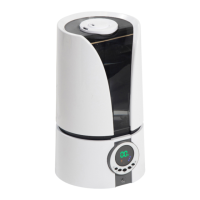
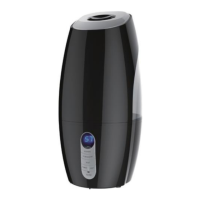
This document is a user manual for the Anko Humidifier, model TR-1801, Rev 4. It provides instructions for safe operation, assembly, use, maintenance, and troubleshooting of the device.
Function Description
The Anko Humidifier is designed to add moisture to the air, helping to alleviate dry conditions in a room. It operates by generating a cool mist, which is then dispersed into the environment. The device features an ultrasonic transducer to create the mist and includes a water tank for holding the water. It offers multiple operating modes, allowing users to adjust the mist output and control a night light function.
Important Technical Specifications
- Model Number: TR-1801
- Water Tank Capacity: 2 litres
- Power Supply: The humidifier must only be supplied at Safety Extra Low Voltage (SELV). It uses a Power Supply Model: XH2400-0500wA.
- Operating Modes: There are four modes combining mist rate (Low/High) and night light (On/Off), plus an "All Functions Off" mode.
- Low Mist Rate plus Night Light On
- Low Mist Rate plus Night Light Off
- High Mist Rate plus Night Light On
- High Mist Rate plus Night Light Off
- All Functions Off
- Indicator Lights: The On/Off button illuminates Red when first plugged in and switched on, indicating power is supplied. When the water tank is full and fitted, and a desired mode is selected, the On/Off button illuminates Blue. If the water tank is not fitted or the water has been consumed, the unit will turn Off, and the On/Off button will flash Red.
- Components:
- Directional Mist Vent
- Water Level Sensor
- Ultrasonic Transducer Disc
- Ultrasonic Disc Cleaning Brush
- Night Light
- Power Adaptor - XH2400-0500wA
- On / Off / Mode Button with Indicator Light
- Water Tank
Usage Features
- Preparation: Before use, the humidifier should be placed on a flat, waterproof, level, and stable surface. It's crucial to read all safety instructions.
- Filling the Water Tank: The water tank holds 2 litres. To fill, remove the water tank from the base unit by grasping the tank and lifting it straight up, then turn the water tank upside down. Unscrew the filler cap, fill the tank with clean cool tap water up to the opening, and then screw the filler cap closed. Carefully place the water tank back onto the base stand, ensuring it is correctly seated.
- Power Supply Connection: Ensure the power supply cord is fully unwound and insert the small plug on the end of the cord into the socket in the back of the appliance. Then, insert the Power Supply into the power point and switch on.
- Operation (Modes): The On/Off button changes to Blue light when any mode is selected.
- Press the On / Off Button once for Low Mist Rate plus Night Light On.
- Press the On / Off Button again for Low Mist Rate plus Night Light Off.
- Press the On / Off Button again for High Mist Rate plus Night Light On.
- Press the On / Off Button again for High Mist Rate plus Night Light Off.
- Press the On / Off Button again for All Functions Off.
- Mist Direction: The mist outlet should not directly face walls, wallpaper, or plaster walls, as the moisture could cause damage. The directional mist vent at the top of the water tank can be rotated to adjust the mist direction.
- After Use: When finished using, the water tank must be emptied, and the water in the base unit must be tipped out. Before removing the water tank, switch off and unplug the Power Supply from the appliance and power point first.
Maintenance Features
- Care and Cleaning (General):
- Switch off and unplug the Power Supply from the appliance and power point first before cleaning.
- Do not immerse the appliance in water or other liquids.
- Do not touch plug or power point with wet hands.
- Unplug the appliance during filling and cleaning.
- Keep away from pets.
- Never place anything over the mist outlet when the unit is plugged in and/or switched on.
- Always operate the appliance from a power source of the same voltage, frequency, and rating as indicated on the product identification plate.
- Position the power supply lead properly so that they will not be walked on or pinched by items placed on or against them.
- The appliance should always be placed on a firm, flat, waterproof surface. It is recommended to place the product on a waterproof mat to prevent water damage to the surface.
- Use appliance only for its intended use. The appliance is intended for household use only and not for commercial or industrial use.
- Do not use the appliance if it has been dropped or any part of the appliance (including power supply and cord) has been damaged.
- If the supply cord is damaged, it must be replaced by a qualified electrical person only or the appliance must be disposed of.
- The use of accessories not intended for use with this appliance may cause injuries to the user or damage to the appliance.
- Do not install the unit on other appliances, on uneven surfaces, or where it could be subject to heat sources (e.g., radiators or stoves), direct sunlight, excessive dust, or mechanical vibrations.
- Appliance should not be used outdoors.
- Do not allow the mist outlet to directly face the wall as the moisture could cause damage, particularly to wallpaper, plaster walls, etc.
- Never tilt, move, or attempt to empty the unit while it is operating. Switch off and unplug before removing the water tank or before moving the unit.
- This humidifier requires daily and weekly maintenance to operate appropriately. Refer to daily and weekly cleaning procedures. Use only cleaners and additives recommended by the manufacturer.
- Do not install near any heat sources such as radiators, heat registers, stoves, or other apparatus that produce heat.
- Do not hang or wall-mount the appliance.
- Do not operate appliance underneath or near flammable or combustible materials (e.g., curtains). Keep at least 300mm clearance around the sides, back, front, and top. If using in a bedroom, ensure the appliance is at least 1.2 meters away from the bed and bed clothing.
- Do not allow curtains, drapes, or any other items to drape across the appliance or openings.
- Unplug this appliance during lightning storms or when unused for long periods of time.
- Do not block any ventilation openings.
- Never insert fingers or any other objects through any ventilation openings.
- Do not use the product in oily or dirty areas (i.e., the kitchen, smoky place, etc.), as the air vents may become blocked.
- NEVER operate the unit without water in the tank.
- DO NOT touch the silver disc (Ultrasonic Transducer) which is located in the bottom of the appliance when the water tank is removed with your fingers. Any residue on the metal will reduce mist output.
- The unit should not be left unattended in closed rooms as air could become saturated and leave condensation on walls or furniture. Always leave the room door partially open.
- Do not place this humidifier near wooden furniture so as to prevent the furniture become damp and damaged.
- Turn off and unplug before cleaning or storing.
- If this appliance is used by a third party, please supply the instruction manual with it.
- Do not misuse the power supply cord. Never carry the appliance by the cord or pull to disconnect it from the outlet. Instead, grasp the plug and pull to disconnect.
- Do not insert or allow foreign objects to enter the grille openings as this may cause damage to the appliance and/or injury to the user.
- No liability can be accepted for any damage caused by non-compliance with these instructions or any other improper use or mishandling of the appliance.
- Cleaning the Ultrasonic Transducer: The Ultrasonic Transducer creates the mist and needs occasional cleaning.
- IMPORTANT: Never touch the transducer with your fingers as the residue from your skin will damage the unit.
- The Ultrasonic Transducer is located in the bottom of the water trough.
- To clean:
- With the unit turned off and unplugged, remove the water tank.
- Using the small cleaning brush and clean water only (no detergents, household cleaners or scouring pads etc.), brush any residue off the transducer.
- When finished, rinse with clean cold water and tip down the sink.
- Dry the brush and store away for safekeeping.
- Cleaning the Base and Water Tank:
- With the unit turned off and unplugged, remove the water tank.
- Clean the outside surfaces with a clean, damp cloth and wipe dry. A mild detergent may be used; however, DO NOT allow any detergent to get onto the Ultrasonic Transducer.
- IMPORTANT: Do not use flammable liquids, chemicals, abrasive creams, steel wool, or scouring pads for cleaning.
- Never spray with liquids or submerge the unit in water or any other liquid.
- Ensure the unit is completely dry before use.
- Storage:
- Switch off and unplug the unit.
- Empty the water tank and the water from the water trough and allow it to completely dry, including the inside of the water tank.
- Coil the power supply cord loosely.
- Store in a cool, dry, well-ventilated area.
Troubleshooting
The manual includes a troubleshooting section with common problems, their causes, and remedies.
- No Power to the unit (On / Off button not lighting up Steady Red):
- Cause: Power Not Switched On.
- Remedy: Plug in the power supply and switch it On at the power point. If still no power, check if the power point has power supplied by checking with another appliance such as a table lamp. If no power to the power point, call an electrician.
- Cause: The power supply is not plugged into the appliance.
- Remedy: Insert the small plug end on the Power supply into the appliance.
- Power is supplied but the indicator light in the On / Off Button is still Steady Red:
- Cause: No-Mode has been selected.
- Remedy: Press the On / Off button until your desired mode is selected. The On / Off button light will change to Blue.
- On / Off light is flashing Red and the unit will not start:
- Cause: No water.
- Remedy: Refer to section "Modes". Fill the water tank and refit to the base.
- Cause: The water float may be stuck.
- Remedy: Jiggle the water float (level sensor) to make sure it is free. (refer to "Components" Section for location of the water float).
- Cause: No Water Tank fitted.
- Remedy: The water tank must be fitted to the base and have water.
- Not much Mist is being emitted:
- Cause: The mist range is set to Low.
- Remedy: Refer to the "Mode" section for Mist Level.
- Cause: The mist outlet is blocked.
- Remedy: Check and clean out the mist outlet.
- Too much Mist is being emitted:
- Cause: The mist range is set to High.
- Remedy: Refer to the "Mode" section for Mist Level.
- Water dripping out between water tank and base unit:
- Cause: The water level in the water trough is too high.
- Remedy: Empty the water tank and the water trough, then refill the tank with cool tap water and start over.
- Night Light is on:
- Cause: The night light has been selected.
- Remedy: Refer to the "Mode" section for Night Light Option.
- Night Light is off:
- Cause: The night light has not been selected.
- Remedy: Refer to the "Mode" section for Night Light Option.
Warranty Against Defect
The product comes with a 12-Month Warranty. Kmart Australia Ltd warrants new products to be free from defects in materials and workmanship for the period stated above, from the date of purchase. Kmart will provide a refund, repair, or exchange for defective products. Customers can retain their receipt as proof of purchase and contact Customer Service Centre 1800 124 125 (Australia) or 0800 945 995 (New Zealand) or alternatively, via Customer Help at Kmart.com.au for any difficulties with the product. Warranty claims and claims for expenses incurred in returning the product can be addressed to the Customer Service Centre at 690 Springvale Rd, Mulgrave Vic 3170. The warranty provides benefits in addition to statutory rights under the Australian Consumer Law and New Zealand legislation. Goods come with guarantees that cannot be excluded under the Australian Consumer Law.

 Need help?
 General

 To Next Page