Need help?
Do you have a question about the Antec GX700 and is the answer not in the manual?
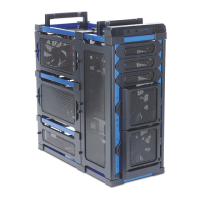
Overview of the Antec GX700 chassis features and components, including quick expandability and cooling options.
Detailed technical specifications of the GX700 computer case, covering dimensions, weight, cooling, drive bays, and I/O.
Inventory and identification of screws and accessories provided with the Antec GX700 for hardware installation.
Important safety guidelines and preparation steps to ensure a positive building experience with the GX700 chassis.
Initial steps for preparing the computer chassis, including removing side panels for hardware installation.
Instructions on how to detach the front panel of the Antec GX700 case for fan installation.
Step-by-step guide for mounting the motherboard into the GX700 chassis, including standoff installation.
Procedure for securely installing the power supply unit (PSU) into the Antec GX700 case.
Guide for installing optical drives and other 5.25-inch bay devices using the tool-less mechanism.
Steps for installing 3.5-inch hard drives or SSDs using the included drive holders and bays.
Instructions for installing 2.5-inch SSDs or HDDs into the chassis's 3.5-inch drive bays.
Techniques for organizing internal cables using routing holes and ties for improved airflow and aesthetics.
Details about the standard 140 mm and rear 120 mm fans included with the GX700 chassis.
Instructions for installing additional 120 mm fans in front and side mounts for enhanced cooling.
Information on accessing and cleaning the removable front and PSU intake air filters for maintenance.
 General
| Model | GX700 |
|---|---|
| Type | Mid Tower |
| Color | Black |
| Material | Steel, Plastic |
| Motherboard Compatibility | ATX, Micro-ATX, Mini-ITX |
| External 5.25" Drive Bays | 3 |
| Internal 3.5" Drive Bays | 4 |
| Internal 2.5" Drive Bays | 2 |
| Expansion Slots | 7 |
| Maximum CPU Cooler Height | 160mm |
| Front Ports | 2 x USB 3.0, 2 x USB 2.0 |
| Cooling System Front | 1 x 120mm fan |
| Cooling System Rear | 1 x 120mm fan |
| Cooling System Top | 2 x 120mm fans |
| Cooling System Side | 1 x 120mm fan |
| Radiator Support Front | 120mm |


 To Next Page