Need help?
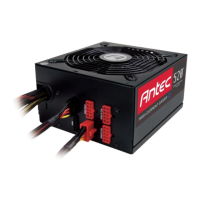
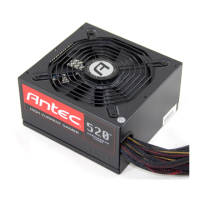
Do you have a question about the Antec HCG-520 and is the answer not in the manual?
Details industrial-grade safety circuitry like OCP, OVP, UVP, SCP, OPP, SIP, and BOP for computer protection.
Provides output capacity and regulation data for different voltages, referencing Table 1.
Instructions for connecting the 24-pin main power connector to the motherboard.
Guidance on connecting the 8-pin or 4+4-pin CPU connector, including motherboard socket considerations.
Instructions for connecting the AC power cord to the PSU, emphasizing the use of the heavy-duty cord.
Details connections for PCI-E, SATA, and Molex connectors for various computer components.
Instructions for turning on the PSU switch after all connections are secured.
Provides contact details, website, Facebook pages, and company information for support.
 General
| Model | HCG-520 |
|---|---|
| Wattage | 520W |
| Form Factor | ATX |
| Efficiency Rating | 80 PLUS Bronze |
| Modularity | Semi-Modular |
| Input Voltage | 100-240V |
| Input Frequency | 50-60Hz |
| Input Current | 8A-4A |
| Cooling Fan | 120mm Double Ball Bearing Fan |
| +12V Output | 40A |
| Output | 520W |
| SATA Connectors | 6 |
| Molex Connectors | 3 |
| Floppy Connectors | 1 |
| Over Voltage Protection | Yes |
| Over Power Protection | Yes |
| Short Circuit Protection | Yes |
| PFC | Active PFC |
| +12V Rails | Single |
| EPS Connector | 1 |
| PCI-E Connector | 2 x 6+2 pin |
| Dimensions | 150mm (W) x 86mm (H) x 140mm (D) |

 To Next Page