15
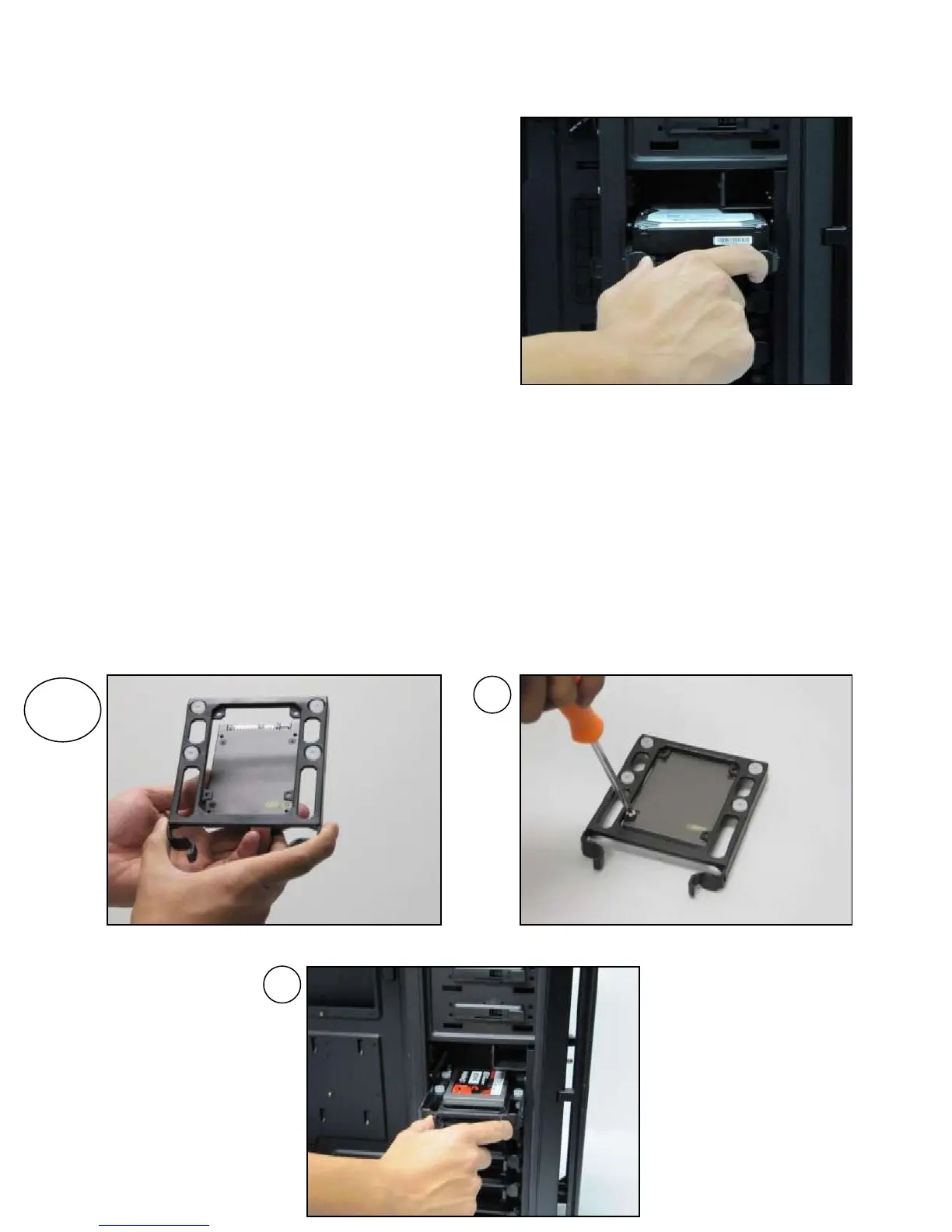
4. Now that your drive is secure to the tray, pinch
the ends of the tray and insert your drive into
the bay. You will hear your device click into
place.
To install a 2.5” drive:
1. Extract one of the drive trays by pinching the ends of the tray inward and pulling the drive tray
out.
2. Place your 2.5” drive on the tray so that the holes line up with the 2.5” tray holes.
3. Using the 2.5” drive screws (F in Section 1.3), secure your 3.5” drive to the tray with a
screwdriver.
4. Now that your drive is secure to the tray, pinch the ends of the tray and insert your drive into
the bay. You will hear your device click into place.
**If you need to install additional 5.25” drive bays, please remove the metal cover adjacent to
the plastic drive bay cover.
Pinch the ends of the tray and insert your drive until
it clicks.


 To Next Page