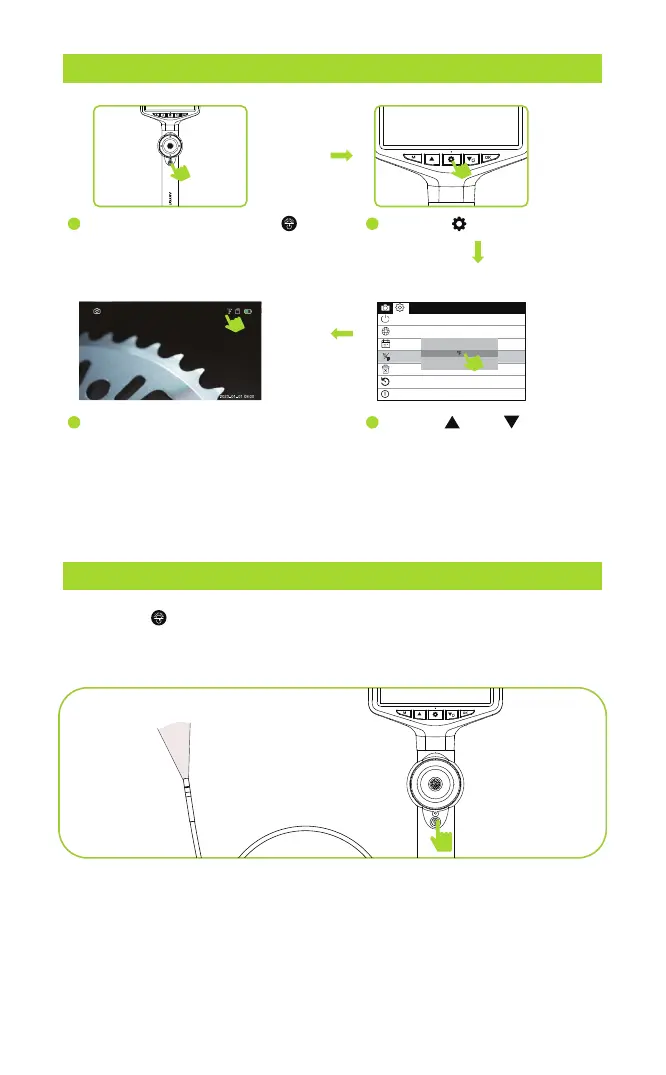
LED BRIGHTNESS ADJUSTMENT
CHANGE THE TEMPERATURE UNITS
Press the “ ” briefly to adjust the brightness of the camera light.
The brightness cycles through bright, medium, dim, and light off.
- 6 -
1
4
90
Language settings
Temperature Unit
Date Time
Automatic shut-down
Default Settings
Version
Format
℃
F
℃
Long Press the power button to
power on, the monitor will light up
and the blue power indicator will
turn on.
Then the temperature on the screen
will be displayed in the unit you
have selected.
2
Press the key twice.
3
Use the“ ”and “ ” to select
whether to set Fahrenheit or
Celsius, then press the“OK
”
to confirm the temperature
unit.



 To Next Page