21.5" LCD Color Monitor AOC e2236Vw
50
9.Firmware and DDC Instruction
9.1 Firmware Instruction(TSUM IC ISP for exemple TSUMO58GDJ)
1. OPERATION CONDITIONS:
1) An i486 (or above) personal computer or compatible.
2) Microsoft operation system Windows XP.
3) “MSTAR ISP Tool V4.5.0.7.7”programs.
4) Printer cable and VGA cable.
5) ISP board (PN: 715GT039-A).
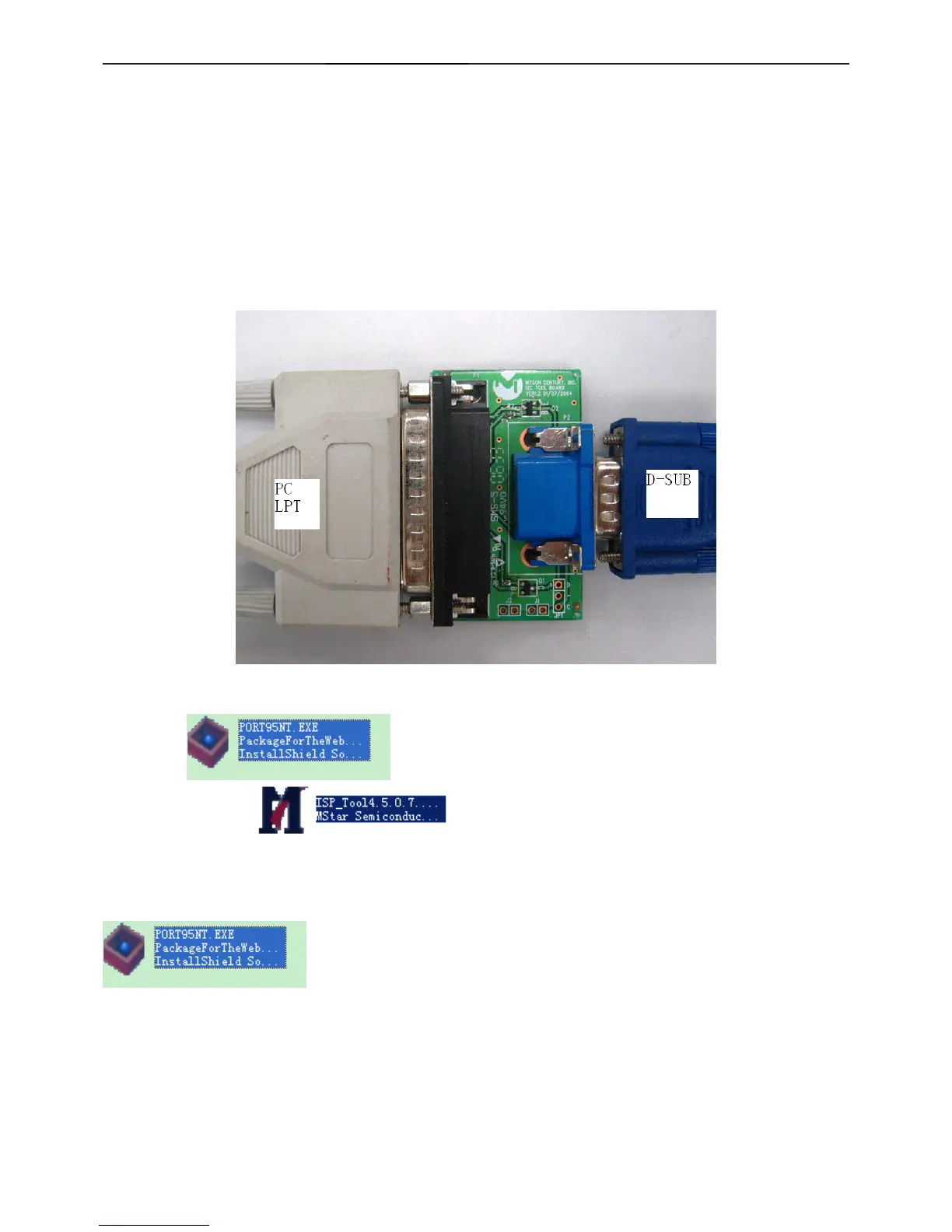
2. Connection:
1) LPT cable connect PC and ISP board ;
2)VGA cable connect monitor and ISP board ;
3)Reference picture as below
ISP Board (TPV P/N:715GT039-A)
3.Software list:
1)LPT driver:
2)MSTAR ISP TOOL:
Eg: TSUMO58GDJ_LGLM215WF4_20100518_V005_8143.BIN
3)Setup LPT driver:run Port95nt icon:
4)USB driver install


 To Next Page