- 12 -
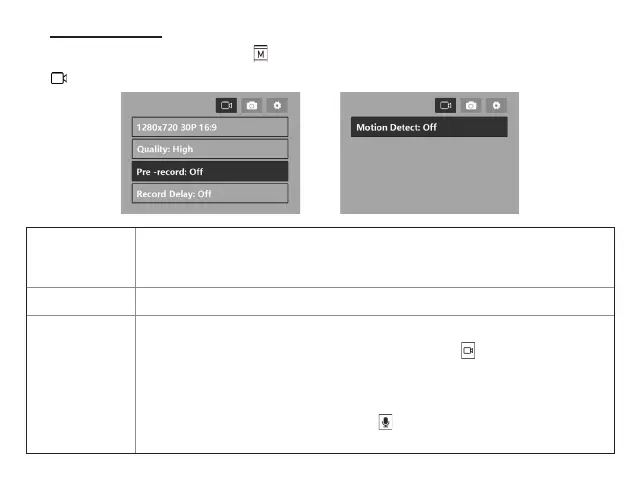
During the Standby Mode, short press enter the setting menu.
Settings>>
Video resolution
1280x720 30P 16:9
/ 2560x1440 30P 16:9/ 2304x1296 30P 16:9/ 2560x1080 30P 21:9/
1920x1080 45P 16:9/ 1920X1080 30P 16:9/ 1920X1080 30P 16:9/ 1440x1080 30P
16:9/1280x720 60P 16:9/ 1280x720 30P 16:9/ 848x480 30P 16:9
Quality
High
/Medium/low
Pre-record
Off
/On
Pre-recording will record up to 30 seconds before the button is pressed.
Users that will not be recording all of the time can turn this option on to make
sure that everything going on is captured.
Note: 1.This feature will use extra battery power.
2.During pre-record mode, Press button will tap the current video,If
you want to record audio only, please turn off this function.
Video Menu


 To Next Page