36
A
A
K
K
7
7
7
7
-
-
6
6
0
0
0
0
G
G
N
N
O
O
n
n
l
l
i
i
n
n
e
e
M
M
a
a
n
n
u
u
a
a
A
A
d
d
j
j
u
u
s
s
t
t
i
i
n
n
g
g
Y
Y
o
o
u
u
r
r
H
H
a
a
r
r
d
d
D
D
i
i
s
s
k
k
Except its original 2 sets of parallel IDE, this motherboard does come with the support for the latest Serial ATA hard disk. If you
are unable to find your newly installed Serial ATA hard disks on your operating system after you have had installed them on, the
problem mainly lies in the BIOS setting. You may simply adjust BIOS settings to have them work properly.
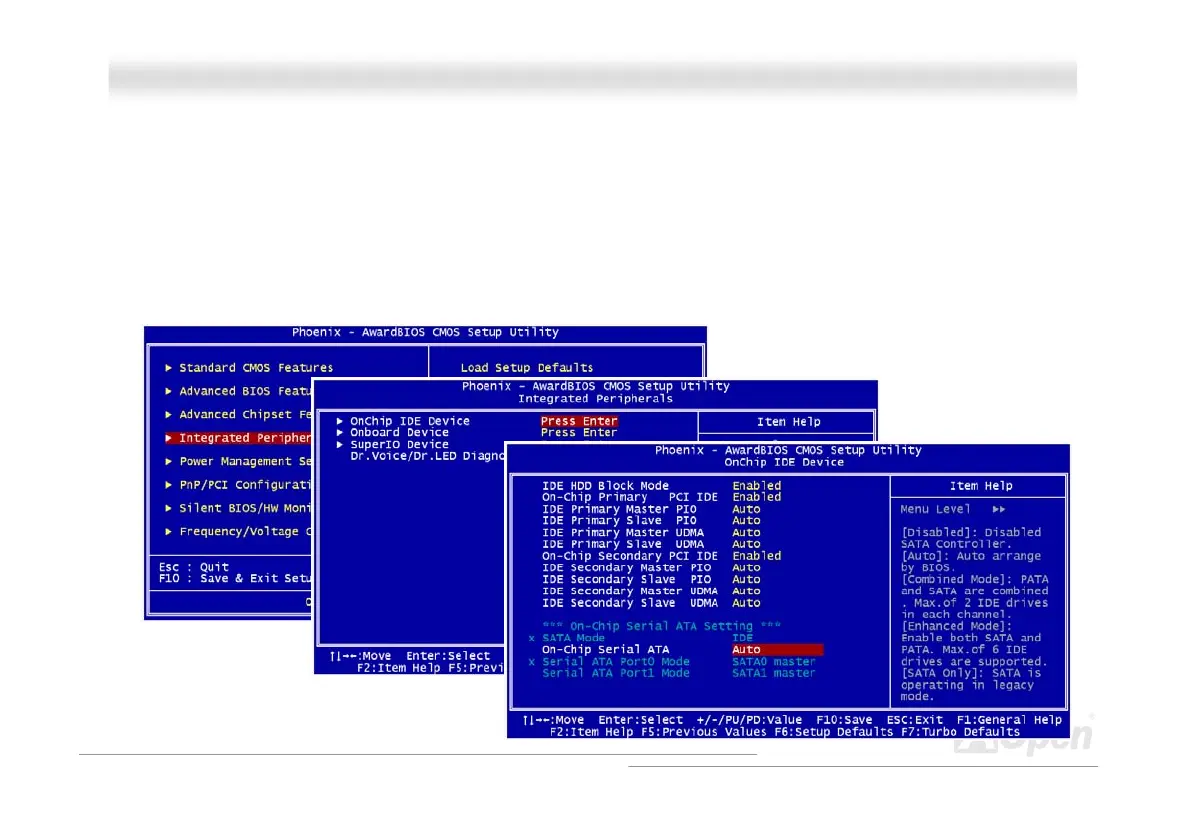
After having properly installed your hard disks, you may directly get into the BIOS setting screen for adjustment. You may simply
press “Integrated Peripherals Æ On-Chip IDE Device Æ On-Chip Serial ATA” to choose your preferable mode. If you have no
intention of changing its setting, the default would be Auto.



 To Next Page