Need help?
Do you have a question about the AOpen Fire Legend QF15a Series and is the answer not in the manual?
Details the functions and icons of the projector's remote control.
Provides guidelines on optimal projection distance and image size.
Lists supported audio and video file formats and their decoding.
Instructions on how to turn the projector on and off.
Guidance on desktop and ceiling mounting for projector installation.
Steps to adjust the lens for clear image focus.
Steps to use the projector in Bluetooth speaker mode.
Steps for multimedia local playback via USB or internal storage.
Guide to screen mirroring from a Windows device.
Guide to screen mirroring from an Android device.
Instructions for cleaning the projector's exterior surfaces.
Guidance on safely cleaning the projector lens.
Procedure for cleaning the projector's dust filter for ventilation.
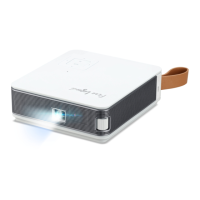
The AOPEN FHD LED Projector, QF15a/L80/CD80/U1P2201 Series, is a versatile multimedia device designed for various projection needs, from home entertainment to professional presentations. It offers a range of connectivity options and smart features, making it user-friendly and adaptable to different environments.
The AOPEN projector serves as a display device, capable of projecting images and videos onto a screen or flat surface. It supports Full HD (1920x1080P) resolution, ensuring clear and vibrant visuals. The projector integrates smart functionalities, allowing for wireless connectivity and access to various applications. It can be connected to a wide array of input sources, including PCs, Blu-ray players, gaming consoles, USB drives, and mobile devices, making it a central hub for multimedia consumption. The built-in speakers provide audio output, eliminating the need for external sound systems in many scenarios, though external audio output is also available.
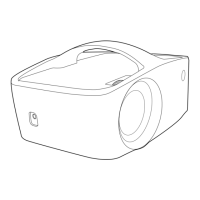
To power on/off the projector, simply press the power button on the control panel or the remote control. For installation, the projector can be placed on a desktop or mounted on the ceiling, offering flexibility in setup. Image focus adjustment is achieved by rotating the lens until the projected image appears clear and sharp.
The projector offers extensive connectivity options. For wired connections, it includes HDMI, AV, and USB ports. It supports USB drives for direct media playback. For wireless connectivity, the projector features Wi-Fi and Bluetooth.
To connect to a wireless network, navigate to "Wifi Settings" in the menu, turn on Wi-Fi, and select the desired network. This enables access to online content and applications.
The projector can connect to Bluetooth devices, such as speakers or headphones. In "Bluetooth Settings," you can add accessories, search for available devices, and pair them. This allows for enhanced audio experiences without the clutter of cables.
This advanced feature allows for precise adjustment of the projected image shape. If the projector is not perfectly aligned with the screen, the four-point keystone correction can correct unevenly rectangular images, ensuring a perfectly rectangular display. Users can adjust each corner separately to achieve the desired shape.
The projector supports multiple languages, allowing users to select the language that best suits their preference for menu navigation and system messages.
Users can set the preferred date and time format, including automatic synchronization with network-provided time or manual adjustment.
The projector comes with pre-installed applications and allows users to download and manage additional apps from an app market. This expands its functionality, turning it into a smart entertainment device.
The projector can function as a Bluetooth speaker. To activate this mode, go to "My apps," select "BlueSound," and connect your Bluetooth speakers to the projector. Once connected, your mobile phone, PC, or notebook can be paired with the projector to play audio through its connected Bluetooth speakers.
For playing media files stored locally or on a USB flash drive (formatted in FAT32), access the "LocalMM" app from "My apps." From there, you can browse internal storage or the USB device and select the desired media file for playback.
The projector supports screen mirroring from both Windows and Android systems.
For DLNA streaming, users need to download a DLNA app on their mobile device and connect it to the same Wi-Fi network as the projector. Within the DLNA app, select "QF15a" as the DLNA DMR/DMP and choose a file to play on the projector.
To mirror an iOS device, ensure both the projector and the mobile device are connected to the same Wi-Fi router. Then, access the Screen Mirroring feature on your iOS device and select "QF15a-xxxxxx" from the list to initiate projection.
From the home page, pressing the "up" button twice will bring up the source menu, allowing users to switch between different input sources such as AV, HDMI, and USB.
Before any cleaning, always unplug the power socket. Avoid using pesticides or volatile chemicals on the projector or lens. Also, prevent rubber or vinyl products from prolonged contact with the projector to avoid damage or peeling of the layers.
Use a soft, dry cotton cloth to wipe the surface. For stubborn stains, dampen a soft cotton cloth with a diluted neutral cleaner, gently wipe the surface, and then dry with a dry cotton cloth. Do not use water, benzene, or other solvents. Avoid scratching the main body with fingernails or hard objects.
Gently blow off any dust from the lens surface. For stains, use a soft cloth. For optimal results, use a professional dryer or lens cleaning paper specifically designed for cameras and glasses. It is crucial not to use ordinary tissue, as its large particles can scratch the lens.
To maintain optimal ventilation and prevent overheating, the outlet dust filter of the vents should be cleaned every three months. Turn off the power and unplug the power cord before cleaning. This regular maintenance helps prevent the projector's LCD panel and COB protection mechanism from being triggered due to poor ventilation.
The manual provides solutions for common issues such as power problems (no power, LED off, or LED on but no power), screen mirroring difficulties, inability to stream media, unresponsive remote control, and inability to power off the projector. These solutions guide users through basic checks and actions to resolve problems.
 General
| Contrast Ratio | 2000:1 |
|---|---|
| Projection Technology | DLP |
| Native Resolution | 1024 x 768 (XGA) |
| Projection Distance | 1.2 - 10 meters |
| Projection Size | 30 - 300 inches |
| Input Connectors | VGA, S-Video, Composite Video |
| Lamp Life | 4000 hours (Normal mode), 5000 hours (Eco mode) |

 To Next Page