RU
IT
ES
ID
DE
FR
KO
SC
TC
EN
32
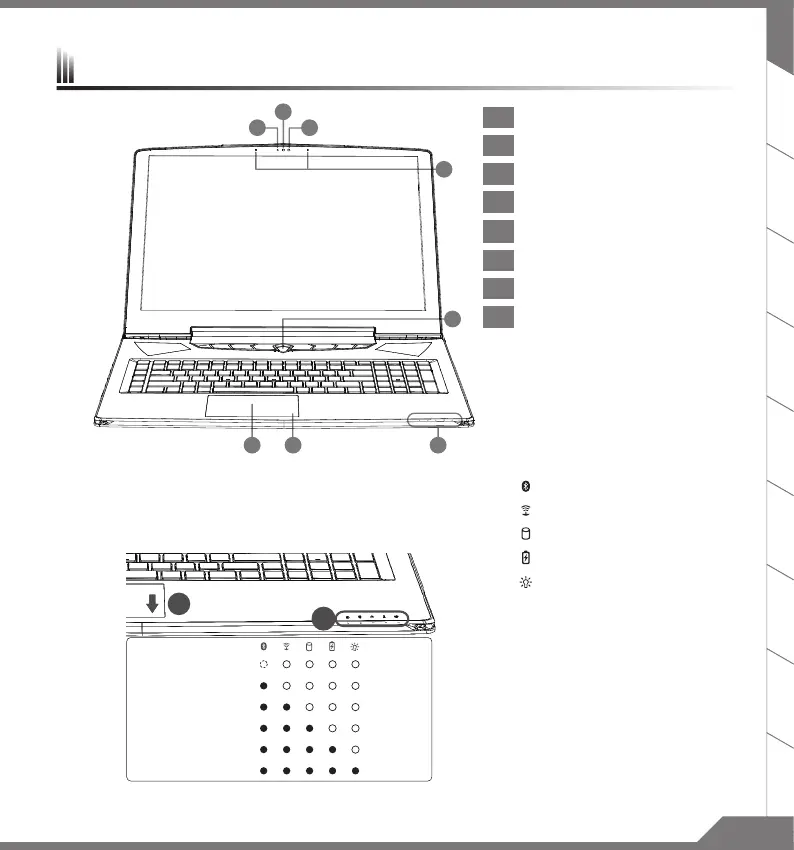
1 Webcam Status LED Indicator
2 Webcam
3 Light sensor
4
Microphone
5 Power Button
6 Touch
Pad
7
Battery Indicator Button
8 LED Indicators
Press the right button of touchpad to check the remaining battery power.
Right click to show the remaining power percentage. As shown below, the
battery life indicator is available when the laptop is shut down, in stand-by
or hibernation.(Battery mode)
1
2
<10%
11-30%
31-50%
51-70%
71-90%
>90%
Bluetooth Status LED
Wireless Lan Status LED
HDD Status LED
Battery Status LED
Power Status LED
Your AORUS Notebook Tour



 To Next Page