Macro Hub Instruction
Welcome to use Macro Hub! Macro Hub makes it much easier for you to control your Macro Key on AORUS
X7. You can deal with complex key stroke combination by just one press on macro key, which brings you
benet both in work and game. Before using Macro Hub, please read following guide.
1
Launch Macro Hub
You can nd the shortcut of Macro Hub on desktop. Just double click it.
2
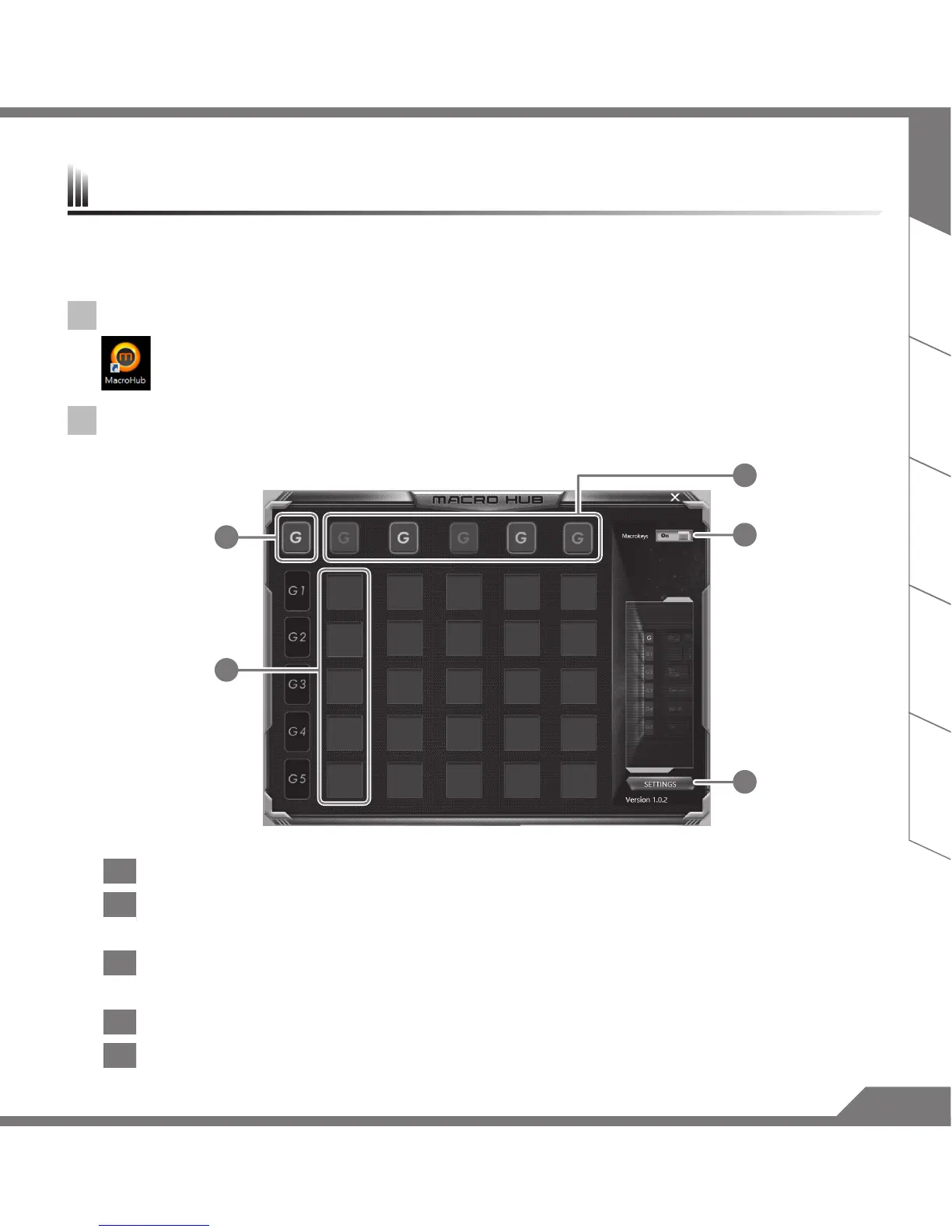
The overview of Macro Hub
1
3
4
5
2
1 Macro Key indicator: Indicate the current Macro Key group you’re using.
2
Macro Key function: it shows the function you’re using in this Macro Key group. There’re total 5
functions, from G1 to G5.
3
Macro Key Group indicator: indicate which group is enabled(the indicator light will on when group
is enabled).
4 Macro Key ON/OFF switch: Turn ON/OFF Macro Key.
5 Others: Update the Macro Hub or reset the conguration of Macro Hub.



 To Next Page