7
the equipment. In AR500 and AR503, the PRG input is accessible from the top of the enclosure. Place the adapter
in the opening in the enclosure with the USB socket facing the nearest wall of the enclosure.
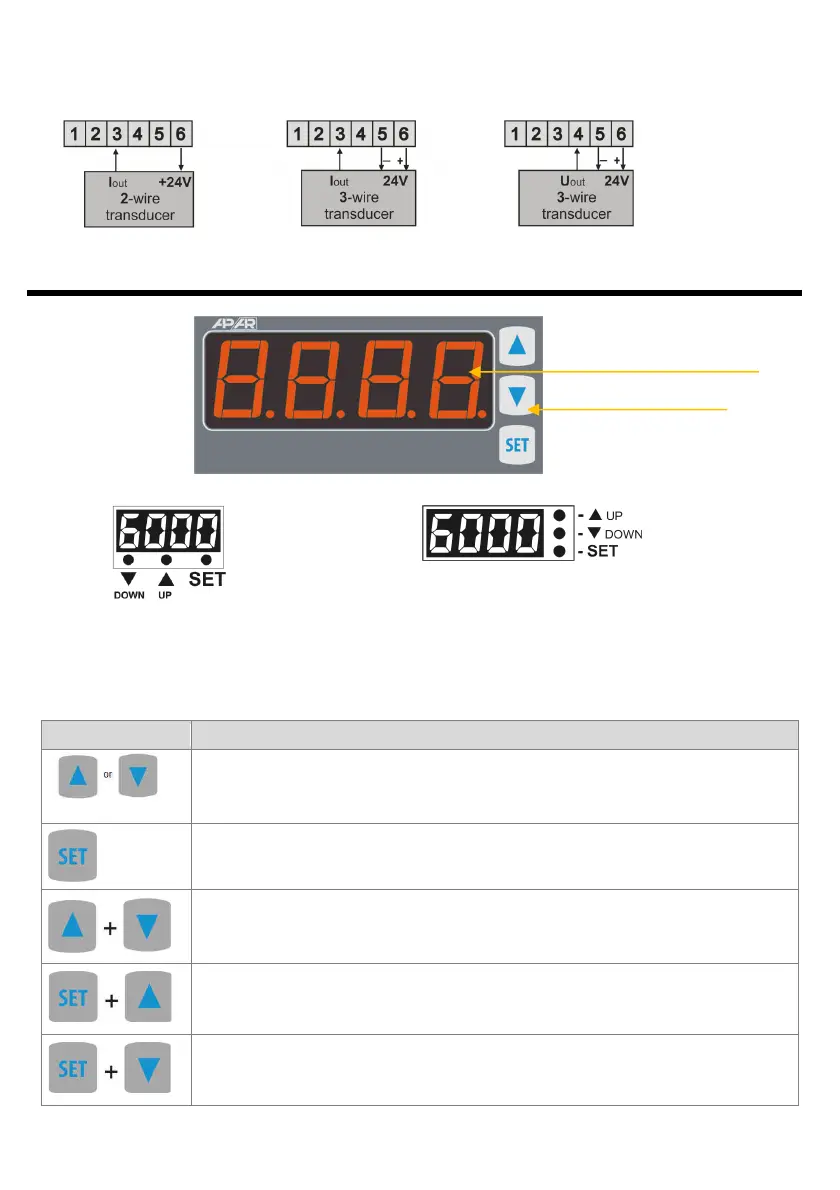
b) connection of a 2- and 3-wire transducer (Iout - output current, Uout - output voltage)
8. FUNCTIONS OF BUTTONS. MINIMUM AND MAXIMUM VIEW
a) Description of a 7-segment LED display
the front side using
the example of programming buttons
the AR517 device
b) AR500 c) AR503
In AR500 and AR503, the buttons are accessible after the front glass is removed.
a) button functions in the measurement display mode
[and marking in the contents of the instructions]
[UP] or [DOWN]: changes the preset value for the alarm (parameter 6: SEt1 ) or the
analog output working in the manual mode 12: HSEt , see chapters 10 and 12.3
[SET] :
- output in the quick access menu (chapter 11)
and
(at the same time): input in the parameter configuration menu (after
hold time longer than 1 s). If parameter 14: PPro = on (password protection is activated)
enter the access code (chapter 10)
and
:
- displays the saved MAXIMUM VALUE of the measurement
- deletes the maximum value of the measurement (after hold time > 6 s)
and
:
- displays the saved MINIMUM VALUE of the measurement
- deletes the minimum value of the measurement (after hold time > 6 s)



 To Next Page