50
USE
DISPLAY PANEL INDICATIONS
This section describes in detail all the information that can be shown on the LCD display.
In order to make it clearer, all the information displayed can be divided into three main groups:
¾ UPS status indicators
¾ Measurements display area
¾ Configuration area
UPS status indicators
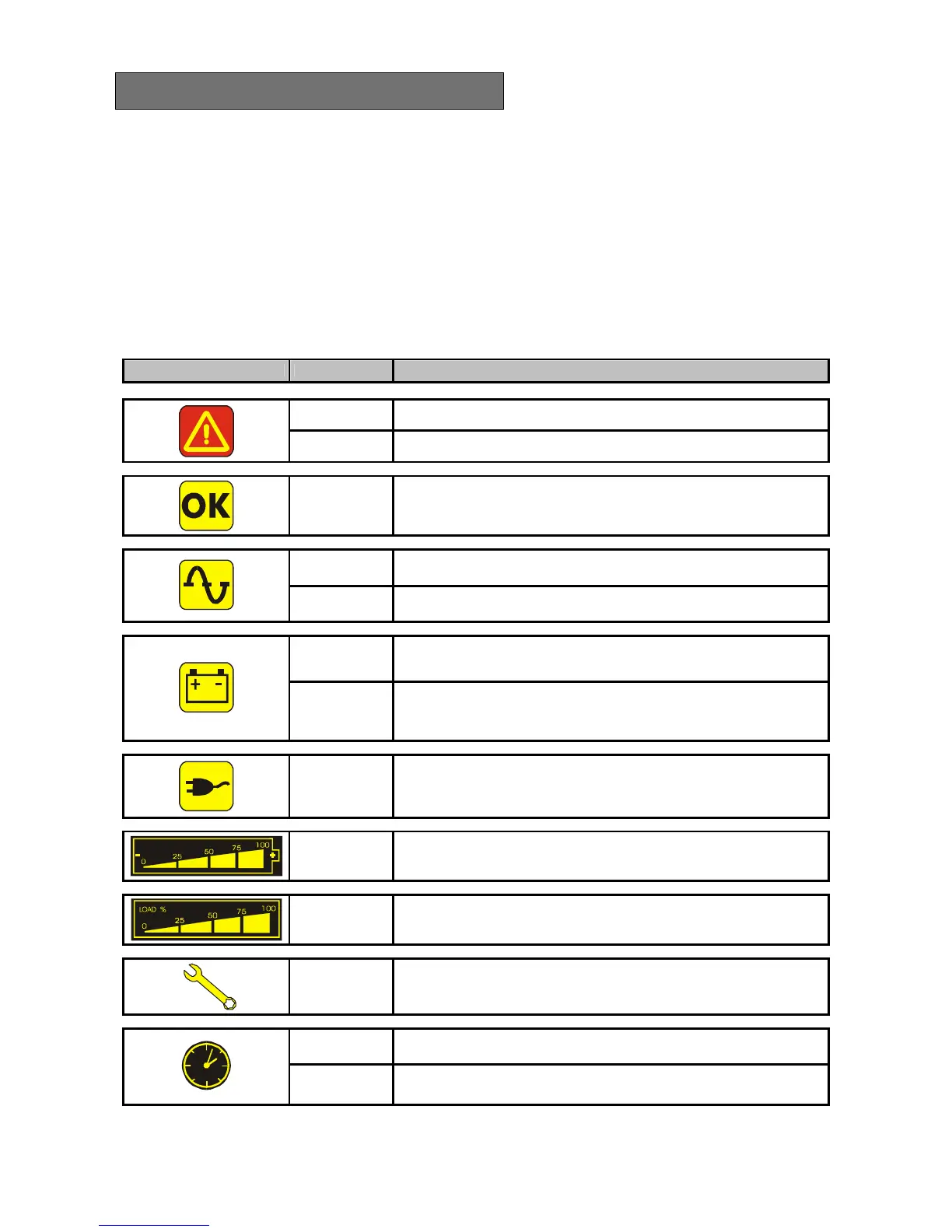
ICON STATUS DESCRIPTION
Constant Indicates a fault
Flashing The UPS is in stand-by state
Constant Indicates regular operation
Constant The UPS is operating from the mains
Flashing
The UPS is operating from the mains, but the output voltage is not
synchronized with the mains voltage
Constant
The UPS is operating from the battery. When it is in this state the UPS
emits an acoustic signal (beep) at regular intervals of 4 sec.
Flashing
End of discharge prealarm. Indicates that the battery back up time is
coming to an end. In this condition the UPS emits a beep at regular
intervals of 1 sec.
Constant
Indicates that the loads connected to the UPS are powered from the
bypass
Dynamic Indicates the estimated percentage of back-up time
Dynamic
Indicates the % of load applied to the UPS with respect to the nominal
value
Flashing A maintenance operation is required
Constant
Indicates that the timer is activated (programmed start-up or shutdown).
The timer can be activated/deactivated via the software provided
Flashing
1 minute to go before the UPS starts up or 3 minutes before it shuts
down



 To Next Page