
 Need help?
Do you have a question about the Apec Water WTS-MAX and is the answer not in the manual?
Initiate programming by pressing NEXT and holding for 5 seconds.
Select filtering type (Backwash or Regen) using up/down arrows.
Select time for the first cycle using up/down arrows.
Select time for the second cycle and program subsequent times.
Set regeneration trigger based on time or volume.
Configure regeneration time options: Normal, On 0, Normal + On 0.
Define relay operation based on time or gallons used.
Set time for relay actuation after regeneration starts.
Set number of gallons for relay actuation.
Displays time remaining in the current regeneration cycle.
Alternates flashing 'Err' and error code for diagnostics.
Shows 'REGEN Pndg', 'STbY', or 'REGEN Pndg RINSE FILL' status.
Scrolls to the next display or advances in program levels.
Schedules regeneration, cancels, or initiates immediate regeneration.
Used for variable changes and control reset.
Schedules regeneration for the current day at the delayed time.
Starts regeneration immediately by holding the REGEN button.
Lists part numbers and descriptions for assembly components.
Provides instructions and diagrams for battery replacement.
Details specifications for the 12V DC Relay.
The WTS-MAX Control Valve is a sophisticated component designed for water treatment systems, offering precise control over various operational cycles. Its primary function is to manage the regeneration process of a water softener or filter, ensuring optimal performance and efficiency. The valve's programming manual provides comprehensive instructions for setup, operation, and maintenance, making it accessible for both installers and end-users.
The WTS-MAX Control Valve acts as the central brain of a water treatment system, orchestrating the flow of water through different stages of treatment and regeneration. It features a robust control system that allows for the customization of various cycle sequences, including filtering backwash, draw, backwash, rinse, and fill. This programmability ensures that the regeneration process is tailored to the specific needs of the system and the water quality being treated.
The valve supports different types of regeneration, such as filtering backwash and filtering regeneration, each with adjustable default times in minutes. For instance, filtering backwash can be set for 8 minutes, while filtering regeneration can involve a 60-minute draw, an 8-minute backwash, an 8-minute rinse, and a 0:30 fill. The valve also accommodates a "filtering regen (2.0")" option with similar cycle times, indicating flexibility for different system configurations or media types. A key feature is the "backwash*" cycle, which is non-adjustable and not shown in the cycle sequence programming, suggesting a fixed, critical step in certain regeneration processes.
The control valve is equipped with a time-of-day setting, crucial for scheduling regenerations at convenient times, typically during periods of low water usage. This setting is particularly important after power outages lasting more than 8 hours, which might deplete the internal battery and require a manual reset. The valve's display will flash on and off to indicate when the time of day needs to be reset, providing a clear visual cue to the user. For shorter power outages (less than 8 hours), if the time of day flashes, it indicates that the battery may need replacement.
The controller setup involves several steps, allowing for detailed configuration of the valve's operation. Step 1F, for example, involves a simultaneous press of NEXT and REGEN for 5 seconds to access programming, with a lock feature to prevent accidental changes. Step 5F allows the user to set the regeneration trigger, which can be based on a specific number of gallons or set to "OFF." If set to "OFF," regeneration is solely triggered by the day override setting, as detailed in the installer display/settings. When a number is specified, regeneration is triggered by the volume of water treated, ensuring the system regenerates only when necessary.
Step 6F focuses on setting the regeneration time options. Users can choose between "NORMAL," "on 0," or "NORMAL + on 0." "NORMAL" means regeneration occurs at a preset time. "on 0" means regeneration occurs immediately when the volume capacity reaches zero. "NORMAL + on 0" combines these, initiating regeneration at the preset time if the volume capacity falls below the reserve or the specified number of days between regenerations, or immediately after 10 minutes of no water usage if the volume capacity reaches zero. These options provide flexibility to optimize regeneration based on water usage patterns and system requirements.
The valve also includes relay actuation features, configurable in steps 7F, 8F, and 9F. Relay operation can be set to "Set Time on," where the relay activates after a set time at the beginning of regeneration and deactivates after a set period. Alternatively, "Set Gallons Filtering on" activates the relay after a set number of gallons have been used while in service. "Set Gallons Filtering Regen on" activates the relay during regeneration after a set number of gallons have passed. An "ERROR" setting closes the relay when the valve enters error mode, and "Set Off" disables the relay. These relay functions are useful for integrating the valve with other system components or external alarms.
The WTS-MAX Control Valve is designed for user-friendly interaction, featuring a clear display and intuitive button controls. The main buttons are NEXT, REGEN, and arrow keys (up/down triangles).
Bypass Operation: The manual clearly illustrates how to shut off water to the system using the bypass valve, showing arrow handles in both "treated out/untreated in" and "untreated out/untreated in" positions. This is a crucial feature for maintenance or in case of system issues, allowing water flow to bypass the treatment unit.
Setting Time of Day: This is a straightforward process. Users press NEXT until the time of day screen appears, then press and hold the up/down arrow until "SET TIME" is displayed. The hour flashes, allowing adjustment with the arrow keys. Pressing NEXT again makes the minutes flash for adjustment. This ensures accurate scheduling of regeneration cycles.
Regen Screen: During regeneration, the display shows "REGEN" and the time remaining in the current cycle, for example, "BACKWASH 8:22 MIN." Pressing REGEN during this phase advances the valve to the next cycle, allowing for manual progression through the regeneration stages if needed.
Error Screens: The valve provides clear error indications. An "Error" message alternates with an error code (e.g., "103") every 3 seconds. Errors can be cleared by disconnecting and reconnecting power or by simultaneously pressing NEXT and REGEN for 3 seconds. This quick troubleshooting guide helps users resolve issues efficiently.
Alternator Systems Displays: For systems with multiple tanks (alternator systems), the valve displays specific messages. "REGEN Pndg" indicates that a unit is waiting to initiate the first cycle step of regeneration. "STbY" signifies that a valve is in standby state. "REGEN Pndg RINSE FILL" is displayed when a zero-capacity tank has transferred to an off-line state and is waiting to initiate the second portion of a regeneration cycle, visible only when Delayed Rinse and Fill is set to ON. These messages provide critical status updates for complex systems.
Button Operation and Function:
Manual Regeneration: The manual outlines two ways to perform manual regeneration. A single press and release of the REGEN button makes "REGEN TODAY" flash, scheduling regeneration at the delayed time, which can be canceled by pressing REGEN again. Holding the REGEN button for approximately 3 seconds immediately starts regeneration, which cannot be canceled except by a control reset (NEXT and REGEN simultaneously for 3 seconds).
The WTS-MAX Control Valve is designed with maintenance in mind, particularly concerning its internal battery and component accessibility.
Battery Replacement: The manual provides clear instructions and an illustration for battery replacement. The battery is a 3-volt lithium coin cell type 2032. The illustration shows the correct battery orientation, emphasizing the importance of aligning positives when pushing the battery down to fully seat it. This is crucial for maintaining the time-of-day setting and other programmed parameters during power outages.
Component Breakdown: An exploded diagram of the front cover and drive assembly is included, listing part numbers and descriptions for key components such as the WS1 Front Cover Assembly, Motor Assembly, Drive Bracket & Spring Clip, WS1 thru 2 EE PCB 5 Digit Rpl Board, Drive Reducing Gear, Drive Gear Cover, and TC Drive Assembly. This detailed breakdown is invaluable for identifying and replacing parts during maintenance or repair.
Relay Specifications and Wiring: The manual specifies the relay requirements (12V DC Relay with a coil resistance no less than 80 ohms) and provides wiring instructions for correct on/off operation. It details the PC Board Relay Terminal Block connections for RLY 1 (Relay Coil -+) and COM (Coil +). This information is essential for technicians performing electrical checks or integrating external devices.
Troubleshooting: The error screen functionality serves as a built-in troubleshooting tool, quickly alerting users to issues and providing a method to clear them. The ability to reset the control system by simultaneously pressing NEXT and REGEN is a fundamental maintenance step for resolving software or operational glitches.
The WTS-MAX Control Valve is a comprehensive solution for managing water treatment systems, combining advanced programming capabilities with user-friendly operation and clear maintenance guidelines. Its design ensures reliable performance and ease of service, making it a valuable component for various water purification applications.
 General
| Flow Rate | 15 GPM |
|---|---|
| Operating Temperature | 40-100°F |
| Installation Type | Whole House |
| Capacity | 100, 000 gallons |
| Inlet/Outlet Size | 1 inch NPT |
| System Type | Whole House |
| Connections | 1 inch NPT |
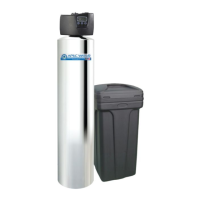
| Product Type | Whole House Water Filtration System |



 To Next Page