
 Need help?
Do you have a question about the Apera Instruments EC700 and is the answer not in the manual?
Explains standard solutions, calibration icons, and frequency recommendations.
Step-by-step guide for calibrating the meter using a 1413 µS/cm standard solution.
Instructions for rinsing the electrode, submerging in sample, and obtaining readings.
Details error codes (Err1, Err4, Err5) and their troubleshooting steps.
Step-by-step guide to navigate and adjust meter parameters P1 through P7.
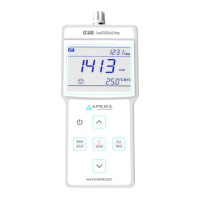
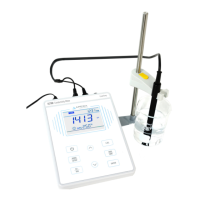
The APERA INSTRUMENTS EC700 Benchtop Conductivity Meter is a sophisticated instrument designed for precise conductivity measurements in laboratory settings. It combines advanced electronics and sensor technology to provide reliable and accurate readings, making it an economical choice for various applications.
The EC700 is primarily a conductivity meter, capable of measuring conductivity across a wide range, from micro-Siemens per centimeter (µS/cm) to milli-Siemens per centimeter (mS/cm). It also offers the functionality to measure Total Dissolved Solids (TDS), which is linearly related to conductivity. The meter features a built-in microprocessor chip that enables a suite of intelligent functions, enhancing its usability and accuracy. These functions include automatic calibration, automatic temperature compensation (ATC), data storage, parameter setup, and the display of maximum and minimum readings.
The instrument comes equipped with a combination conductivity electrode that integrates a temperature sensor. This allows for simultaneous measurement of conductivity and temperature, which is crucial for accurate readings as conductivity is highly temperature-dependent. The automatic temperature compensation feature adjusts the conductivity readings to a reference temperature (typically 25°C), ensuring consistency and comparability of results. Users also have the option for manual temperature compensation (MTC) if needed.
The meter supports a 1-4 point auto-calibration process, which is guided by on-screen prompts and includes self-diagnosis functions. It automatically recognizes standard calibration solutions, simplifying the calibration procedure and reducing potential errors. The advanced digital processing technology employed in the EC700 significantly improves its response time and overall measuring accuracy. A stable reading display mode is available, indicated by a smiley face icon on the LCD, which signals when the measurement value is stable and ready to be recorded or used for calibration.
The EC700 is designed for user-friendliness and efficiency. Its LCD display provides clear and comprehensive information, including the measurement mode, measurement value, calibration icons and numberings, measurement unit, temperature unit, and various reminder icons. The keypad offers intuitive control over the device's functions, with short and long press options for different operations. For instance, a short press can select the measuring mode or enter calibration mode, while a long press can enter parameter settings or recall stored data.
Data management is a key feature of the EC700. It can store up to 50 groups of measuring data, including numberings, measurement values, units, temperature, and temperature compensation status. Users can easily store data with a short press of the M+/RM key when a stable reading is achieved. Stored data can be recalled by a long press of the M+/RM key, and users can navigate through the stored records quickly using the arrow keys. The meter also includes a Max/Min function, which allows users to display the maximum or minimum records from a group of measurements, providing valuable insights into data trends.
Parameter setting is accessible through a dedicated mode, allowing users to customize various aspects of the meter's operation. This includes selecting the electrode constant, setting the reference temperature for compensation, adjusting the temperature compensation coefficient, and modifying the TDS conversion factor. The ability to select the temperature unit (°C or °F) adds to its versatility. For troubleshooting or resetting, the meter offers options to clear stored data and restore factory default settings, which can be particularly useful if calibration or measurement issues arise.
The physical setup of the EC700 is straightforward. It includes a detachable electrode holder, consisting of a metal stand base, a supporting pole, and an electrode clip, which can be easily assembled and attached to either side of the meter. The power adapter connects securely to a DC9V socket. The electrode itself uses BNC and RCA connectors for the conductivity sensor and temperature sensor, respectively, ensuring reliable connections.
Maintaining the EC700 and its electrode is crucial for ensuring long-term accuracy and performance. The meter's housing is IP54 dustproof and spillproof, providing protection in typical laboratory environments. The connectors are further protected by silicone seal caps, enhancing the reliability and service life of the instrument, especially under harsh conditions.
The conductivity electrode requires regular cleaning. Before each measurement, it is recommended to rinse the electrode in distilled or pure water and then in the sample solution. After use, the electrode should be rinsed again in pure water. Conductivity electrodes are typically stored dry. However, if an electrode has not been used for an extended period, it should be rehydrated by soaking it in a 12.88 mS calibration solution for 5-10 minutes, or in tap water for 1 to 2 hours.
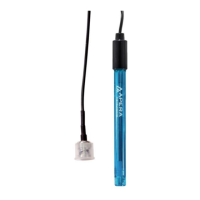
The 2301T-F conductivity electrode features a sensing rod coated with platinum black. This coating is designed to minimize electrode polarization and expand the measuring range. If the platinum black electrode becomes stained, it can be gently cleaned with a soft brush in warm water containing a mild detergent or alcohol. This careful cleaning helps maintain the integrity and performance of the platinum black coating, which is crucial for accurate readings.
Calibration is also a key maintenance aspect. While the meter is designed for stability, periodic calibration (e.g., once a month under normal conditions, or more frequently if high accuracy is required or if the sample temperature differs significantly from the reference temperature) is recommended. The self-diagnosis functions of the meter, indicated by error icons on the LCD, provide guidance on potential issues, such as incorrect calibration solutions, poor electrode connection, or unstable readings, helping users troubleshoot and maintain the device effectively.
 General
| Temperature Accuracy | ±0.5 °C |
|---|---|
| Temperature Resolution | 0.1 °C |
| ATC | Yes |
| Type | Conductivity Meter |
| Conductivity Range | 0.00 µS/cm to 200.0 mS/cm |
| Salinity Range | 0 to 70 ppt |
| Temperature Range | 0 to 60°C |
| Temperature Compensation | Automatic |
| Operating Temperature | 0 to 50 °C |
| Weight | 0.8 kg |
| Conductivity Accuracy | ±1% FS |
| Conductivity Resolution | 0.01 mS/cm |

 To Next Page