iCH Auto/English 13
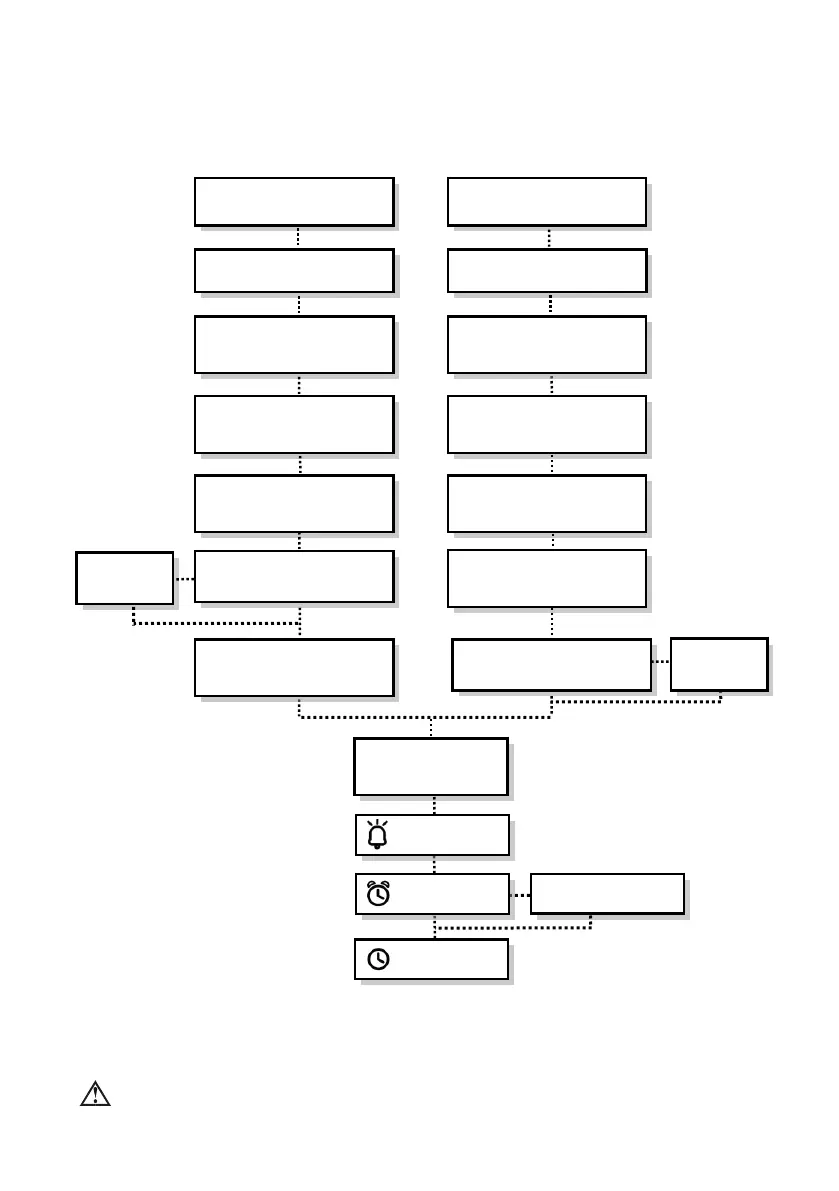
4.4 Flowchart of Menu settings
Enter the user's menu mode by pressing the “MENU” button.
In each setting, when the preferred value has been selected, press "MENU" for confirmation and
press "MENU" again to enter next selection.
NOTE: For doctors, please refer to a separate “Doctor’s Additional Instructions” manual.
Clock Alarm <On>
< hh:mm >
CM
(Compliance Meter)
< xxxx.x > hr
Max. P
(Maximum Pressure)
< 5.0 ~ 20.0 > cmH
2
O / hPa
Min. P
(Minimum Pressure)
< 4.0 ~ 19.0 > cmH
2
O / hPa
Init. P
(Initial Pressure)
< 4.0 ~ 19.0 > cmH
2
O / hPa
Pressure Unit
< cmH
2
O / hPa >
C
(PVA Comfort Level)
< on/off >
Ramp
(Ramp Time)
< 0 ~ 45 > min
P
(Therapy Pressure)
< 4.0 ~ 20.0 > cmH
2
O / hPa
Ramp P
(Ramp Starting Pressure)
<4.0~19.0>cmH
2
O / hPa
Pressure Unit
< cmH
2
O / hPa >
Low P
(Low Pressure Shut Off)
< on/off >
C
(PVA Comfort Level)
< on/off >
Ramp
(Ramp Time)
< 0 ~ 45 > min









 To Next Page