iCH Auto/English 14
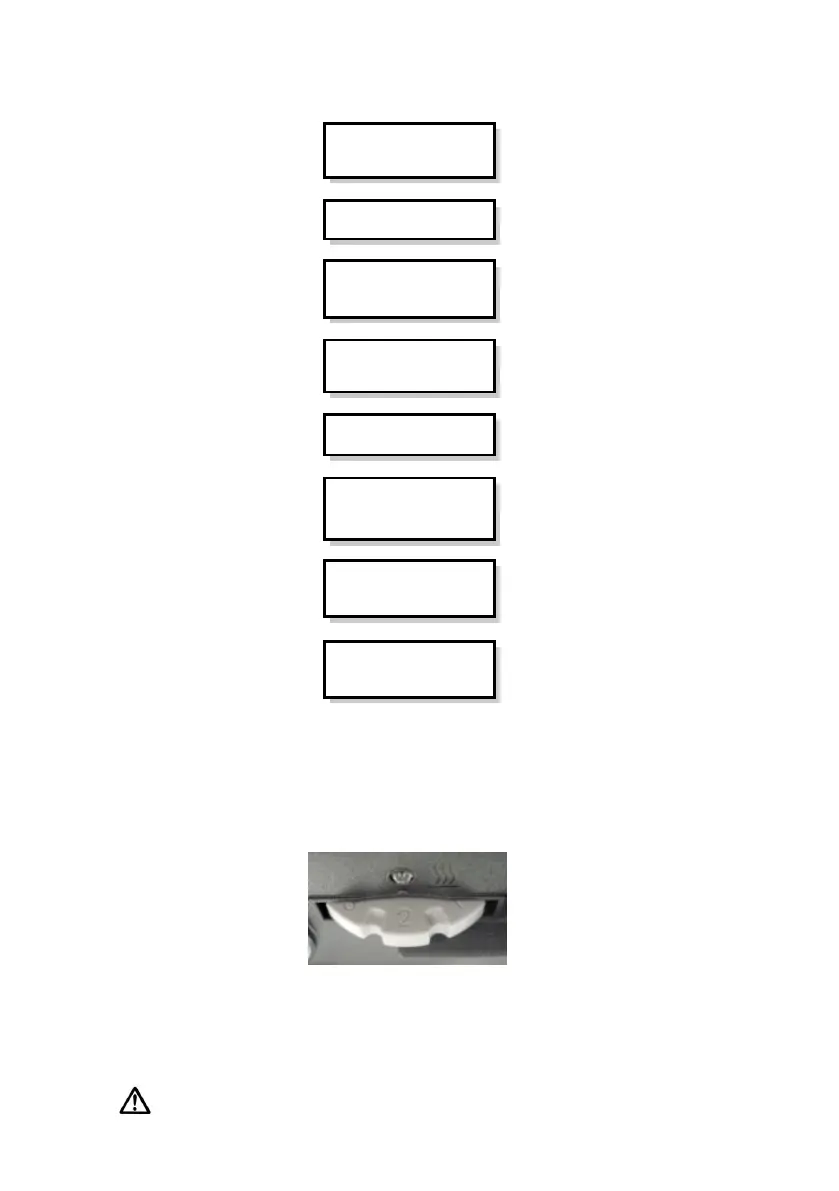
4.5 Flowchart of Compliance Information reading
4.6 Using the heated humidifier
1. Turn the control knob on the back of the device to turn on the heater and the heater on
indicator
above the knob will light up (orange light), as shown in Figure 4-1
2. Adjust the control knob to increase the humidity in the range of 1 to 6 (see diagram). 1 is
minimum humidity, 6 is maximum humidity. The optimum setting is dependent on the ambient
temperature and humidity of your room.
NOTE: When the ‘Low P’ sign is displayed on the screen while large air leakage is
Period
(Time Frame)
< 1 d /7d / 30 d / 90 d>
Average Compliance
Hours per day
< x.x > hrs /d
P
(Average Pressure)
< xx.x > cmH
2
O/hPa
Leak
(Average Leak Rate)
< xx.x > lpm









 To Next Page