EasyManua.ls Logo

Apex Digital XT Fit - User Manual

Apex Digital XT Fit
64 pages
Print Icon
To Next Page IconTo Next Page
Loading...
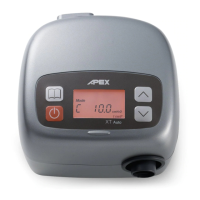
XT Fit
CPAP System
Instruction Manual
Model No.: 9S-005500 Please read the instruction manual before use.

Other manuals for Apex Digital XT Fit

Questions and Answers

  • A
    Angela KingAug 15, 2025
    Why is the air delivered slowly by my Apex Digital Medical Equipment?
    • M
      Melinda HensonAug 15, 2025
      If the Apex Digital Medical Equipment delivers air slowly, it could be due to several reasons. First, it might be during the ramp time; in this case, check the ramp time setting. Alternatively, the filter might be too dirty; you should change or clean the filter regularly. If neither of these resolves the issue, the flow generator might have failed, and you should contact your equipment provider for repair.
  • R
    rachelmaysAug 18, 2025
    How to fix no display on Apex Digital XT Fit?
    • J
      Julie Rogers DVMAug 18, 2025
      If your Apex Digital Medical Equipment shows no display, it could be due to the power cord not being properly connected. Ensure the power cord is connected to the power socket. If the problem persists, it may be due to LCD failure or controlled PCB failure, in which case you should contact your equipment provider for repair.
  • R
    robertsrickeyAug 21, 2025
    What to do if buttons disable on Apex Digital XT Fit?
    • D
      Deanna RodriguezAug 21, 2025
      If the buttons on your Apex Digital Medical Equipment are disabled, it is likely due to a button failure. In this case, you should contact your equipment provider for repair.
  • E
    ehoganAug 25, 2025
    What to do if the display code is incorrect on Apex Digital XT Fit?
    • B
      benjamincampbellAug 25, 2025
      If the display code on your Apex Digital Medical Equipment is incorrect, it is likely due to an LCD failure or controlled PCB failure. In this case, you should contact your equipment provider for repair.
  • R
    rsteeleAug 27, 2025
    Why is the illuminant under LCD not on for Apex Digital XT Fit?
    • R
      Roberto MartinezAug 27, 2025
      If the illuminant under the LCD of your Apex Digital Medical Equipment is not on, it's probably because of LED failure. You should contact your equipment provider for repair.
  • M
    maryramosAug 30, 2025
    What to do if air delivered is slow from Apex Digital Oxygen Equipment?
    • J
      Jenny EspinozaAug 30, 2025
      If the air delivered by your Apex Digital Oxygen Equipment is slow, there are a few potential causes. First, if the device is in ramp time, check the ramp time setting. Second, a dirty filter can restrict airflow, so change or clean the filter regularly. If these steps don't resolve the issue, it may indicate a flow generator failure.
  • F
    Frederick NorrisSep 2, 2025
    What to do if Apex Digital Oxygen Equipment has no display?
    • R
      Richard KnightSep 2, 2025
      If your Apex Digital Oxygen Equipment has no display, first ensure the power cord is properly connected to the power socket. If the problem persists, it may be due to LCD or controlled PCB failure.
  • R
    Ralph WallerSep 5, 2025
    Why is the illuminant under LCD not on in my Apex Digital Oxygen Equipment?
    • S
      Scott GibsonSep 5, 2025
      If the illuminant under the LCD of your Apex Digital Oxygen Equipment is not on, it is likely due to an LED failure.
  • R
    Rachel MartinezSep 8, 2025
    What to do if buttons disable on Apex Digital Oxygen Equipment?
    • O
      olandrySep 8, 2025
      If the buttons on your Apex Digital Oxygen Equipment are disabled, it suggests a button failure.
  • C
    cookerinSep 12, 2025
    What to do if Apex Digital Oxygen Equipment display code incorrect?
    • M
      Melissa VasquezSep 12, 2025
      If the display code on your Apex Digital Oxygen Equipment is incorrect, it may be due to LCD failure or controlled PCB failure.

Summary

Introduction

General Information

Explains Obstructive Sleep Apnea (OSA) and its CPAP treatment.

Intended Use

Specifies the device's purpose for treating adult Obstructive Sleep Apnea (OSA).

Product Description

Components Overview

Lists the main CPAP device and included accessories.

Installation

Unpacking

Instructions for safely removing the CPAP device and accessories from the box.

Setting Up

Step-by-step guide on connecting the power cord, tubing, and mask.

Operation

Control Panel Description

Details the function of the START/STANDBY, MENU, UP, and DOWN buttons.

Getting Started - First time use

Step-by-step guide for initial setup and starting the first therapy session.

Ramp Time Configuration

How to adjust the Ramp Time feature for comfortable sleep onset.

Ramp Starting Pressure Configuration

How to set the initial low pressure for the ramp-up period.

Therapy Pressure Configuration

Details on setting the prescribed therapy pressure for the device.

Altitude Compensation Configuration

Adjusting pressure based on altitude relative to sea level.

Total Meter

Displays the total operating hours of the device.

Compliance Meter

Records the total therapy hours for patient compliance tracking.

Session Counter

Counts therapy sessions longer than four hours.

Check Value

Displays a check value for home care provider reference.

Turn off the Device

Procedure for safely powering down and disconnecting the CPAP machine.

Flowchart of Menu settings

Visual representation of the device's menu navigation and settings.

Adding a Humidifier

Humidifier Compatibility

Information on using the XT Fit CPAP with the XT Heated Humidifier.

Cleaning & Maintenance

Cleaning the Main Unit

Instructions for regular cleaning of the CPAP device's main body.

Tubing and Mask Cleaning

Procedures for cleaning the air tubing and nasal mask.

Air Filter Maintenance

Guidance on cleaning and replacing the device's air filter.

Troubleshooting

Common Problems and Solutions

Table of common issues, possible causes, and their solutions.

Error; Warning Messages

Defines error and warning codes displayed on the LCD screen.

Technical Specifications

Device Specifications

Details operational modes, pressure, ramp, dimensions, weight, and power.

Environmental and Classification Details

Specifies operating environment, humidity, and device classification.

Symbols

Symbol Explanations

Explains various safety and functional symbols used on the device and manual.

NOTE, CAUTION, AND WARNING STATEMENTS

Statement Definitions

Defines the meaning of Note, Caution, and Warning statements within the manual.

Servicing

Recommended Servicing

Guidance on when and how the XT system should be inspected by technicians.

Limited Warranty

Warranty Period and Conditions

Information on the manufacturer's limited warranty for CPAP devices and accessories.

EMC Information

Electromagnetic Emissions Guidance

Details on electromagnetic emissions and their compliance with standards.

Electromagnetic Immunity Guidance

Guidance on the device's immunity to electromagnetic interference.

RF Immunity Guidelines

Specific guidance on conducted and radiated RF immunity compliance.

Recommended Separation Distances

Guidelines for separation distances from RF communication equipment.

Apex Digital XT Fit Specifications

General IconGeneral
BrandApex Digital
ModelXT Fit
CategoryMedical Equipment
LanguageEnglish

Related product manuals