9
(4) Altitude Compensation (Alt XXX)
The fourth option of the “MENU” button is the Altitude Compensation option, used to adjust
pressure in the mask based on the altitude relative to sea level. Press the “UP” or "DOWN"
buttons to select from eight options (1 to 8) that correspond to a range of altitudes listed in the
table below. The level should be set relative to your elevation above sea level. Once the
preferred option has been selected, press the “MENU” button to confirm.
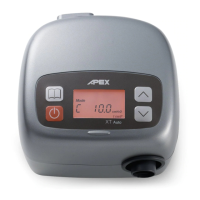
Users can operate XT Fit at wide range of altitude within 0~8000 ft (limit to 5000 ft if
the pressure is set at 18.5-20 cmH
2
O). The altitude function provides a method of
accuracy pressure output at high altitude. Users must follow the below table to select
correct altitude setting depending on your elevation above sea level, the device will
automatically regulate airflow output to achieve targeted pressure at high altitude.
Otherwise, wrong altitude setting will cause inaccuracy pressure output.
There are eight altitude compensation levels. The level should be set depending on
your elevation above sea level. Below table is the comparison of altitude setting and
altitude.
(5) Total Meter (TM XXXX.X)
The fifth “MENU” item is the Total Meter which displays the total number of hours that the
device has been “On” and delivering airflow. In other words, it is the time the
“START/STANDBY” button was pressed to begin airflow to the time the
“START/STANDBY” button was pressed again to stop airflow. This meter should only be
re-set by the equipment provider, a respiratory therapist or by a physician.
(6) Compliance Meter (CM XXXX.X)
Press "MENU" button to select [CM XXXX.X hr] menu, the compliance meter records the
total therapy hours for the device. The compliance meter should be re-set only by the provider,
a respiratory therapist or by a physician.
(7) Session Counter (CM XXX 4hr)
Press "MENU" button to select [CM XXX 4hr] menu, the session counter displays the
number of sessions greater than four hours. Your home care provider may ask for this
information. The session counter will be erased once the compliance meter has been reset.


 To Next Page
 Loading...