7
4. Operation
NOTE: Always read the operating instruction before use.
4.1 Control Panel Description
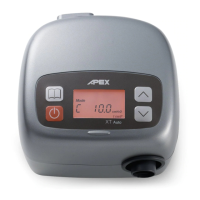
Main control panel and button descriptions:
START/STANDBY
To start the treatment, simply press the "START/STANDBY" button. To stop the
treatment, press the "START/STANDBY" button again. The display will switch
between [STANDBY] and Therapy Pressure [ XX.X cmH
2
O] in cmH
2
O unit.
MENU
When the unit is in “Standby” mode, you can press the “MENU” button to enter the
configuration menus. The patient can adjust the “Ramp Up Time” (Ramp), Ramp
Starting Pressure (Ramp P) and Altitude Compensation (Alt). The three other
options, Therapy Pressure (P), Compliance Meter (CM), and Total Operating meter
(TM) are to be set only by a physician or other care provider. To confirm a change to a
setting, you must press the “MENU” button again. Refer to section 4.2 (Menu Option
Descriptions) for a detailed explanation.
UP
Press the “UP” button to the increasing values when adjusting configurations.
DOWN
Press the "DOWN" button to decrease values when adjusting configurations.


 To Next Page
 Loading...